Participant
August 19, 2026
Answered

I can't find anywhere to download my storyboard

  • August 19, 2026
  • 6 replies
  • 52 views

I can’t see anyway to download the storyboard I’ve created in Firefly

    Correct answer droopydog500

    Hi ​@Callum262944711fi3,

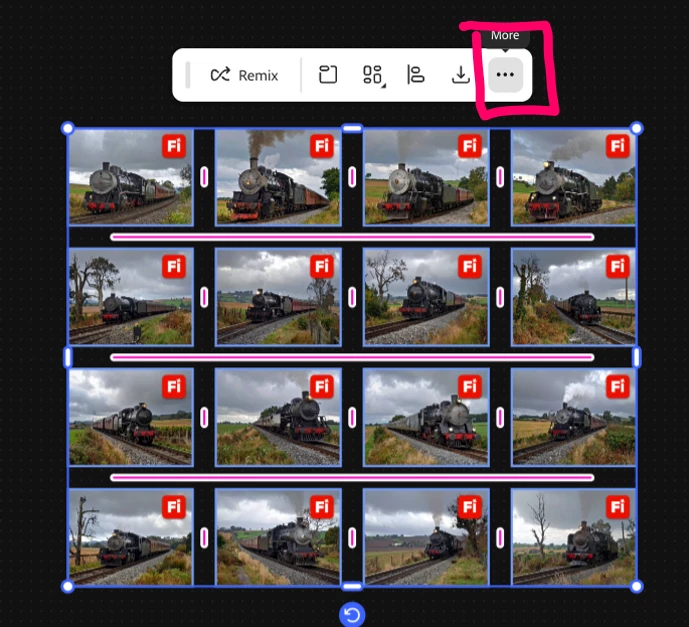
    If you would like to save a Firefly Board, on the Board, first select the items on the Board you want to export and click the “...” on the contextual menu:

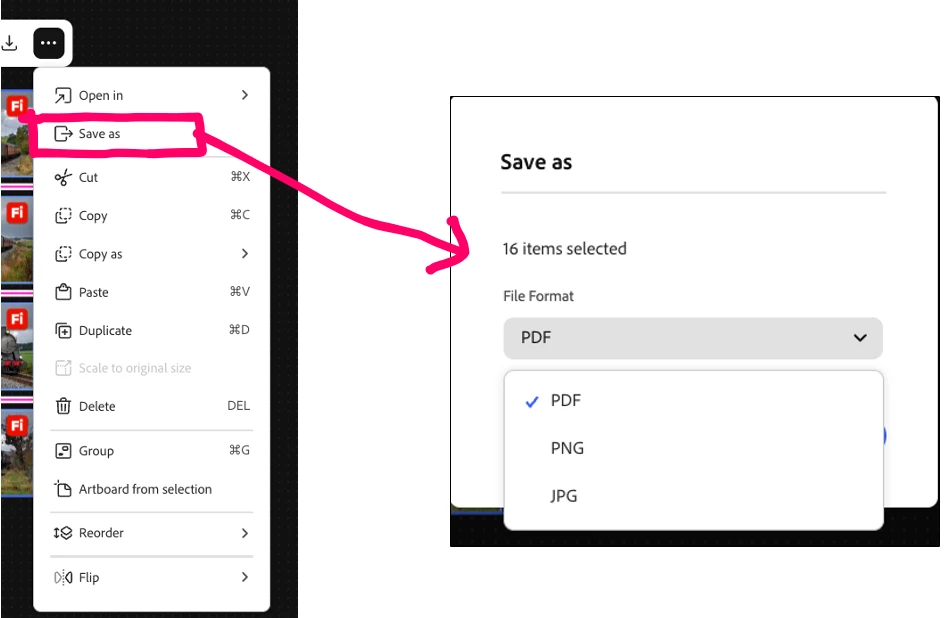
    Select “Save As” and then the export file type:


        droopy

    6 replies

    N8.
    Community Expert
    September 22, 2026

    Hey ​@Callum262944711fi3 
    You need to go to your Generation History to view your files.

    Nate

    droopydog500
    Community Manager
    droopydog500Community ManagerCorrect answer
    Community Manager
    September 22, 2026

    Hi ​@Callum262944711fi3,

    If you would like to save a Firefly Board, on the Board, first select the items on the Board you want to export and click the “...” on the contextual menu:

    Select “Save As” and then the export file type:


        droopy

    Adobe Community Expert (not an Adobe employee)
    N8.
    Community Expert
    August 19, 2026

    ​@Callum262944711fi3 
    Thanks for sharing the image.
    Could you log out of your CC app and then log back in to see if that fixes the issue?

    Cheers

    Nate

    Participant
    August 19, 2026

    Still can’t download those files specifically - the PDFs and Photoshop docs have a download option, just not Firefly or Adobe Express

    N8.
    Community Expert
    August 19, 2026

    Hey ​@Callum262944711fi3 
     

    How to reliably download your files
    In your Adobe Creative Cloud you can find your files there and download them. Here s a short video showing the steps

    https://youtube.com/shorts/fCgb1ZR48tU?feature=share


    Cheers

    Nate


    Participant
    August 19, 2026

    Hi, thanks for your response, unfortunately there isn’t a ‘Download’ button coming up when I follow those steps (please see image)