
Aurelie
Participant
March 5, 2026
Answered

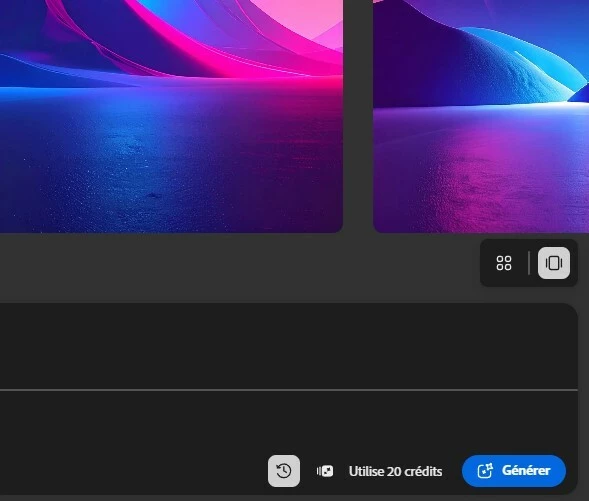
I have no access to the button "Enhance prompt" in Firefly

  • March 5, 2026
  • 2 replies
  • 46 views

I don't have the button to enhance my prompt in Adobe Firefly. Yet I'm using the Firefly Image 4 Ultra model and write the prompt in english… is it a bug ?
 

    Correct answer Hajar Toutsi

    Thanks Aurelie for your update!

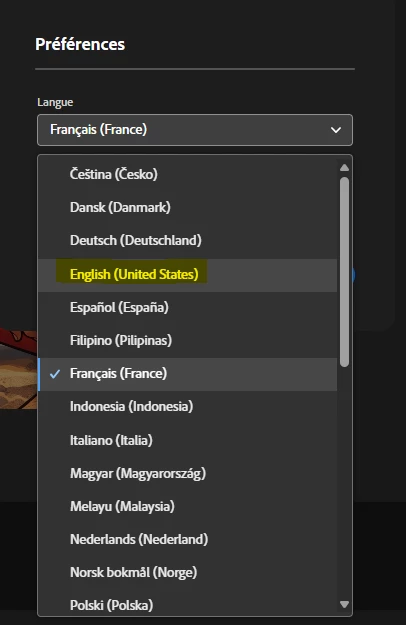
    Click on the top-right corner icon to access your Account information, then click on Preferences, then Select English for language instead of French.
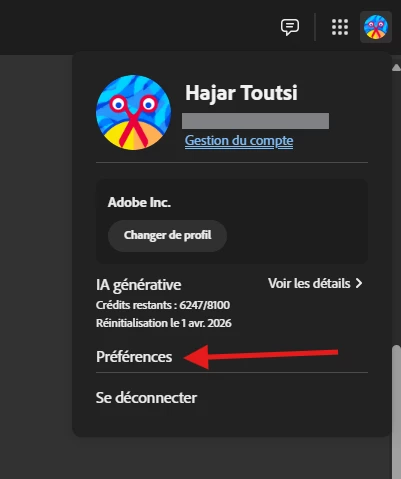
     

    Step 1: Open Account menu
    Step 2: Change language


    I hope these steps will make the icon appear!

    Hajar

    2 replies

    Hajar Toutsi
    Community Manager
    Community Manager
    March 5, 2026

     Hi Aurelie,

    Thank you for raising this question.


    The prompt enhancement feature in Firefly Image 4 and Firefly Image 4 Ultra is currently available only for prompts written in English. It can be accessed through the prompt feature icon, which doesn’t appear in the screenshot you shared.

    Prompt enhancement location


    Could you please try the following steps:


    Let us know if the prompt feature icon shows up after these steps. If not, we’ll be happy to investigate further.

    Hajar


    Aurelie
    AurelieAuthor
    Participant
    March 5, 2026

    Hello,

    Thx for your answer. I have followed your instructions and it still the same… I haven’t access to this button


    Hajar Toutsi
    Community Manager
    Hajar ToutsiCommunity ManagerCorrect answer
    Community Manager
    March 5, 2026

    Thanks Aurelie for your update!

    Click on the top-right corner icon to access your Account information, then click on Preferences, then Select English for language instead of French.


    Step 1: Open Account menu
    Step 2: Change language


    I hope these steps will make the icon appear!

    Hajar

    droopydog500
    Community Manager
    Community Manager
    March 5, 2026

    Hi ​@Aurelie,


    What browser and OS are you using? If you use another browser as a test, does the button appear?


    Thanks,

        droopy

    Adobe Community Expert (not an Adobe employee)
    Aurelie
    AurelieAuthor
    Participant
    March 5, 2026

    I have tried on Chrome and Edge latest version
