Inspiring
Oct 29, 2024 6:15 PM UTC
Answered

Importing my image to Firefly

Firefly Folks,

How can I import my own image into Firefly to work on it there?   I use Windows 11 and PS.

Thanks,

Richard

N8.
N8.Correct answer
Oct 30, 2024 9:48 AM UTC

Hey @richardg52861327 
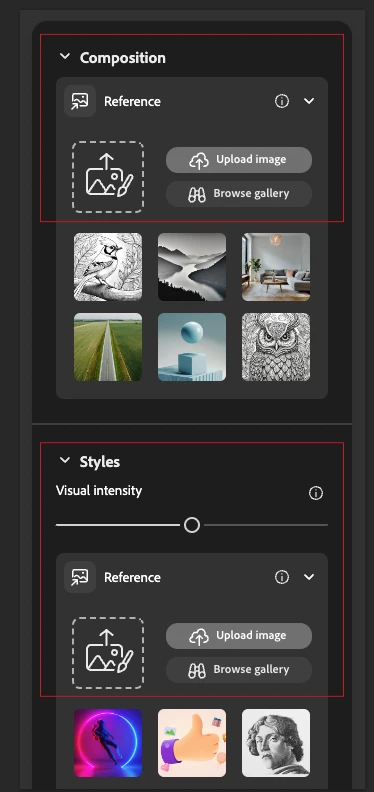
Just to add a bit more to what @Kevin Stohlmeyer  said and to give you a visual. On the right side of FF there is a panel w drop down menus. Within the menus you can add photos, change effects, and so on. 
The composition image attempts to generate and composite the image as closely or roughly as you choose based on the slider settings.

The Style Reference image is the type of style that you want. Again the sliders effect the outcome of generated image. 
In my experience, the composition image has the most influence on the outcome.


Cheers,
O.Nate

 

4 replies

N8.
Community Expert
N8.Community ExpertCorrect answer
Oct 30, 2024 9:48 AM UTC

Hey @richardg52861327 
Just to add a bit more to what @Kevin Stohlmeyer  said and to give you a visual. On the right side of FF there is a panel w drop down menus. Within the menus you can add photos, change effects, and so on. 
The composition image attempts to generate and composite the image as closely or roughly as you choose based on the slider settings.

The Style Reference image is the type of style that you want. Again the sliders effect the outcome of generated image. 
In my experience, the composition image has the most influence on the outcome.


Cheers,
O.Nate

 

Translate
Inspiring
Oct 30, 2024 10:25 PM UTC

Kevin and Oh.N8,

Thank you both for your help. While I can bring an image of my own into FF I cannot place it in the main editing window. When I download an image created FF I can bring it into PS. However, I am having a beast of a time blending it with an image of my own in PS. Is this a common complaint and can a FF image not be combined with any other real image?  Thanks,  Richard 


Translate
Kevin Stohlmeyer
Community Expert
Community Expert
Oct 31, 2024 12:46 PM UTC

@richardg52861327 the only method on Firefly.com is to use Generative Fill features on your original image to add Firefly elements. There are no blending/compositing workflows on the Firefly site - you are correct to use Photoshop to blend elements using layers and other compositing techniques.

Translate
Kevin Stohlmeyer
Community Expert
Community Expert
Oct 29, 2024 7:40 PM UTC

@richardg52861327 If you have Photoshop, you could use Generative Fill to add elements or edit your image.

If you want to use your image as a composition reference, you can either upload in Photoshop via Edit>Generate Image (upload a reference image) or using the left panel in Firefly.adobe.com to upload a composition or style reference.

Translate