Hi esra8544, Thanks for bringing this to our attention.
I see where the frustration comes from, you were expecting a straightforward interpretation, but the phrasing left too much room for ambiguity. When you say “the character should turn his back to the window”, the AI has to decide:
Which direction is “back to the window”? Facing the chair, facing the desk..?
Should the character’s pose, lighting, or perspective change?
What elements of the scene must remain untouched?
Without those clarifications, the AI may introduce unintended changes because it’s trying to “fill in the blanks” creatively.
To get more accurate results, it’s best to think of the AI like a very literal assistant, almost like explaining to a 4‑year‑old. That means:
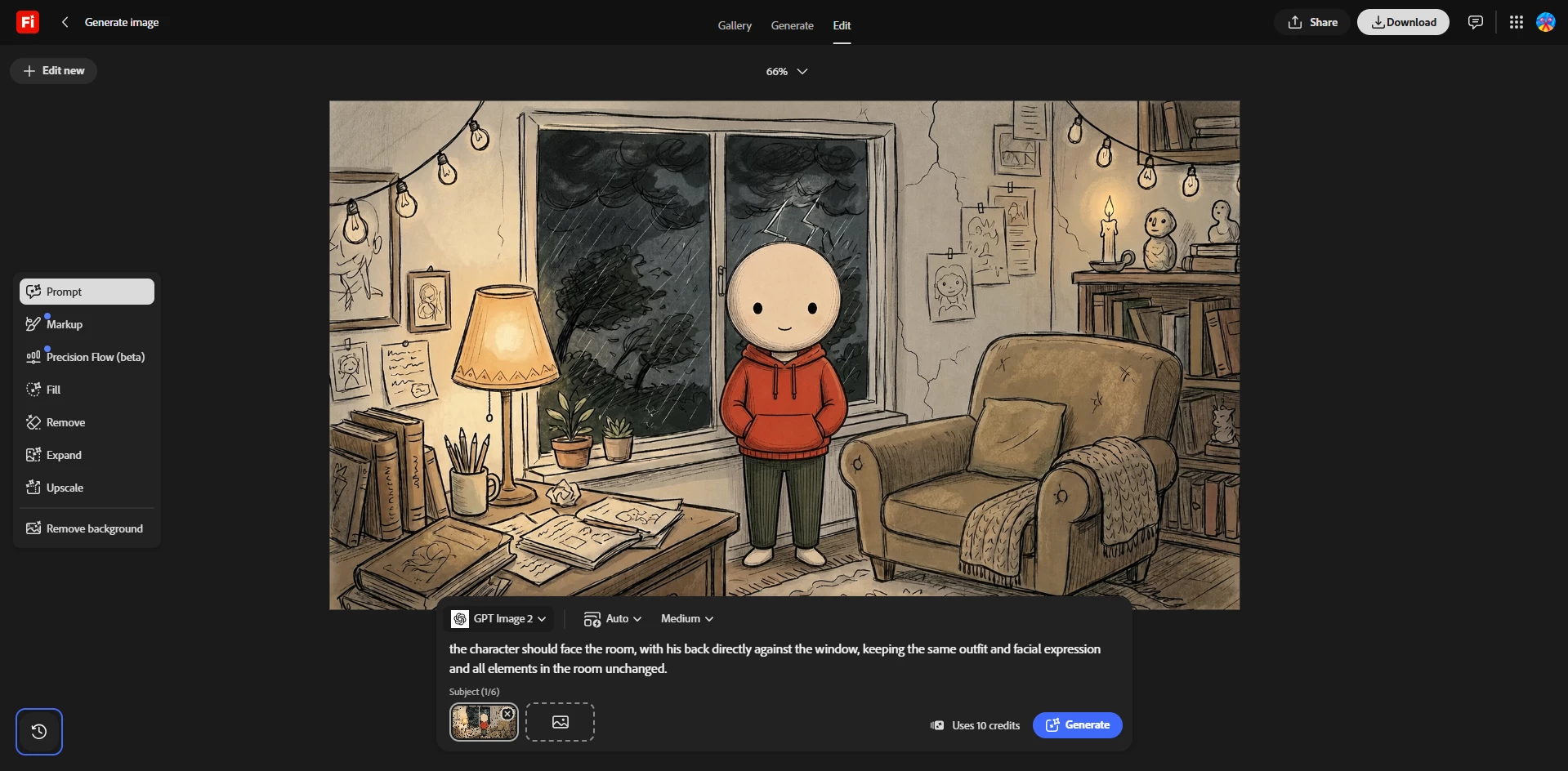
Be explicit: Instead of “turn his back to the window,” say for example “the character should face the room, with his back directly against the window, keeping the same outfit and facial expression and all elements in the room unchanged.”
Highlight what stays intact & Avoid assumptions: Don’t rely on the AI to guess context; spell it out. If you want the character’s clothing, or mood unchanged, you should state that clearly.
Break down steps: Describe the action in small parts: position, orientation, and what must remain constant.
Test a different model: Some models perform better than others, choosing the right one is key!
Testing the suggested prompt using Edit feature
This way, the AI has less “creative wiggle room” and is more likely to deliver exactly what the user envisions.
We appreciate your patience and feedback, it helps us improve both the tool and the guidance we provide.
Hi esra8544, Thanks for bringing this to our attention.
I see where the frustration comes from, you were expecting a straightforward interpretation, but the phrasing left too much room for ambiguity. When you say “the character should turn his back to the window”, the AI has to decide:
Which direction is “back to the window”? Facing the chair, facing the desk..?
Should the character’s pose, lighting, or perspective change?
What elements of the scene must remain untouched?
Without those clarifications, the AI may introduce unintended changes because it’s trying to “fill in the blanks” creatively.
To get more accurate results, it’s best to think of the AI like a very literal assistant, almost like explaining to a 4‑year‑old. That means:
Be explicit: Instead of “turn his back to the window,” say for example “the character should face the room, with his back directly against the window, keeping the same outfit and facial expression and all elements in the room unchanged.”
Highlight what stays intact & Avoid assumptions: Don’t rely on the AI to guess context; spell it out. If you want the character’s clothing, or mood unchanged, you should state that clearly.
Break down steps: Describe the action in small parts: position, orientation, and what must remain constant.
Test a different model: Some models perform better than others, choosing the right one is key!
Testing the suggested prompt using Edit feature
This way, the AI has less “creative wiggle room” and is more likely to deliver exactly what the user envisions.
We appreciate your patience and feedback, it helps us improve both the tool and the guidance we provide.





 AdChoices