Participating Frequently
June 7, 2025
Answered

More than one picture delete?

  • June 7, 2025
  • 1 reply
  • 221 views
How can I delete multiple images at once? Thx 4 answering!

 

Correct answer droopydog500

Hi @tom_cromlech,


Do you mean under "Generation History"?


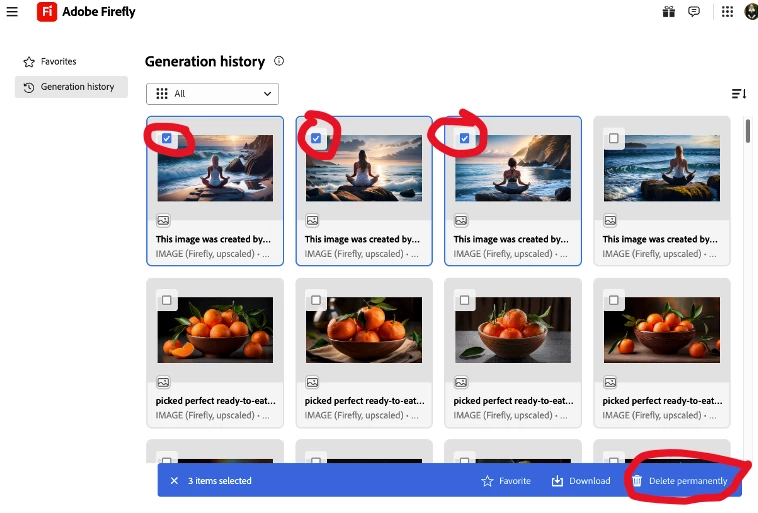
If so, you select the images you want to delete with the checkboxes in the upper left corner and then select "Delete Permanently" on the far right of the blue bar at the bottom of the browser window:

My best,

    droopy

1 reply

droopydog500
Community Manager
droopydog500Community ManagerCorrect answer
Community Manager
June 8, 2025

Hi @tom_cromlech,


Do you mean under "Generation History"?


If so, you select the images you want to delete with the checkboxes in the upper left corner and then select "Delete Permanently" on the far right of the blue bar at the bottom of the browser window:

My best,

    droopy

Adobe Community Expert (not an Adobe employee)
Participating Frequently
June 9, 2025

Thanks a lot! I didn't see that! Tom