



Lisa-JD
Participant
May 18, 2026
Answered

Quality of generated image decrease with the number of attempts

  • May 18, 2026
  • 3 replies
  • 34 views

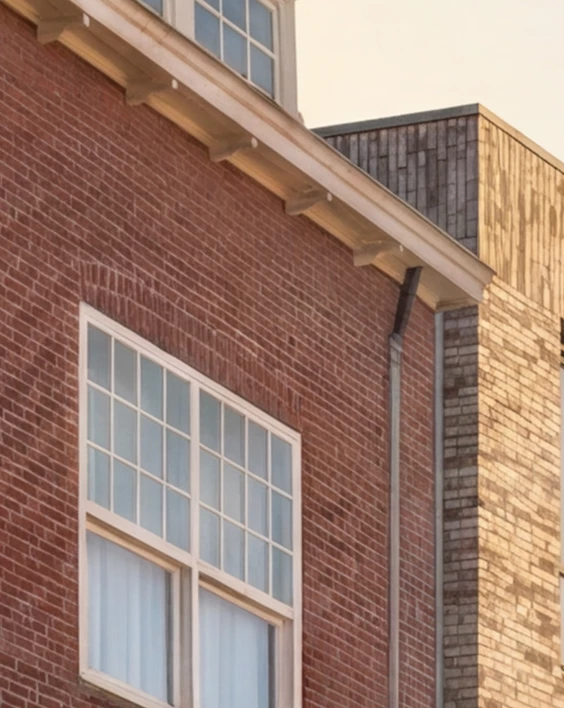
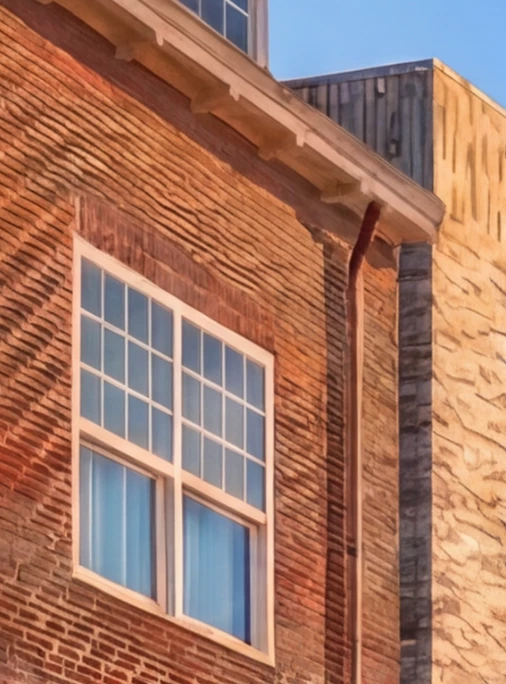
Does anyone have advice on how I can prevent the quality of a generated image from decreasing significantly every time I resubmit the prompt or make partial adjustments? It seems as if the AI ​​uses the previously generated image as a reference instead of re-examining the reference images (which, in my case, are the same every time). One of the first generated images has the quality of a photo, and this is steadily decreasing in detail every new or adjusted prompt. I am using Gemini 3 Nano Banana Pro and Gemini 3.1. with 4K resolution, I have this problem with both.

After a certain number of generations, I finally have the image exactly as I want it, but by then the quality is too poor to use the image. Image attached to see te difference in quality. In the first image, you can clearly see the bricks of the building, and in the second, this is no longer the case at all, the quality of the details is gone.
 

    Correct answer Oh.N8

    Hey ​@Lisa-JD 


    The best way to explain this is to think of expanding your images like a photocopied version of the original image.
    As you may know, when you photocopy an image the photocopied version is not as good as the original. When I keep using the photocopied version of the photocopied version the quality deteriorates rather quickly.

    I would use PS for projects like this. There are many powerful tools like Camera Raw filters to enhance an image like this. 

    Cheers

    Nate 

    3 replies

    May 19, 2026

    Thanks ​@Lisa-JD 
    Also remember to give the developers feedback. Pressing the thumbs up and down. They read your feedback.
     

    Cheers

    Nate

    daniellei4510
    Community Expert
    Community Expert
    May 18, 2026

    I jump between the Gemini partner model and Gemini proper, where this also happens. The way I get around it is to download the freshly generated image, upload THAT image, and enter the prompt or edit text and work on the latest version. This degradation usually starts to happen (if it DOES happen) around the third or fourth edit. 

    Adobe Community Expert | If you aren't submitting your assets in sRGB, you probably didn't read the rules.
    Oh.N8Community ExpertCorrect answer
    May 18, 2026

    Hey ​@Lisa-JD 


    The best way to explain this is to think of expanding your images like a photocopied version of the original image.
    As you may know, when you photocopy an image the photocopied version is not as good as the original. When I keep using the photocopied version of the photocopied version the quality deteriorates rather quickly.

    I would use PS for projects like this. There are many powerful tools like Camera Raw filters to enhance an image like this. 

    Cheers

    Nate 

    Lisa-JD
    Lisa-JDAuthor
    Participant
    May 18, 2026

    Hi Nate, Thanks for your reply. I understand what you mean, but what I think is strange is that I keep using the same reference image for every new/adjusted prompt, it is not that I use the previous generated image as a reference image, I use the same ‘original’ reference image every time. So It doesn’t seem logical that the image is decreasing quality with every new attempt.
