SonseraeLeese
Known Participant
Aug 5, 2024 3:07 PM UTC
Answered

Text prompt is missing.

Text prompt is missing for me to describe what I need done.

This topic is closed to new replies. Start a new post to keep the conversation going.
droopydog500
droopydog500Correct answer
Community Manager
Aug 5, 2024 4:28 PM UTC

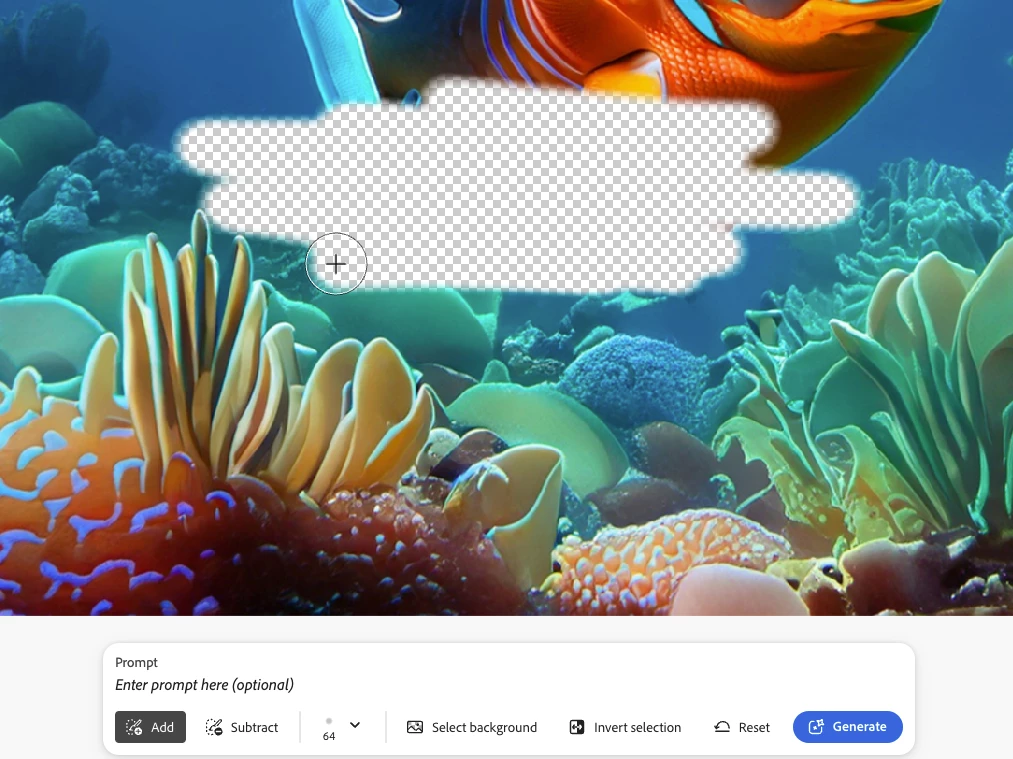
Ah, got it.  You now have to select an area first before it shows the prompt box above the bottom control panel:


My best,

    droopy

Adobe Community Expert (not an Adobe employee)

6 replies

SonseraeLeese
Known Participant
Aug 5, 2024 4:46 PM UTC

Oh! Doh! Thank you!!

Translate
droopydog500
Community Manager
droopydog500Community ManagerCorrect answer
Community Manager
Aug 5, 2024 4:28 PM UTC

Ah, got it.  You now have to select an area first before it shows the prompt box above the bottom control panel:


My best,

    droopy

Translate
Adobe Community Expert (not an Adobe employee)
SonseraeLeese
Known Participant
Aug 5, 2024 4:19 PM UTC

There used to be a text prompt to describe what you want changed. I don't see anything like that anymore. Just Add, Remove, Extend...but no place to put any text description option to change image.

Translate
SonseraeLeese
Known Participant
Aug 5, 2024 4:18 PM UTC

Translate
droopydog500
Community Manager
Community Manager
Aug 5, 2024 3:41 PM UTC

Hello @SonseraeLeese,

Thank you for your message. I am sorry you are having this problem. 

Can you please show us a screen shot of what you are seeing?

Thanks,
    droopy

Translate
Adobe Community Expert (not an Adobe employee)
SonseraeLeese
Known Participant
Aug 5, 2024 4:10 PM UTC

There is no text prompt to specify what to change on the image.

--

Sonserae Leese
Sonserae Designs
Disney Legacy Artist/Art Instructor
Photographer
Fine Artist/Painter
Digital Artist - Visual Effects for Film/TV
Graphic Design/Branding/Websites
Jewelry Designer


[website and email removed by moderator]


Translate