Hi TheFlaredLip, I understand the frustration of burning through credits and not getting the result you wanted!
The issue you're running into is that resizing an image cannot be done by text prompting in Adobe Firefly. When you type a size like "12x16" into the text prompt, the AI interprets it as a request to generate entirely new visual elements or interpret the text creatively, rather than adjusting the structural canvas of your current image. That is why you ended up with unexpected additions and strange crops.
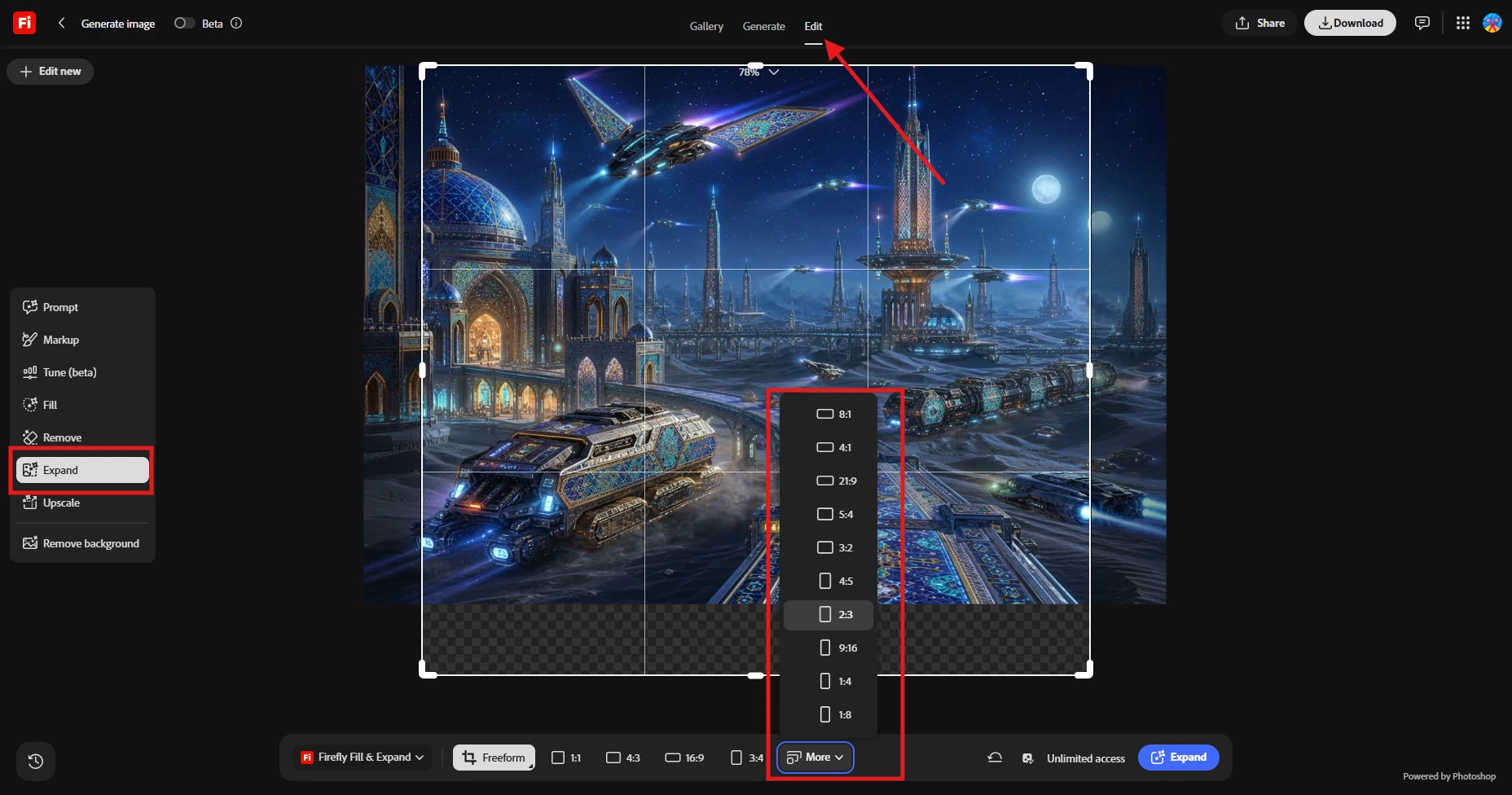
To properly resize an image and keep your original artwork intact, you need to use the dedicated tool for this:
Use the preset options provided there to choose your exact desired size output or aspect ratio.
This tool is designed exactly for resizing. It will expand your canvas to your requested dimensions and seamlessly fill in the new borders without altering or warping your original subject.
Regarding your request for a credit refund: because the three attempts did result in successful image outputs, we unfortunately cannot issue a refund for them. The credits used cover the computational cost of the generation itself, and unwanted outputs cannot be refunded.
I hope this clarifies how the tools work and helps you get the exact size you need on your next try!
Perhaps the promotional link Adobe sent to me today too quickly and easily resize a bit should come with some instructions? I click the link got your page with multiple options and no use information.
Appreciate you laying out exactly what happened, TheFlaredLip, that's useful.
If the promotional link dropped you into text-to-image without making clear that's a generation tool rather than a resize one, that's a real gap in the link's landing experience, and I'll pass that along. If you want to share more about which promotion you received, our support team (type "agent" or "talk to a person" to request escalation to a live human) can log that detail properly and route it to the right team.
Hi. I quit out of it, don't have a link. It must be in my account. I asked it to slightly resize a vertical photo tp make it 12x16. It came back with some horizontal crop of a small portion. No idea what size it was. Asked it again clearly to resize to 12x16: It converted the art to a new high-def version with all sorts of new added parts, at 12x21. Tried to communicate the problem to it, but it started cranking out a new visual. Gave up, closed out.
Hi TheFlaredLip, I understand the frustration of burning through credits and not getting the result you wanted!
The issue you're running into is that resizing an image cannot be done by text prompting in Adobe Firefly. When you type a size like "12x16" into the text prompt, the AI interprets it as a request to generate entirely new visual elements or interpret the text creatively, rather than adjusting the structural canvas of your current image. That is why you ended up with unexpected additions and strange crops.
To properly resize an image and keep your original artwork intact, you need to use the dedicated tool for this:
Use the preset options provided there to choose your exact desired size output or aspect ratio.
This tool is designed exactly for resizing. It will expand your canvas to your requested dimensions and seamlessly fill in the new borders without altering or warping your original subject.
Regarding your request for a credit refund: because the three attempts did result in successful image outputs, we unfortunately cannot issue a refund for them. The credits used cover the computational cost of the generation itself, and unwanted outputs cannot be refunded.
I hope this clarifies how the tools work and helps you get the exact size you need on your next try!





 AdChoices