MN+rijwana
Participant
August 2, 2026
Answered

Video generations fails

  • August 2, 2026
  • 3 replies
  • 31 views

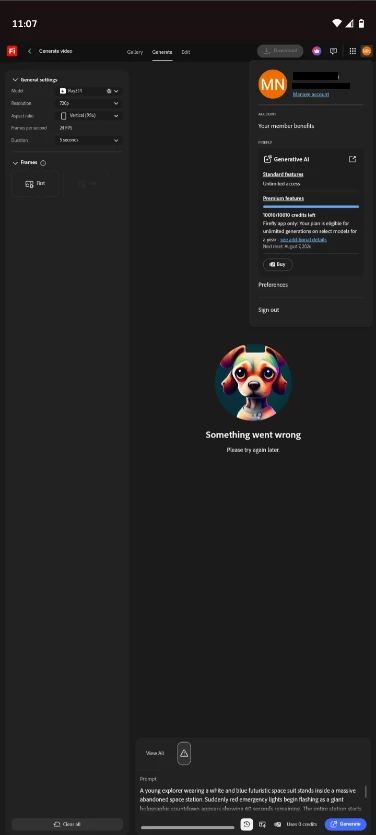
"Firefly video generation fails even with simple prompts, shows 'Something went wrong' error

[PII removed by Mod]

    Correct answer N8.

    Help us. Help you.  ​@MN+rijwana 
    Sorry to hear you're running into that "Something went wrong" error. Could you provide more information; so, the team can proceed to troubleshoot? Without the requested information it is difficult to assist you and resolve the issue. 

    Something went wrong troubleshooting

    A Full Screenshot or short video:  Please provide a screenshot of your entire browser or application window, including your avatar in the upper right corner. Many errors have multiple causes; seeing the full context is much more helpful than a zoomed-in image of the error message alone.
    >>Make sure to remove person details: email address, name... before posting<<

    • System Details: Specify your Operating System (OS) and Browser (including version numbers).
    • Workflow Context:
      • Which Firefly function were you using? (e.g., Text to Image, Generative Fill, Text to Video, etc.)
      • Which model was selected? (e.g., Firefly Image 3, Image 4 Ultra, Imagen 3).
      • The full prompt you were using.
      • Copies of any reference images, keyframes, or original images used.

    Other suggestions

    1. Try a different web browser (or an Incognito/Private window) to rule out browser extensions or cache issues.
    2. Disable any active VPN, ad-blockers, or strict firewall settings temporarily.
    3. Clear your browser's cache and cookies (see image below):

     For more details and additional troubleshooting steps, you also check this article as well!


    Resources & Suggestions on How to Prompt
    Generate images from text descriptions
    Writing Effective Prompts
    Adobe Firefly Resources

    Cheers

    Nate

     

    3 replies

    N8.
    Community Expert
    N8.Community ExpertCorrect answer
    September 19, 2026

    Help us. Help you.  ​@MN+rijwana 
    Sorry to hear you're running into that "Something went wrong" error. Could you provide more information; so, the team can proceed to troubleshoot? Without the requested information it is difficult to assist you and resolve the issue. 

    Something went wrong troubleshooting

    A Full Screenshot or short video:  Please provide a screenshot of your entire browser or application window, including your avatar in the upper right corner. Many errors have multiple causes; seeing the full context is much more helpful than a zoomed-in image of the error message alone.
    >>Make sure to remove person details: email address, name... before posting<<

    • System Details: Specify your Operating System (OS) and Browser (including version numbers).
    • Workflow Context:
      • Which Firefly function were you using? (e.g., Text to Image, Generative Fill, Text to Video, etc.)
      • Which model was selected? (e.g., Firefly Image 3, Image 4 Ultra, Imagen 3).
      • The full prompt you were using.
      • Copies of any reference images, keyframes, or original images used.

    Other suggestions

    1. Try a different web browser (or an Incognito/Private window) to rule out browser extensions or cache issues.
    2. Disable any active VPN, ad-blockers, or strict firewall settings temporarily.
    3. Clear your browser's cache and cookies (see image below):

     For more details and additional troubleshooting steps, you also check this article as well!


    Resources & Suggestions on How to Prompt
    Generate images from text descriptions
    Writing Effective Prompts
    Adobe Firefly Resources

    Cheers

    Nate

     

    Community Expert
    August 10, 2026

    As ​@Hajar Toutsi mentioned, sharing more details will help in giving guidance from here. 

    One thing I’d add, go to your Generation History to see if something was created. I’ve experienced the ‘something went wrong’ error but then in the Generation History, I have found an output from the prompt, that can be accessed.
    https://firefly.adobe.com/your-stuff

    Hajar Toutsi
    Community Manager
    Community Manager
    August 10, 2026

    Hi MN+rijwana,

    Thank you for providing the screenshot.

    Could you please share the entire prompt you were trying to use? This will help us look into the reason for the error and investigate further.

    Hajar
    [Moved to questions]