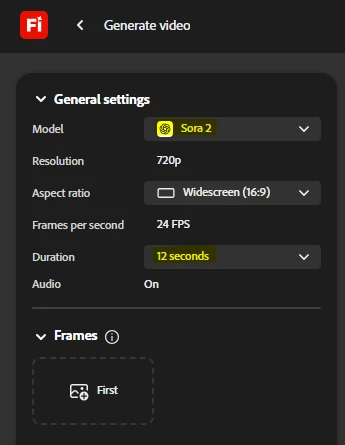
For the Generate Video feature, the Firefly Video model currently has a fixed duration of 5 seconds. Some of our partner models offer longer options, including durations up to 12 seconds with Sora 2.
You can find a full breakdown of each partner model’s duration options in this article.
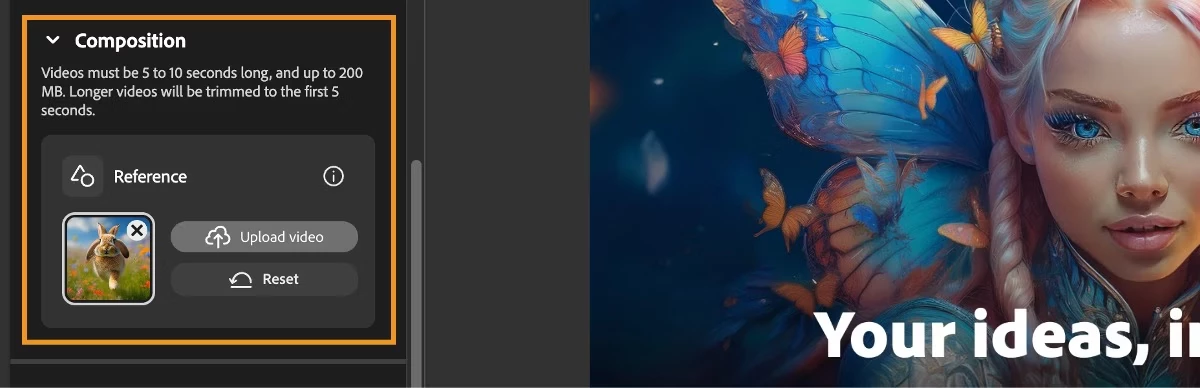
If you prefer to work only with the Firefly Video model, one workaround is to create a series of 5‑second clips and stitch them together afterward. You can start by generating the first clip, then upload it as a reference in the Composition section. This helps keep the layout and visual style consistent when generating the next segment.
For the Generate Video feature, the Firefly Video model currently has a fixed duration of 5 seconds. Some of our partner models offer longer options, including durations up to 12 seconds with Sora 2.
You can find a full breakdown of each partner model’s duration options in this article.
If you prefer to work only with the Firefly Video model, one workaround is to create a series of 5‑second clips and stitch them together afterward. You can start by generating the first clip, then upload it as a reference in the Composition section. This helps keep the layout and visual style consistent when generating the next segment.
The problem is the settings on the firefly. AI does not permit me to continue the scene as a warning came up, saying it’s not permitted by community standards. The problem is is that firefly created the image so if firefly creates images That violates its own standards it impossible for me to paste clips of videos together
Does it happen that the reference image or keyframe you reproduced in Firefly, the one that keeps triggering the user‑guidelines violation message when generating a video; might contain a minor or depict a minor in any way? That could explain why the generation wont be processed.





 AdChoices