Participant
Apr 29, 2025 8:30 AM UTC
Answered

Where are my Firefly creations?

Hi,

My "Files" section in Firefly is empty. I can't see any of my many creations suring 2024. I am a registered paying customer. Help....?

droopydog500
droopydog500Correct answer
Community Manager
Apr 29, 2025 11:23 AM UTC

Hello @revitalm73617907,

Thank you for your message. 

Are you looking for old favourites?  If so, since the new release, favourites are now stored in the cloud rather than in the local browser cache. However, old favourites are still available from the local browser cache. When you go to the Favourites page, if you have favourites in the local browser cache, a button will appear on the right side "View favourites saved in browser":
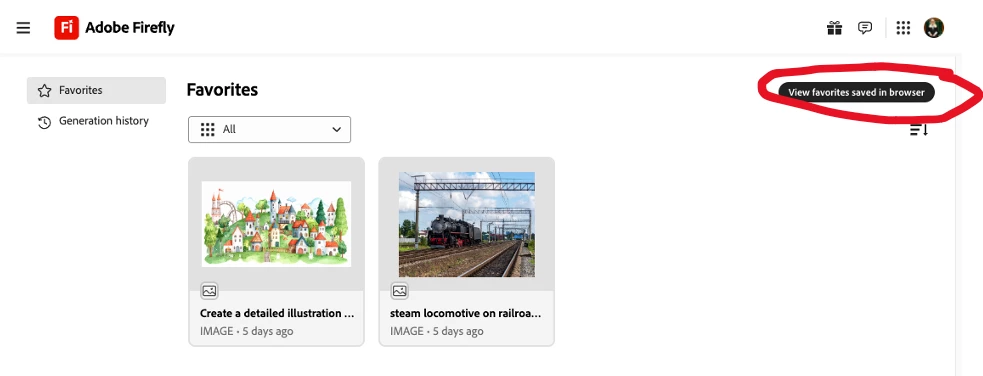
 

Note, if you have a lot of favourites stored in the browser cache, it can take a few seconds for that button to appear. It takes 17 seconds for it to appear in my browser window (I have hundreds of favourites saved in this browser).


Browser favourites are only available on the computer and in the specific browser they were saved in. There is no function available to transfer those favourites to cloud storage.


My best,
    droopy

Adobe Community Expert (not an Adobe employee)

2 replies

droopydog500
Community Manager
droopydog500Community ManagerCorrect answer
Community Manager
Apr 29, 2025 11:23 AM UTC

Hello @revitalm73617907,

Thank you for your message. 

Are you looking for old favourites?  If so, since the new release, favourites are now stored in the cloud rather than in the local browser cache. However, old favourites are still available from the local browser cache. When you go to the Favourites page, if you have favourites in the local browser cache, a button will appear on the right side "View favourites saved in browser":


Note, if you have a lot of favourites stored in the browser cache, it can take a few seconds for that button to appear. It takes 17 seconds for it to appear in my browser window (I have hundreds of favourites saved in this browser).


Browser favourites are only available on the computer and in the specific browser they were saved in. There is no function available to transfer those favourites to cloud storage.


My best,
    droopy

Translate
Adobe Community Expert (not an Adobe employee)
N8.
Community Expert
Apr 29, 2025 9:54 AM UTC

Hey @revitalm73617907 

Ya... that was a surprise to many of us. It seems all of those files are gone. 

Cheers

O. Nate

Translate