



LambCreek
Participant
June 23, 2026
Answered

you all generated a 4 sec video for me. it was perfect first time. I went to download it and was unable as I had to clear my cache by restarting. When i did I seem to have lost the work you already did. Where can I find what you already generated?

  • June 23, 2026
  • 1 reply
  • 1 view

I often am unable to download images and vidoes generated by Firefly, due to having to clear my cache. This time you all created a beautiful 4 sec video the first time. I was unable to locate it after having to restart. Where can I find it?

    Correct answer Hajar Toutsi

    Hi LambCreek,

    Thanks for reaching out.

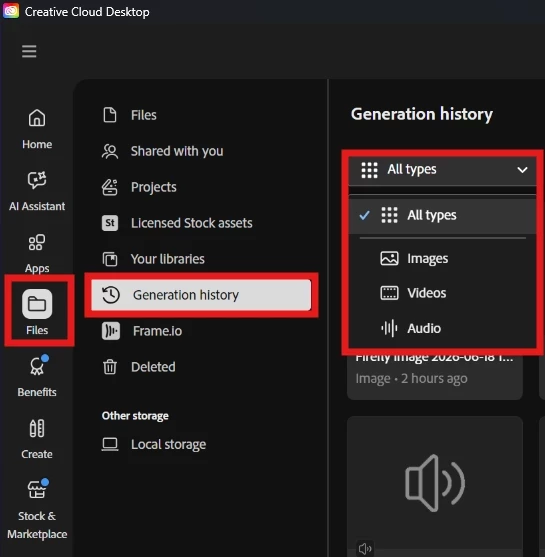
    If you want to locate your AI generated outputs, please go to your Creative Cloud desktop or to: https://www.adobe.com/home, and select Generation history under Files. This space saves all of your generated media (images, audio, and videos) and it allows you to access them, which consumes your allocated Adobe Cloud storage space.


    Let us know if that helped you locate your output.

    Hajar
    [Moved to questions]

    1 reply

    Hajar Toutsi
    Community Manager
    Hajar ToutsiCommunity ManagerCorrect answer
    Community Manager
    June 23, 2026

    Hi LambCreek,

    Thanks for reaching out.

    If you want to locate your AI generated outputs, please go to your Creative Cloud desktop or to: https://www.adobe.com/home, and select Generation history under Files. This space saves all of your generated media (images, audio, and videos) and it allows you to access them, which consumes your allocated Adobe Cloud storage space.


    Let us know if that helped you locate your output.

    Hajar
    [Moved to questions]