
Participating Frequently
May 12, 2025
Answered

Adobe Fonts disabled but font still functional

  • May 12, 2025
  • 4 replies
  • 480 views

For template programming reasons, I need fonts in a file to work off the actual font file stored locally, not the Adobe font. Files supplied by the client use the Adobe font, so whenever I open these files, the font reactivates. Whenever I change the fonts to the local font file, it's redded out as if the font doesn't exist or is corrupted:
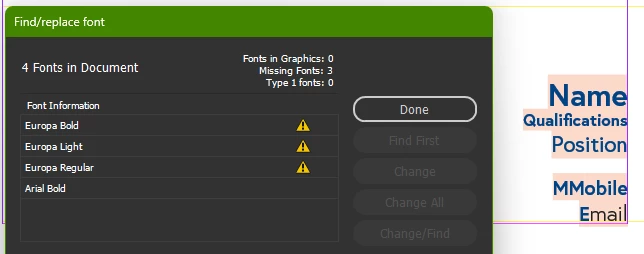


I deactivated Adobe Fonts entirely--not ideal, but it worked... until I reopened InDesign the next day and all the Adobe Fonts are funtional again. Adobe Fonts is still disabled in Creative Cloud, but the fonts in the font list are still fully functional, which breaks my link to the actual font file again.


I worked around this by re-enabling Adobe Fonts, turning off the specific fonts giving me grief at the moment, then disabled Adobe Fonts again and finally, happy days. Until tomorrow when I inevitably have to go through all this again.


I hate when programs think they're smarter than I am. I don't just want, I need to use the local font file too make this template function for my client. Why, when there's an option for both a local file and Adobe font, does Adobe tell me the local file is nonexistent/corrupted? Before the above process, I went through the rigmorole of uninstalling that font file, reinstalling, redownloading, re-reinstalling... only to find out my file is perfectly fine and it's just Adobe thinking it's smarter than I am.


How do I stop this sodding Adobe font from reactivating every time I get a new file from my client?

Correct answer Ton Frederiks

You can license that font to not be dependend on Adobe Type;

https://europatype.com/license

4 replies

Community Expert
May 12, 2025

The only reliable way to avoid annoying missing font issues in documents shared among multiple users is by having everyone who opens and edits the document installing the same exact font files on their computers. It's not enough for the typeface name to be the same, it has to be the same build of the same font file. Otherwise the missing font dialog box is likely to appear when opening the document.


Adobe Fonts is simply another factor contributing to the issue. In one respect Adobe Fonts is pretty convenient if everyone who opens the document has a Creative Cloud subscription. Any Mac or PC user who has a CC subscription can automatically sync the same font files. Not everyone has a CC subscription though.

kglad
Community Expert
Community Expert
May 12, 2025

in the future, to find the best place to post your message, use the list here, https://community.adobe.com/

p.s. i don't think the adobe website, and forums in particular, are easy to navigate, so don't spend a lot of time searching that forum list. do your best and we'll move the post (like this one has already been moved) if it helps you get responses.


<"moved from cc services">
Ton Frederiks
Community Expert
Ton FrederiksCommunity ExpertCorrect answer
Community Expert
May 12, 2025

You can license that font to not be dependend on Adobe Type;

https://europatype.com/license

Tarun Saini
Community Manager
Community Manager
May 12, 2025

Hi 

@Jon Bull

,

Thanks for reaching out! I'd like to inform you that extracting the font files from their obscured location is a violation of our end-user license agreement.


Please check this article for more info- https://adobe.ly/3Zcc8lO


Regards,

Tarun