
Removed/Uninstalled Fonts Still Active in Creative Suite
I need to stop Creative Suite apps from automatically "calling" fonts from Adobe Fonts so I can replace them with purchased versions that are stored locally on my PC. All Creative Suite apps default to using the Adobe Fonts versions, so I can't select or even see the purchased versions within Creative Suite apps, even though the purchased fonts are installed on my PC.
Using the Fonts tab in the Creative Cloud Desktop app, I have removed ALL fonts from Added fonts and Installed fonts. I have also gone to preferences in the Creative Cloud Desktop app and disabled Adobe Fonts. In InDesign, I have also gone to Edit>Preferences>File Handling and made sure that "Auto-add Adobe Fonts" is not checked. And yet every time I open ANY of my apps (Photoshop, InDesign, Illustrator), there are Active Adobe Fonts:
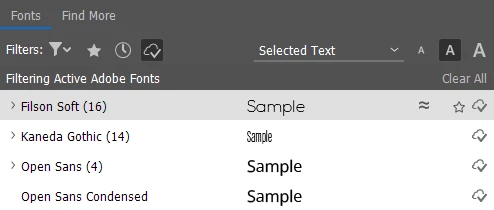
The example above is from InDesign, but its essentially the same in my other Creative Suite apps. Would love some guidance on how to totally remove these fonts and prevent this from happening.


 AdChoices