
rcraighead
Legend
December 23, 2019
Answered

Why is "Black and White EmojiOne" disabled in latest versions of Creative Cloud Apps?

  • December 23, 2019
  • 2 replies
  • 1333 views

We use EmojiOne font in AI CC 2015 and outline the emoji characters for use in metal etching. 
When testing with AI CC 2019 or later we find the B&W version of the EmofiOne font is inaccessible and ONLY the color characters are available which are useless to us. We could jump through several hoops to convert them to B&W, but in a production environment this is not practical.


Why is there a "Fallback" font embedded in EmojiOne that is completely unavailable in the latest versions of Adobe Illustrator? B&W emojis are extremely useful in our market and I'm sure wer'e not alone. Adobe, if you're listening, please give us a B&W version of EmojiOne (since it's already available in your older software).


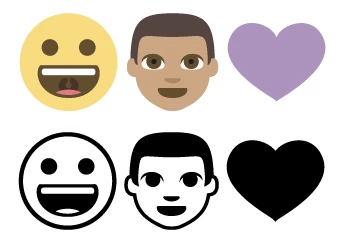
Edit: Here's a simple example of EmojiOne characters in AI CC 2020. The B&W images were outlined in AI CC 2015 and pasted into 2020. Adobe, just give us a "Black and White" option for this font.
 

This topic has been closed for replies.
Correct answer rcraighead

One year later:
It turns out converting the "EmojiOne Color OTF" font to TTF makes the emojis B&W. It also changes the Unicode#. BUT, the "alternate" glyph is the correct emoji! This is a relatively easy conversion using the new "quick glyph access" built into AI CC 2020:

2 replies

rcraighead
Legend
May 12, 2022

It's interesting to note that Photoshop auto-converts EmojiOne Color characters to B/W when converted to Shapes. Why can't Illustrator do the same? Hmm… I guess they could if Adobe product teams collaborated a bit more.

https://helpx.adobe.com/fonts/using/ot-svg-color-fonts.html

rcraighead
rcraigheadAuthorCorrect answer
Legend
December 28, 2020

One year later:
It turns out converting the "EmojiOne Color OTF" font to TTF makes the emojis B&W. It also changes the Unicode#. BUT, the "alternate" glyph is the correct emoji! This is a relatively easy conversion using the new "quick glyph access" built into AI CC 2020:

Participant
August 10, 2021

Holy moly, thank you so much! I've been going mad over this problem