MCormier
Inspiring
October 6, 2017
Answered

Adobe Captivate Prime

  • October 6, 2017
  • 1 reply
  • 1255 views

I am working in Adobe Captivate Prime and I have created several catalogues and loaded content.  How can I add content to an existing catalogue?

This topic has been closed for replies.
Correct answer MCormier

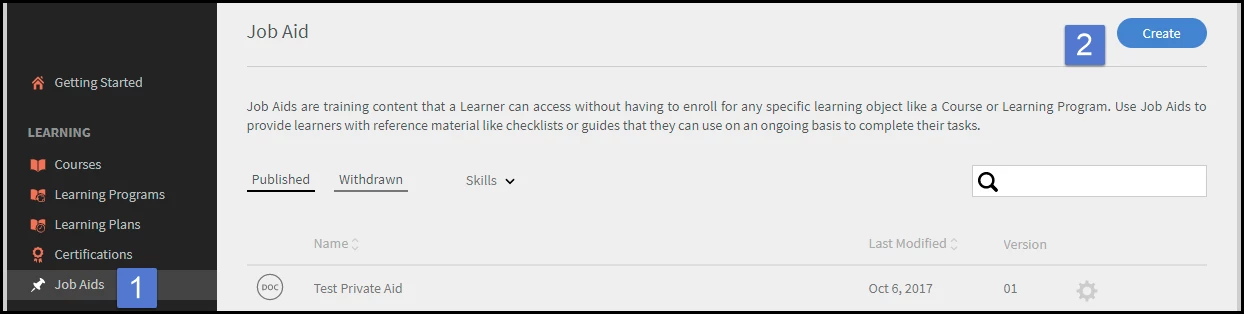
Yes, make the job aids under the job aids section.

Select Job Aids then Create

Fill in the info, upload your file, and hit save.

Now you should find it for your catalog.

Yes, I can see how to load correctly now.

Thanks for the help.

1 reply

Stagprime2687219
Legend
October 6, 2017

Select your catalog.

Then select Content from the left

Then click 'Add Content'

Select the courses you want to add and click 'Save'

Hopefully that makes sense and helps!

MCormier
MCormierAuthor
Inspiring
October 6, 2017

Thank you.  I am trying to add job aids to an existing catalogue.  I can see the job aids in the content library in Author, but when I go to Administrator to load the job aids, I don't see them in content.  Did I load them in the Content Library wrong.

Is there a User Guide for Adobe Captivate Prime that I could access for simple questions?

Stagprime2687219
Legend
October 6, 2017

Hmmm....

Gonna try this again...

Once you click on 'Content' - did you then select 'Job Aids'?

I am not sure about a manual but there is a lot of good information using the links on the right side of this forum.