

Question
Article: ALM How to re-activate an External user and move the learner from one external profile to another
If an external learner is deleted by admin as the user is no longer part of that external profile or organization and now in case the user is rehired and belongs to a different organization or partner, admin can follow the steps below to reactivate the user profile:
When admin tries to add the user again, system will through error that user with email already exists. To resolve this issue,
- Login as Admin.
- Navigate to Users >> External users.
- Open the External profile and click on learners.
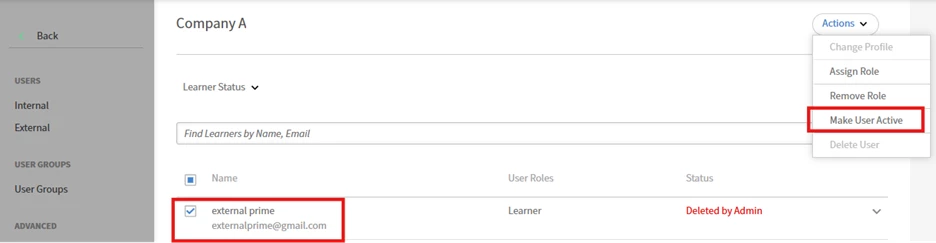
- Now select the deleted user whom you want to reactive as below and click on actions >> click on ‘Make user active’
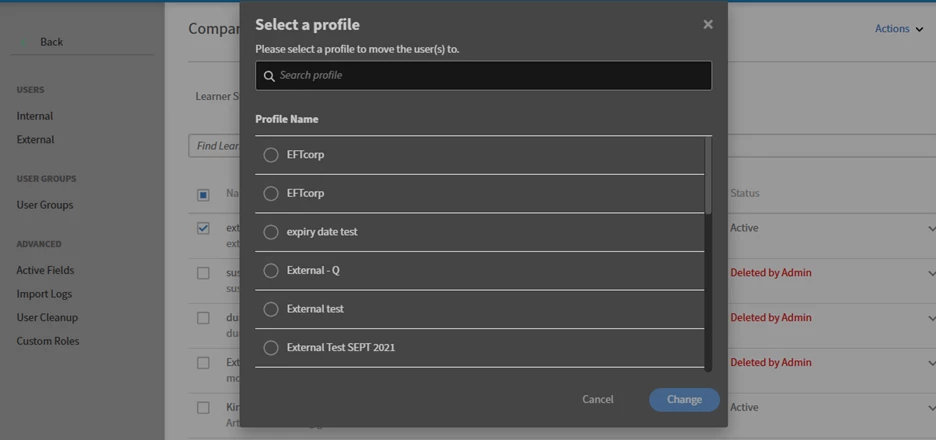
- If the user belongs to a different organization, select the user again and click on actions >> select Change profile.
- You will see all external profiles. Select the external profile to which you want to move the learner to:
- Post that the learner will be moved to the new external profile.


 AdChoices