Jun 10, 2016 11:35 AM UTC
Answered

Can't hear Audio

Uploaded a course to prime and can't hear the audio when viewing the course on browser. Help me.

    This topic is closed to new replies. Start a new post to keep the conversation going.
    AJIT_M
    AJIT_MCorrect answer
    Inspiring
    Jun 10, 2016 4:28 PM UTC

    Hi There,

    May I know the issue that you were facing is specific to any browser or it occurs on all the browsers? If it occurs only in Internet Explorer then you may try to follow the below steps and see if that works-

    1. Go to Tools > Internet options in IE.
    2. Click on Advanced tab.
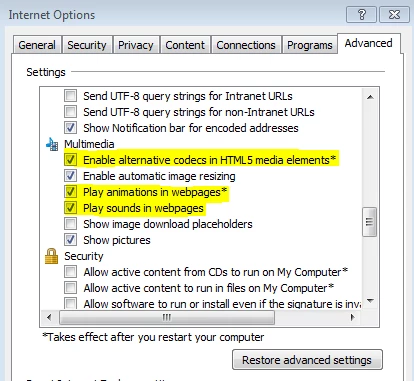
    3. In Settings, scroll down to Multimedia section and please make sure the below highlighted option must be selected-

    Once you checked the above options then try to view the course on IE and check if that works.

    Regards,

    Ajit

    2 replies

    AJIT_M
    AJIT_MCorrect answer
    Inspiring
    Jun 10, 2016 4:28 PM UTC

    Hi There,

    May I know the issue that you were facing is specific to any browser or it occurs on all the browsers? If it occurs only in Internet Explorer then you may try to follow the below steps and see if that works-

    1. Go to Tools > Internet options in IE.
    2. Click on Advanced tab.
    3. In Settings, scroll down to Multimedia section and please make sure the below highlighted option must be selected-

    Once you checked the above options then try to view the course on IE and check if that works.

    Regards,

    Ajit

    Translate
    Jun 10, 2016 5:07 PM UTC

    Thank you Ajit. You understood my problem and solved it perfectly. Genius you are.

    Translate