


CSV Error: Email address of user already present in the system
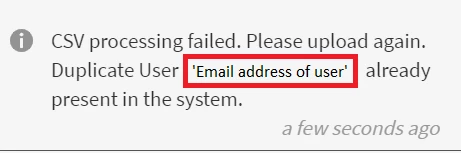
Issue: There are scenarios where you are unable to upload a CSV because CSV processing has failed. You see the error message below:
Cause
This issue occurs if there is a user who is already present in the system with the same email address or UUID.
Resolution
SCENARIO 1
Accounts on which UUID is not enabled.
In this scenario, there are two reasons for this error:
- The user that you are trying to add is a Manager of an External profile. To resolve this, open the external profile the user is a part of, select the user, click Actions > Assign Role > Manager, and change the Manager of the profile.
- The user that you are trying to add has been purged. In this scenario, you will not be able to add the user with the same email address until the purge process is completed. As a workaround, add the user with a secondary email address to provide access to the platform. Once the purge process is complete, edit the user and change the email address to the correct email address.
SCENARIO 2
UUID-enabled accounts.
For UUID-enabled accounts, this issue can occur if a user has been assigned a UUID that is already being used by another user on the account or if the user has a different email address.
For example, let there be two users, A and B, with email addresses, a@xyz.com and b@xyz.com with UUID 1 and 2 respectively.
Now, if you upload a CSV that has user A's UUID as 3 and user B's UUID as 2, then you will see an error.
To resolve this issue, you must have the same email address and UUID for the user on the CSV and the system


 AdChoices