
Participant
June 9, 2021
Answered

Generating Reports in Captivate Prime

  • June 9, 2021
  • 1 reply
  • 230 views

I uploaded a SCORM course which includes a test with multiple choice and written answers to a series of questions.  I can see that a user completed the course, but how do I generate a report where I can see the person's anser (a,b,c or d) to each multiple choice question, and also view the written answers they submitted?
 

    This topic has been closed for replies.
    Correct answer Abhijeet_Tewari

    @JonKjaerulff 

    To generate a Quiz report, you may follow the below steps:


    1: Login as Admin > Click on Courses.

    2: Open the Course for which the report needs to be generated.

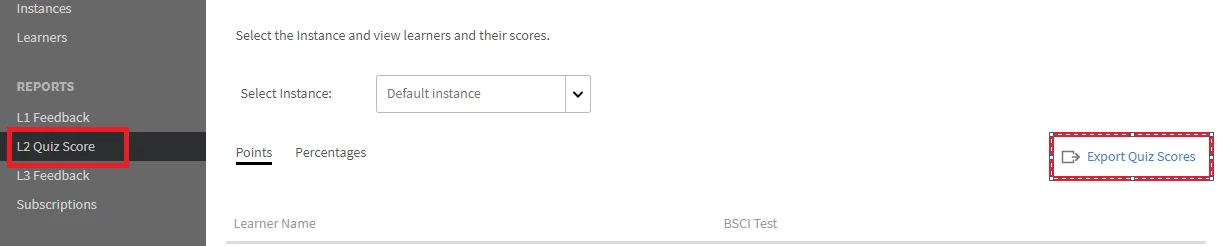
    3: Click on L2 Quiz Score > Export Quiz score.


    Hope this helps.

    1 reply

    Abhijeet_Tewari
    Adobe Employee
    Abhijeet_TewariCorrect answer
    Adobe Employee
    June 25, 2021

    @JonKjaerulff 

    To generate a Quiz report, you may follow the below steps:


    1: Login as Admin > Click on Courses.

    2: Open the Course for which the report needs to be generated.

    3: Click on L2 Quiz Score > Export Quiz score.


    Hope this helps.