

Harrell_t
Inspiring
March 13, 2017
Answered

How do I deactivate email notifications for managers?

  • March 13, 2017
  • 1 reply
  • 662 views

Hello to the Prime tech development team.

In my organization, my managers DO NOT need to get the auto-generated emails from Prime when a learner, for example, self-enrolls in a course.

How can I change that setting so that emails of that nature only come to me?

Thanks,

Thomas H.

Master Electronics
This topic has been closed for replies.
Correct answer Harrell_t

Thanks...

Devendra Nath Mishra,Technical Support Consultant.

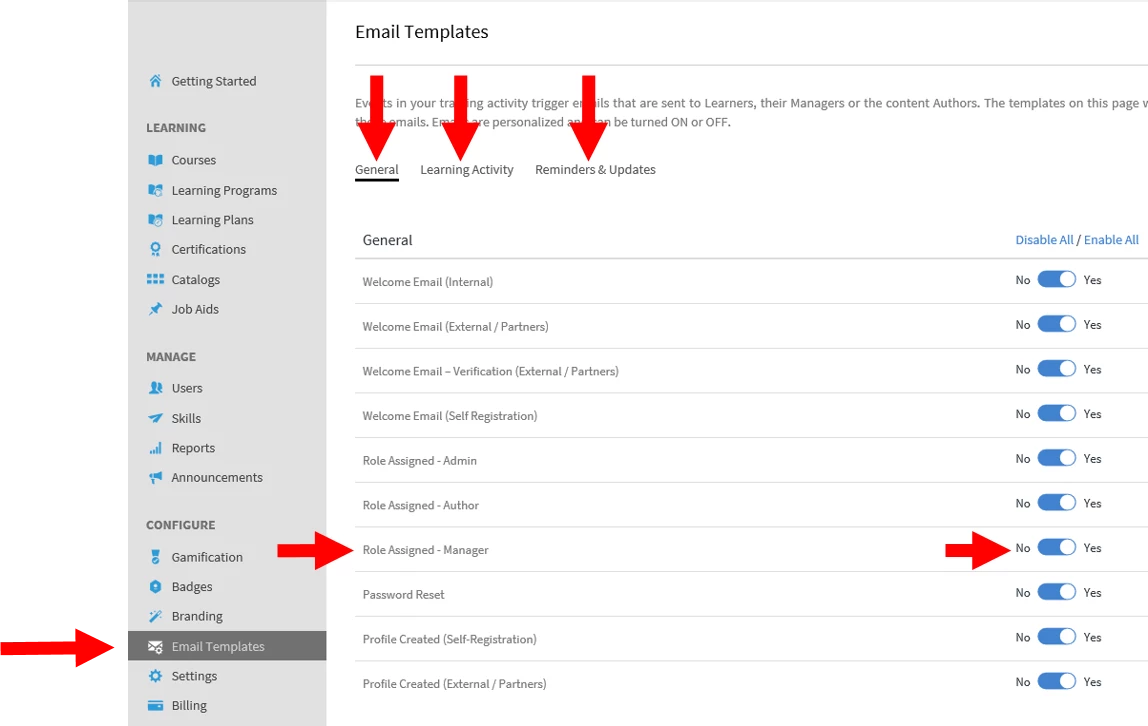
To DEACTIVATE EMAIL NOTIFICATIONS TO MANAGERS go to --> Email templates, find the Manager role and switch it to NO for the specific notifications you want to turn off.

Regards,

Thomas H.

Master Electronics

1 reply

Harrell_t
Harrell_tAuthorCorrect answer
Inspiring
March 14, 2017

Thanks...

Devendra Nath Mishra,Technical Support Consultant.

To DEACTIVATE EMAIL NOTIFICATIONS TO MANAGERS go to --> Email templates, find the Manager role and switch it to NO for the specific notifications you want to turn off.

Regards,

Thomas H.

Master Electronics

Participant
October 7, 2024

Wouldn't disabling the Role Assigned - Manager email only disable a manager email for that specific scenario (when someone is assigned the manager role)? My interpretation of this question is how do you remove the manager from being included on all the other learner-specific emails. The original poster used the Course - Self-Enrollment email on the Learning Activity tab as an example. I'd say the Course Auto-enrollment and Course Enrolled by admin emails are other better examples. When you click into that template, the Learner and Manager tabs tell me that this email will be sent to both the Learner and their Manager. But say a training is being assigned to an entire department, someone who managers 40 people would receive 40 emails about this? And this would happen everytime they enrolled or were assigned a any training. There doesn't seem to be a way to still keep that email enabled for the learner but disable it for the manager, unless I'm missing an option on that screen?