
JamesAkimbo
Inspiring
November 13, 2015
Answered

How to return to Prime home page after completing quiz?

  • November 13, 2015
  • 2 replies
  • 465 views

Hi, not sure if this is more of a Captivate9 question but I've uploaded a captivate assessment module to Prime for the end of a course, it works as intended but when I complete it and then hit the 'Continue' button nothing happens. How can I make it behave like the default Prime Learning modules where you are taken back to the learner home page? At the moment the only way I can do this is to hit the cross on the top right (circled in red below):


Best, James
    This topic has been closed for replies.
    Correct answer shikha__

    Hi,

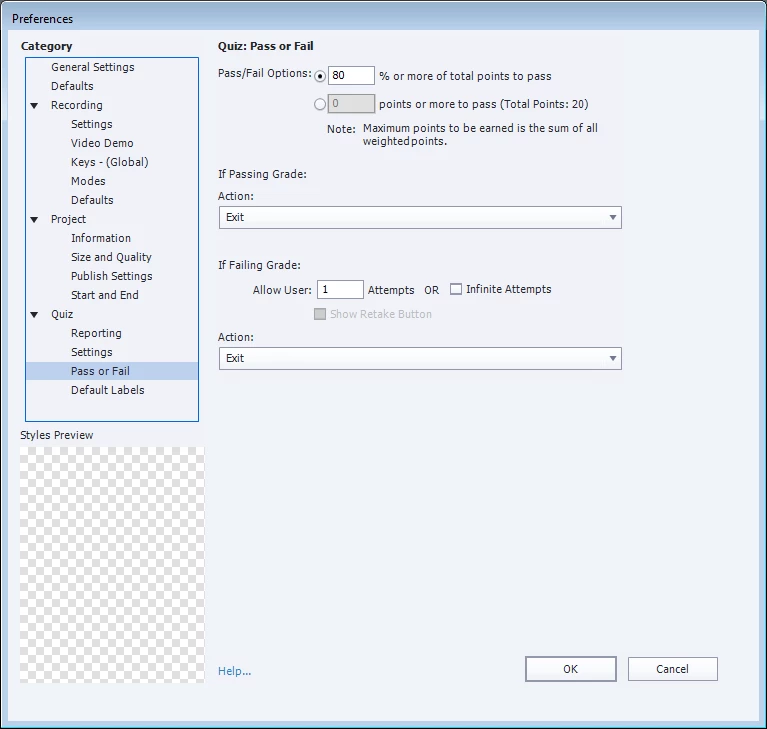
    You need to initiate exit action on Continue button in the Quiz Preferences while creating your project in Captivate 9.

    Steps:

    1.Go to Quiz Preferences in Captivate 9

    2.Go to Quiz > Pass or Fail

    3.Choose "Exit" action for Passing or Failing grade

    Thanks,

    Shikha

    2 replies

    JamesAkimbo
    Inspiring
    November 16, 2015

    Perfect! Thank you so much for posting this Shikha.

    shikha__Correct answer
    Adobe Employee
    November 16, 2015

    Hi,

    You need to initiate exit action on Continue button in the Quiz Preferences while creating your project in Captivate 9.

    Steps:

    1.Go to Quiz Preferences in Captivate 9

    2.Go to Quiz > Pass or Fail

    3.Choose "Exit" action for Passing or Failing grade

    Thanks,

    Shikha