
How to use cURL with API?
I am starting to look at the Adobe LMS API and can get it to work through the app->Integration Admin->API reference.
I can also get it to work when I trigger my configured app in a browser to get my Oauth Code. It redirects with a new parameter PRIME_BASE and Code (my oauth code).
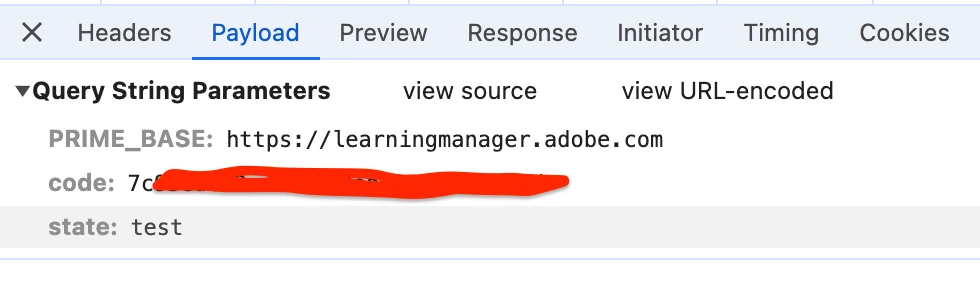
But when I try it with curl (as I am writing a script to get some course completion data) I get redirected to a page that says my browser is not supported.
Has anyone been able to use curl to get Oauth code?
Eg.
curl -X GET 'https://learningmanager.adobe.com/oauth/o/authorize?client_id=<myappclientid>&state=test&scope=admin:read&response_type=CODE&redirect_uri=https://rainfocus.lightning.force.com/' -v

< HTTP/2 302
< date: Thu, 25 Apr 2024 14:35:39 GMT
< content-type: application/octet-stream
< content-length: 0
< location: https://learningmanager.adobe.com/login?returnPath=https%3A%2F%2Flearningmanager.adobe.com%2Foauth%2Fo%2Fauthorize%3Fclient_id%3<myclientid>%26state%3Dtest%26scope%3Dadmin%3Aread%26response_type%3DCODE%26redirect_uri%3Dhttps%3A%2F%2Frainfocus.lightning.force.com%2F%26acap_prime_oauth%3D1&client_id=<myclientid>
Note that it appends some acap_prime_oauth and if I tell curl to follow that redirect it gets to some page with this in it:
<div id="themeUrl" style="display:none">'https://cpcontents.adobe.com/public/acapassets/f127ac45.default.min.css'</div>
<div id="enterEmail" style="display:none;">Please enter email address.</div>
<div id="updateBrowser" style="display:none;">This browser (or it&#x2019;s version) is not recommended for accessing Adobe Learning Manager. Use the latest version of <a href='https://www.google.com/chrome/'>Chrome</a> or <a href='https://support.apple.com/downloads/safari'>Safari</a></div>
Even if I pass a bunch of headers that my browser passed into curl it also does not work:
 -H 'accept: text/html,application/xhtml+xml,application/xml;q=0.9,image/avif,image/webp,image/apng,*/*;q=0.8,application/signed-exchange;v=b3;q=0.7' \
  -H 'accept-language: en-US,en;q=0.9' \
  -H 'cache-control: no-cache' \
  -H 'pragma: no-cache' \
  -H 'priority: u=0, i' \
  -H 'sec-ch-ua: "Chromium";v="124", "Google Chrome";v="124", "Not-A.Brand";v="99"' \
  -H 'sec-ch-ua-mobile: ?0' \
  -H 'sec-ch-ua-platform: "macOS"' \
  -H 'sec-fetch-dest: document' \
  -H 'sec-fetch-mode: navigate' \
  -H 'sec-fetch-site: none' \
  -H 'sec-fetch-user: ?1' \
  -H 'upgrade-insecure-requests: 1' \
  -H 'user-agent: Mozilla/5.0 (Macintosh; Intel Mac OS X 10_15_7) AppleWebKit/537.36 (KHTML, like Gecko) Chrome/124.0.0.0 Safari/537.36'
I am not sure what I am doing wrong or why I get nothing back with cURL but I do via a browser session?


 AdChoices