

Harrell_t
Inspiring
May 23, 2018
Answered

In Prime I created a second catalog - how do learners see it?

  • May 23, 2018
  • 1 reply
  • 682 views

In Prime I created a second catalog - how do learners see it? Even though I've enabled it and added shared it internally with all learners I still cannot see it separately when I login as a learner.

I did this because I wanted learners to EASILY get to this learning content instead of wading through the hundreds of courses we've got in Prime.

Thanks!

Regards,

Thomas H.

Master Electronics
This topic has been closed for replies.
Correct answer zweigle@clarix.com

In Captivate Prime you can have many 'Catalogs' with content such as courses, learning programs, certificates and job-aids.

A Learner sees only one combined catalog with all of the content for all of the catalog's to which they have been given visibility.

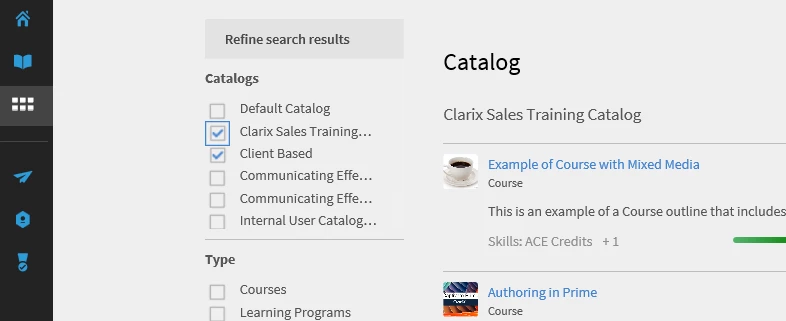
If account Administrators have check the box under Settings>General to 'Show Catalog Listing', then if enabled, Learners can see the list of all Catalogs available for them. Learners can use this to refine their learning object listing.

To see items from specific catalogs a Learner can filter based on catalog as shown here:

Feel free to contact me directly with additional questions about Captivate Prime and/or Adobe Connect.

Walter Zweigle 585-899-5300 x156 or Zweigle@clarix.com

1 reply

zweigle@clarix.com
zweigle@clarix.comCorrect answer
Participating Frequently
May 23, 2018

In Captivate Prime you can have many 'Catalogs' with content such as courses, learning programs, certificates and job-aids.

A Learner sees only one combined catalog with all of the content for all of the catalog's to which they have been given visibility.

If account Administrators have check the box under Settings>General to 'Show Catalog Listing', then if enabled, Learners can see the list of all Catalogs available for them. Learners can use this to refine their learning object listing.

To see items from specific catalogs a Learner can filter based on catalog as shown here:

Feel free to contact me directly with additional questions about Captivate Prime and/or Adobe Connect.

Walter Zweigle 585-899-5300 x156 or Zweigle@clarix.com

Walter Zweigle - Sales Account Manager | Clarix Technologies Inc. | 585-899-5300 x156 | zweigle@clarix.comAdobe Connect | Adobe Learning Manager | Adobe Acrobat Sign
Harrell_t
Harrell_tAuthor
Inspiring
May 23, 2018

That did it. Thanks Walter!

Regards,

Thomas H.

Master Electronics