


petrk27901450
Inspiring
Aug 23, 2017 10:22 PM UTC
Answered

SCORM module continous loading

I am trying to republish an older Captivate project as a SCORM 1.2 to put onto an LMS. When I try to republish the project for only HTML5, the SCORM displays its circular loading animation and does not stop trying to load. I have tried testing it both in the LMS and SCORM Cloud and the same never ending loading screen appears.

If I select both SWF and HTML5 on the publish screen, the SCORM then actually loads correctly. But I would like to publish it as HTML5 only.
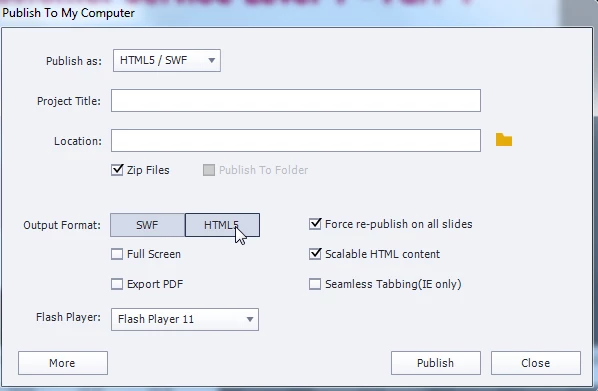
There was a swf animation on the first slide of the Captivate project, but I have since removed this and also removed the swf from the project library. I thought that this was the culprit, but after publishing and testing again the same loading screen appears.

Any suggestions on how to troubleshoot this?

This topic is closed to new replies. Start a new post to keep the conversation going.
petrk27901450
petrk27901450Correct answer
Inspiring
Aug 30, 2017 10:06 PM UTC

Ok I have managed to solve this by going through each slide one by one. For some reason a drag and drop slide was causing this continuous loading issue. Removing this and recreating the drag and drop solved this problem.

3 replies

Debiprasad Maharana
Adobe Employee
Adobe Employee
Jun 26, 2024 7:55 PM UTC

Hi @petrk27901450,


Thank you for contacting the Adobe Learning Manager Team. 


Can you please try to copy-paste all the slides to a new project and then try it?

Sometimes, older projects show unusual behaviour, and this may help. Also, please publish the project as HTML 5 only and remove all the Flash objects from it.


Regards,

Debiprasad Maharana

Adobe Inc.

Translate
petrk27901450
petrk27901450AuthorCorrect answer
Inspiring
Aug 30, 2017 10:06 PM UTC

Ok I have managed to solve this by going through each slide one by one. For some reason a drag and drop slide was causing this continuous loading issue. Removing this and recreating the drag and drop solved this problem.

Translate
Participant
Jun 24, 2024 6:02 PM UTC

How were you able to troubleshoot that - that was the culprit?

Translate