

Understanding Adobe Learning Manager (ALM) Transcript Report Data Structure.
Adobe Learning Manager (ALM) provides a powerful reporting framework that helps organizations track, analyze, and optimize learner progress across modules, courses, learning paths, and higher‑level learning paths (details of certification data is not included in this article).
One of the most valuable reports in ALM is the Learner Transcript Report, which gives a granular breakdown of every learner’s learning activity.
This article provides a systematic, easy‑to‑understand explanation of the ALM Transcript Report data structure, helping administrators, L&D teams, and reporting specialists interpret the report accurately.
The Transcript Report in Adobe Learning Manager captures detailed progress information for every training entity a learner interacts with:
- Modules
- Courses
- Learning Paths
- Higher-Level Learning Paths
Because ALM allows nested structures (modules → courses → learning paths → higher-level paths), the transcript report includes multiple rows per learner depending on the training structure.
Modules: In ALM authors upload training contents such as video, e-learning scorm, pdf, doc etc. These are called as modules. Each module has its own module ID.
Courses: A collection of modules/contents. Each course has unique Training ID. When a learner completes all the mandatory modules then the course level status is shown as completed.
Learning paths: A collection of courses (embedded courses). Each learning path has a unique Training ID. When a learner completes all the mandatory courses then learning path level status is shown as completed.
Learning paths (Higher-Level): A collection of courses and learning paths (embedded learning paths) when all the mandatory courses and learning paths present in a high level learning path is completed then the status of the high level learning path is shown completed. Each Higher level learning path has a unique Training ID just like a normal learning path.
Report structure for courses: Depending on the count of modules in a course, the courses rows will be multiple with same course name/Training ID.
ex: If a learner enrolled in a course that has 3 modules then the report will have 4 rows for a learner;
1st row for the course level progress.
2nd row for module A level progress
3rd row for module B level status of progress
4th row for module C level status of progress

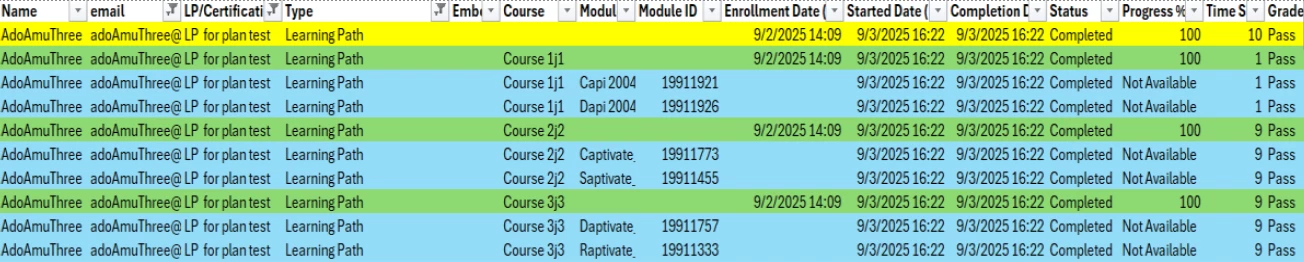
Report structure for Learning Paths: Depending on the count of courses and modules of those, the learning path rows will be multiple with same learning path name/Training ID.
ex: If a learner is enrolled in a path that has 3 courses and if each course has 2 modules, then for enrolled learner the rows will be 10 for the path.
1st row for the learning path level progress.
2nd row for Course A level progress
3rd row for CourseA_ModuleA1 level progress
4th row for CourseA_ModuleB1 level progress
5th row for Course B level progress
6th row for CourseB_ModuleA2 level progress
7th row for CourseB_ModuleB2 level progress
8th row for Course C level progress
9th row for CourseC_ModuleA3 level progress
10th row for CourseC_ModuleB3 level progress
Report structure for Higher Level Learning Paths:
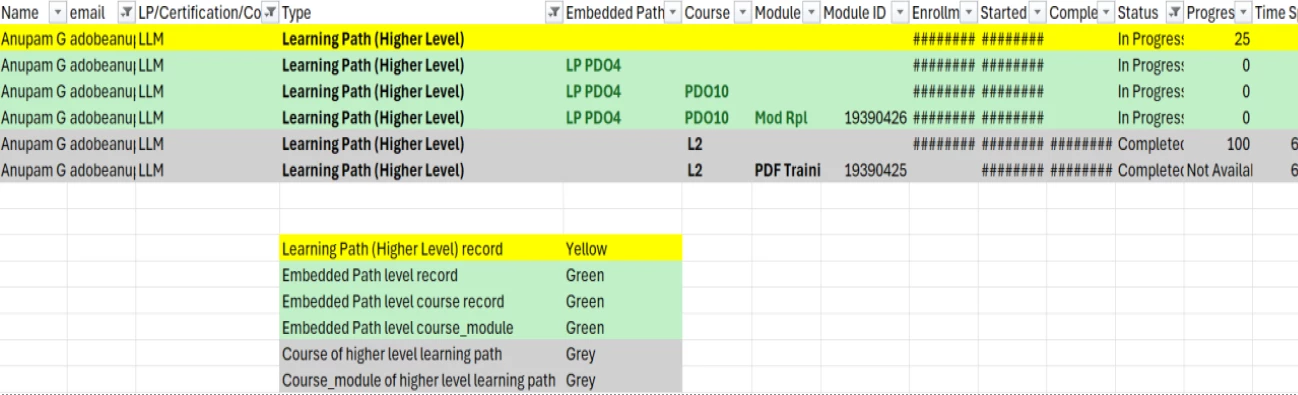
Depending on the count of modules, courses, embedded learning paths, the higher learning path rows will be multiple with same higher learning path name/Training ID.
ex: If a learner is enrolled in a higher path that has 1 course (has 1 module), and an embedded learning path which has one course with 1 module in it:
1st row for the higher learning path level status of progress.
2nd row for Course A level status of progress
3rd row for CourseA_ModuleA level progress
4th row for embedded path level status of progress
5th row embedded path’s course B level progress
6th row embedded path’s courseB_moduleB level progress.
Key Column definitions:
email:The email ID of the learner
User unique ID: UUID of the learner
LP/Certification/Course: The name/title of the trainings (learning path, course etc)
Type: The training type in which the learner is enrolled (ex: ‘Course’ if learner is directly enrolled in a course standalone, ‘Learning path’ if learner is enrolled in learning path, ‘Learning path (higher level)’ if the learner is enrolled in high level learning path which contains embedded learning paths in it. Embedded Path: Name of the embedded path in a higher path
Course: Name of the course in learning path or higher learning path
Module: Name of the modules of the course
Module ID: module IDs of the course
Enrollment Date: The timestamp of when a learner was enrolled in training type
Started Date: The timestamp when a learner has started a training/module
Completion Date: The timestamp when a learner has completed a training/module
Status: status of a learner’s progress in path, course or module.
Manager Name: The manager of the learner in the organization.
Training ID: This column contains the IDs of the trainings the learner is enrolled, if learner is enrolled in learning path then learning path ID is shown, if the learner is enrolled in course then the course ID is shown, if the learner is enrolled in higher level path then the associated path ID is shown.
Embedded_Course_ID: The course IDs of the courses that are part of a learning path or higher path.
Embedded Path ID: The learning path IDs which are part of a higher path.
NOTE: - module names and module IDs doesn’t appear in the report until the learner has started the modules inside a course. - enrollment doesn’t happen in the module level hence enrollment dates will be empty in the module rows. - enrollment timestamp only appear in the course or path level record rows.
Column combinations used as keys:
-To extract a record of a specific learner the below combination of columns can be used: ‘email’ + ‘Type’+ ‘LP/Certification/Course’ OR ‘email’ + ‘Type’ +’Training ID’
-
To check the progress of a learner’s training only at the highest level follow the below combination: ‘email’+ ‘Type’+ ‘LP/Certification/Course (or Training ID)’ WHERE Embedded Path = null and ‘Course’=null and ‘module’=null and ‘module ID’=null OR
‘email’+ ‘Type’+ ‘LP/Certification/Course (or Training ID)’ WHERE Embedded Path ID= null and ‘Embedded_Course_ID’=null
- In case the ALM instance has courses are setup with multiple instance enrollments for same learner then consider using the course instance column in your queries.
--------------------------------------------------------------------------------------------------------------------------------------------------------------
Understanding the transcript data structure helps organizations:
✔ Audit learner progress accurately
✔ Build dashboards in Excel/Power BI/Tableau
✔ Analyze multi-level training programs
✔ Troubleshoot course or module inconsistencies
As ALM supports complex learning hierarchies, mastering the transcript report enables deeper insights and smarter decision-making for L&D operations.
#AdobeLearningManager #ALM #LearningAnalytics #LMSReports #TranscriptReport #LearningPaths #HigherLevelLearningPaths #CourseModules #TrainingData #LearningManagement #AdobeLMS #LearningOperations #LMSInsights #learner transcript report ALM
#ALM learner transcript report data structure.#understand learner transcript data of ALM #questions #queries


 AdChoices