

Harrell_t
Inspiring
June 12, 2017
Answered

What is the work around for including audio clips in Prime?

  • June 12, 2017
  • 1 reply
  • 486 views

Hello Community.

I have an audio clip that is 7 minutes long.

Does anyone have a work around to get audio into Prime as a usable module?

Thanks.

Regards,

Thomas H.

Master Electronics
This topic has been closed for replies.
Correct answer Jorma_at_Knox

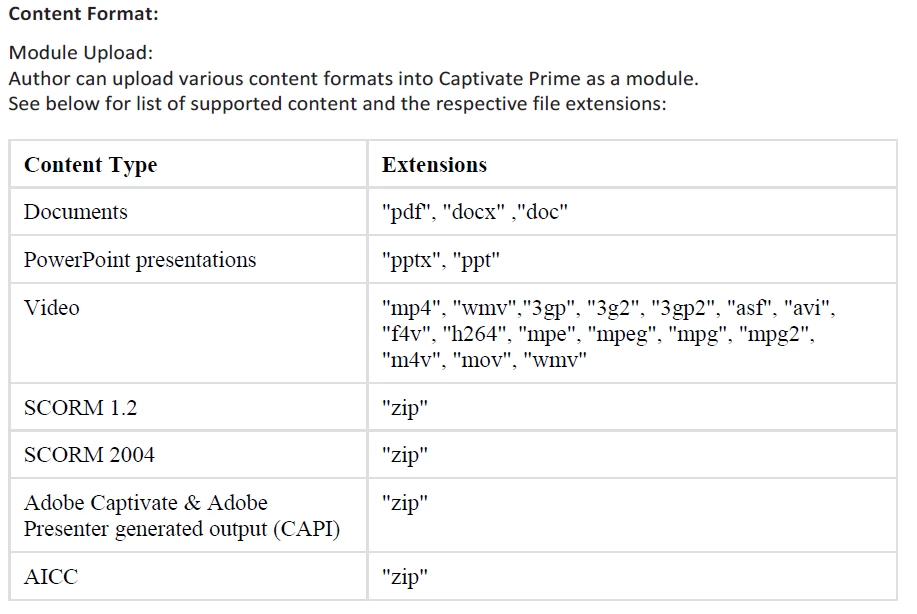
You just need to convert it to a supported file type or use an eLearning authoring tool. I would either create an MP4 of the audio file or use something like Presenter or Captivate to output a supported eLearning presentation. Here are the supported file types in Captivate Prime:

1 reply

Jorma_at_Knox
Jorma_at_KnoxCorrect answer
Legend
June 12, 2017

You just need to convert it to a supported file type or use an eLearning authoring tool. I would either create an MP4 of the audio file or use something like Presenter or Captivate to output a supported eLearning presentation. Here are the supported file types in Captivate Prime:

Harrell_t
Harrell_tAuthor
Inspiring
June 12, 2017

Thanks for the input.

I didn't want to go through turning into a Captivate file.

But, looks like that's my only recourse.

Jorma_at_Knox
Legend
June 12, 2017

You could create a single slide Cp file without much time invested. It will provide good reporting as well, so at least you gain that at the same time.