


Chilean User
Participant
May 23, 2023
Answered

Adobe Scan cuts or skews some book pages

  • May 23, 2023
  • 1 reply
  • 417 views

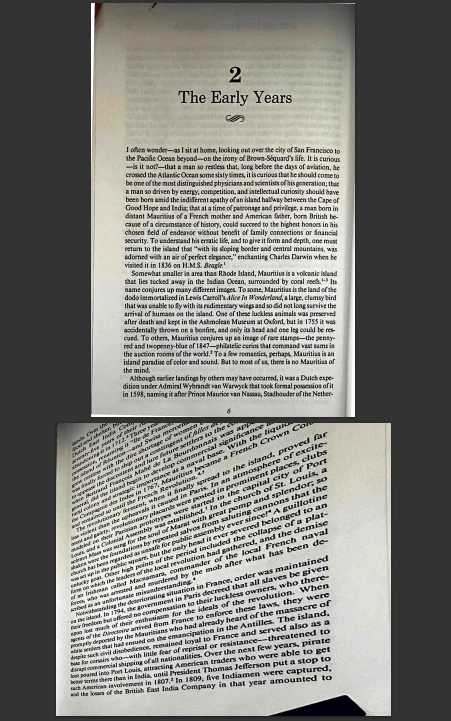
For some reason, when I am scanning books, some pictures get not fully captured. Even though I am capturing the same way all pages, and getting nice results to most pages, some get skewed or cut like in the picture. I am not sure what causes this issue, but is quite annoying.


See the attached picture. First the left page looks perfect, but for some reason the right one was automatically adjusted and effectively 'destroyed'.



This topic has been closed for replies.
Correct answer S_S

Hi @Chilean User,


Hope you are doing well. Sorry for your experience with Adobe Scan.


Please let me know the mode you are using to scan the files. Have you tried using the book mode? This will allow the application to scan two pages simultaneously without clipping the image.


Also, can you try changing the application preferences for Auto Crop to be disabled or allow you to check every image you scan before proceeding further?


To do so, you can go to Home-> Profile-> Preferences-> toggle the option "Let me adjust borders after Scan".


Let me know if this helps.


-Souvik


Marking a reply or response “Correct” will help future users with the same issue quickly identify the correct answer.

1 reply

S_S
Community Manager
S_SCommunity ManagerCorrect answer
Community Manager
May 30, 2023

Hi @Chilean User,


Hope you are doing well. Sorry for your experience with Adobe Scan.


Please let me know the mode you are using to scan the files. Have you tried using the book mode? This will allow the application to scan two pages simultaneously without clipping the image.


Also, can you try changing the application preferences for Auto Crop to be disabled or allow you to check every image you scan before proceeding further?


To do so, you can go to Home-> Profile-> Preferences-> toggle the option "Let me adjust borders after Scan".


Let me know if this helps.


-Souvik


Marking a reply or response “Correct” will help future users with the same issue quickly identify the correct answer.