
Participant
August 3, 2024
Answered

Adobe Scan downloads

  • August 3, 2024
  • 2 replies
  • 1865 views

I am trying to download my Adobe Scan files to my NAS.


As discussed otherwhere, the Creative Cloud app can only download one file at a time. That is a complete nonstarter.


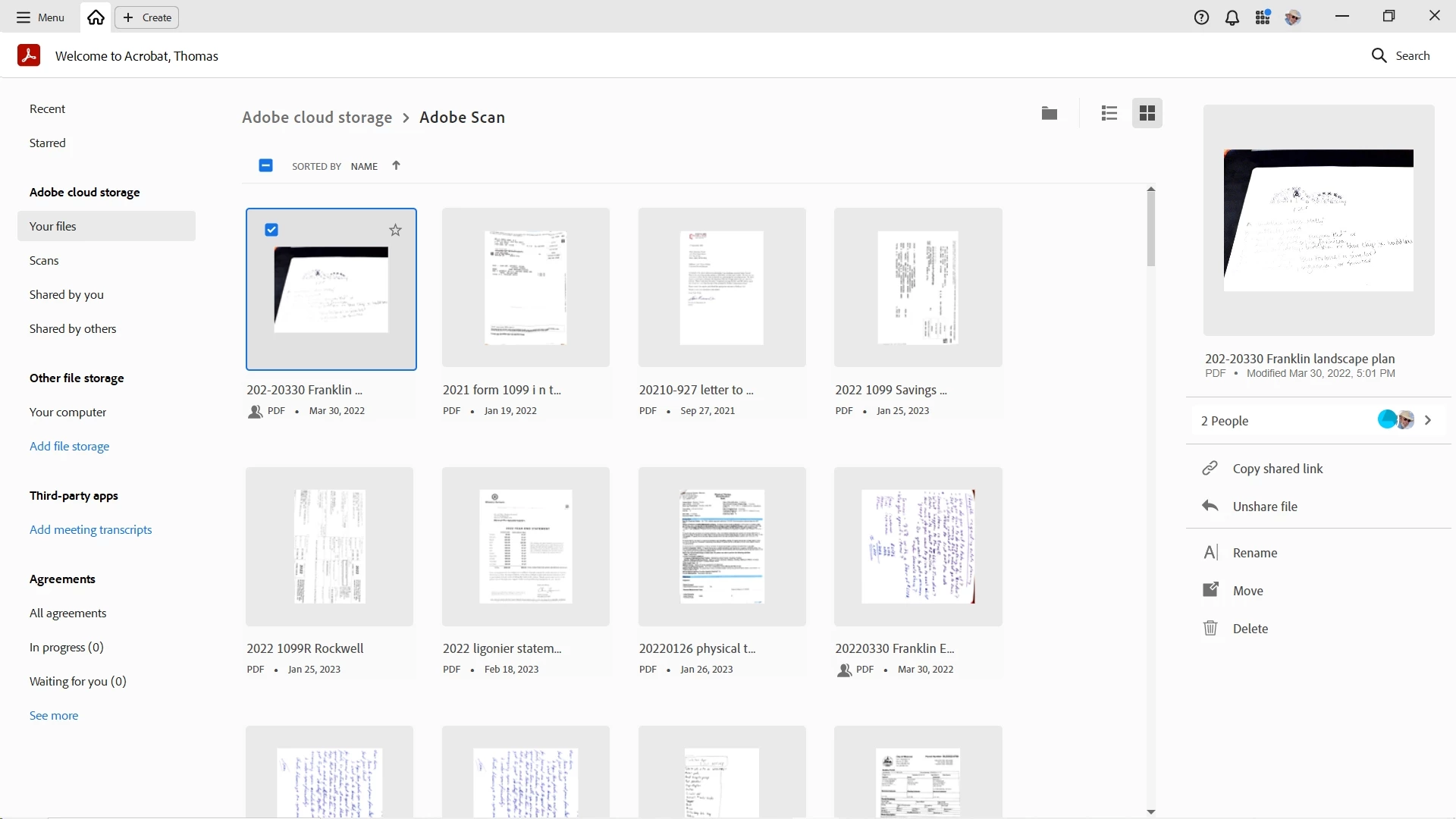
Using Acrobat Pro I have clicked the 'select all' box at the top of the checkbox column. The first time it selects 100 files. Then clicking on the 'Download' button (which is still there) only yields a 'Download Error.' It doesn't work.


Sometimes I can click on 9 files, click the download button and it works. If I try to click on ten, the first nine suddenly aren't checked anymore.


Sometimes I click on one file and the download button won't appear.


I ***ought to*** be able to download everything all at once.


Instead, the Acrobat Pro interface appears to be an unstable afterthought.


My Adobe Cloud files used to appear in Windows File Explorer. I don't know why Adobe stopped making that available. I'm sure it was good for their integration, but bad for the customer.
Correct answer JayneJy


I can't duplicate it, because the Acrobat Pro files page I have inserted a copy of above now DOESN'T EVEN SHOW A DOWNLOAD BUTTON.

Sometimes it is there, sometimes it is not. Sometimes you can click on ten items, sometimes clicking on the tenth item causes the ohter nine to no longer be selected.

This stuff is stable as water. Good Grief.


I have the same issue earlier on and was searching for an answer till I stumbled upon this. The employee's replies didnt help as I didnt have any download or sharing options for my folders too. However, I found something from it. You cannot download a shared file. If you select 10 files with only 1 shared files in it, the download option will disappear. You will have to unshare that file then select all together to download at once. Hope this helps.

2 replies

Participant
January 3, 2025

Still not working. Why is this so difficult? No adobe scan for me anymore!!! I have now to download the thousends documents one by one!! thank you adobe!

Participant
February 19, 2025

I know right. Paying a premium fee for CC, and figured I'd use Scan as it's really good and quick to manage all my expenses for work. I'm discovering now just how terrible the whole UX is. Appalling. There are so many issues with the UX I decided to just DL all my pdfs to my pc and manage my acocunts from there, but now i'm learning I have to download 1 at a time. What the actual F adobe.  I'm genuinely shocked. They need to fixs this. 

Next accounting year I'll quit adobe, I honesty can't believe "professional" level software is so poorly designed. 

EdificareAuthor
Participant
August 3, 2024

I have just spent a couple of hours downloading files 2 - 10 at a time. The Acrobat Pro interface with the Cloud/Adobe Scan files is as unstable as water, and almost totally unpredictable. It shows all the signs of Adobe just not committing enough bandwidth to accomplish the tasks.

When you open that wall you will seldom find hidden perfections.
Inspiring
August 5, 2024

Hi there


Hope you are doing well and thanks for reaching out.


Would you mind sharing a small video recording of the steps you are taking and the issue occurring for more clarity? Also please share the screenshot of the error message for better understanding.


Please log in to https://adobe.ly/3ysx7qE with your Adobe ID and password, select the Adobe Scan folder, and click the download button in the right-hand panel that pops up and see if that works for you.


Let us know if you experience any trouble and need more help.


~Amal

EdificareAuthor
Participant
August 6, 2024

Logging in and doing what you have detailed only works for single files. If you select two files, the download button disappears.

When you open that wall you will seldom find hidden perfections.