Participant
July 3, 2022
Answered

Adobe Scan Mobile not sync with Creative Cloud

  • July 3, 2022
  • 4 replies
  • 2566 views

Files scanned into Adobe Scan are not showing up in the files in document cloud on desktop Creative Cloud app.  I have read through the forums and checked all possible solutions including signing in and out of both the desktop and mobile app and the files do not show up on the desktop.  The files are on the web via this link but not in creative cloud - 

adobe.acrobat.com/link/home


I also read thru your help page -https://helpx.adobe.com/creative-cloud/help/about-cloud-documents.html?mv=product&mv2=accc 


Signing in an out does not solve the problem and I am signed in with the same credentials.


Thank you

 

This topic has been closed for replies.
Correct answer S_S

@LAF 29  Hi,


I hope you are doing well. 


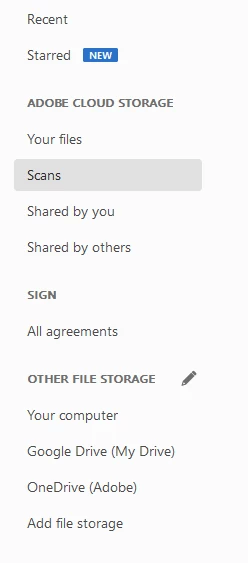
As Bernd said, scans are not saved on Creative Cloud, and you will be able to see the files on Acrobat Reader or Acrobat Pro DC if you are signed in to the credentials in which you have the scans.


You may be able to see the below tab on the left-hand side of Acrobat when launched:

You can then click on the tab that says Scan to view all the scans you have saved on Adobe Cloud Storage.


Let me know if this helps.


Thanks,

Souvik.

4 replies

Participant
August 15, 2022


Where can I find the names of people I emailed the scans or a link to scans? Is there a "Sent" folder I can access? I  any remember if I've sent the scan to Luci and need to know how to did this information. Thank you.

S_S
Community Manager
Community Manager
August 16, 2022

@buddysage Hello,


When you visit the online portal: Adobe Acrobat Documents, you will see the documents that you have shared. 

Once you open any document from there, the sixth icon from the far right will give you the names of the people you have shared the files with.

Let me know if this helps.


Thanks,

Souvik.

Participant
August 16, 2022

Thank you  for that help -- but I looked all over the doc for the name of person I shared it with but it only shows I shared it w one other person but not their name.  Sometimes I dont share it straight away with the link -- I do it another way via the app -- so maybe I have to be careful how i send it via email.

LAF 29Author
Participant
July 4, 2022

Thank you - 

S_S
Community Manager
Community Manager
July 4, 2022

@LAF 29 Hi,


Does the above picture help you in accessing your scans?


Regards,

Souvik.

S_S
Community Manager
S_SCommunity ManagerCorrect answer
Community Manager
July 4, 2022

@LAF 29  Hi,


I hope you are doing well. 


As Bernd said, scans are not saved on Creative Cloud, and you will be able to see the files on Acrobat Reader or Acrobat Pro DC if you are signed in to the credentials in which you have the scans.


You may be able to see the below tab on the left-hand side of Acrobat when launched:

You can then click on the tab that says Scan to view all the scans you have saved on Adobe Cloud Storage.


Let me know if this helps.


Thanks,

Souvik.

Bernd Alheit
Community Expert
Community Expert
July 4, 2022

The documents are not saved there. You will find them in the Adobe Document Cloud.