
josr31643277
Participant
November 16, 2017
Answered

Auto if search of document

  • November 16, 2017
  • 1 reply
  • 342 views

In the latest update of the Adobe scanner the documents are automatically searched and recognized. However,  often this function does recognize only part of the document, so that the scan is not the complete document. As far as I can see there is no manual function for correcting the frame of the scan area and there is no possibility to cancel the automatic document search.

How to solve this problem?
This topic has been closed for replies.
Correct answer AkanchhaS8194121

Hi Josr,

The document detection feature has been added to simplify your search of finding the only documents from your phone's picture library.

However, the document correction you are referring above has always been there when even with the earlier version.

Adobe scan app automatically corrects the frame of the captured document. Not with all the document, but few those have not been captured correctly or not symmetric.

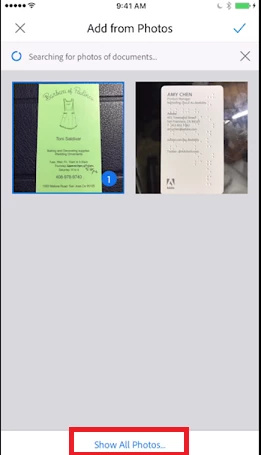
Even if you ignore the option of choosing the document from auto detect documents menu and select them from "Show All Photos" (as shown in picture below) then manual correction will do the same and correct the frame accordingly.

As "Document Detection" is the latest feature has been added by default. There in'st a way to turn it off manually.

Regards,

Akanchha 

1 reply

AkanchhaS8194121
AkanchhaS8194121Correct answer
Legend
November 16, 2017

Hi Josr,

The document detection feature has been added to simplify your search of finding the only documents from your phone's picture library.

However, the document correction you are referring above has always been there when even with the earlier version.

Adobe scan app automatically corrects the frame of the captured document. Not with all the document, but few those have not been captured correctly or not symmetric.

Even if you ignore the option of choosing the document from auto detect documents menu and select them from "Show All Photos" (as shown in picture below) then manual correction will do the same and correct the frame accordingly.

As "Document Detection" is the latest feature has been added by default. There in'st a way to turn it off manually.

Regards,

Akanchha