Participant
December 11, 2022
Answered

Contrast Stuck at -153

  • December 11, 2022
  • 1 reply
  • 694 views

Hi,


I'm new to adobe scan so if I'm missing something bear with me.


I have scanned about 30 documents of drawings into the app however, when I go to modify each scan, within the "adjust tab" the contrast it automatically all the way down (-153) leaving the page completely blank. It would be alright if I just had to adjust the contrast back to half way for each document, but when I bring it up and click out of the "adjust tab" it automatically goes back to -153. This happens with every document.


Any ideas? Thanks.

This topic has been closed for replies.
Correct answer S_S

Hi @Liam27521491dyky,


Hope you are doing well. Sorry for your experience with Adobe Scan.


From the description, it looks like you are using a different mode to scan the file.

Would you mind checking with a few troubleshooting steps if they work:

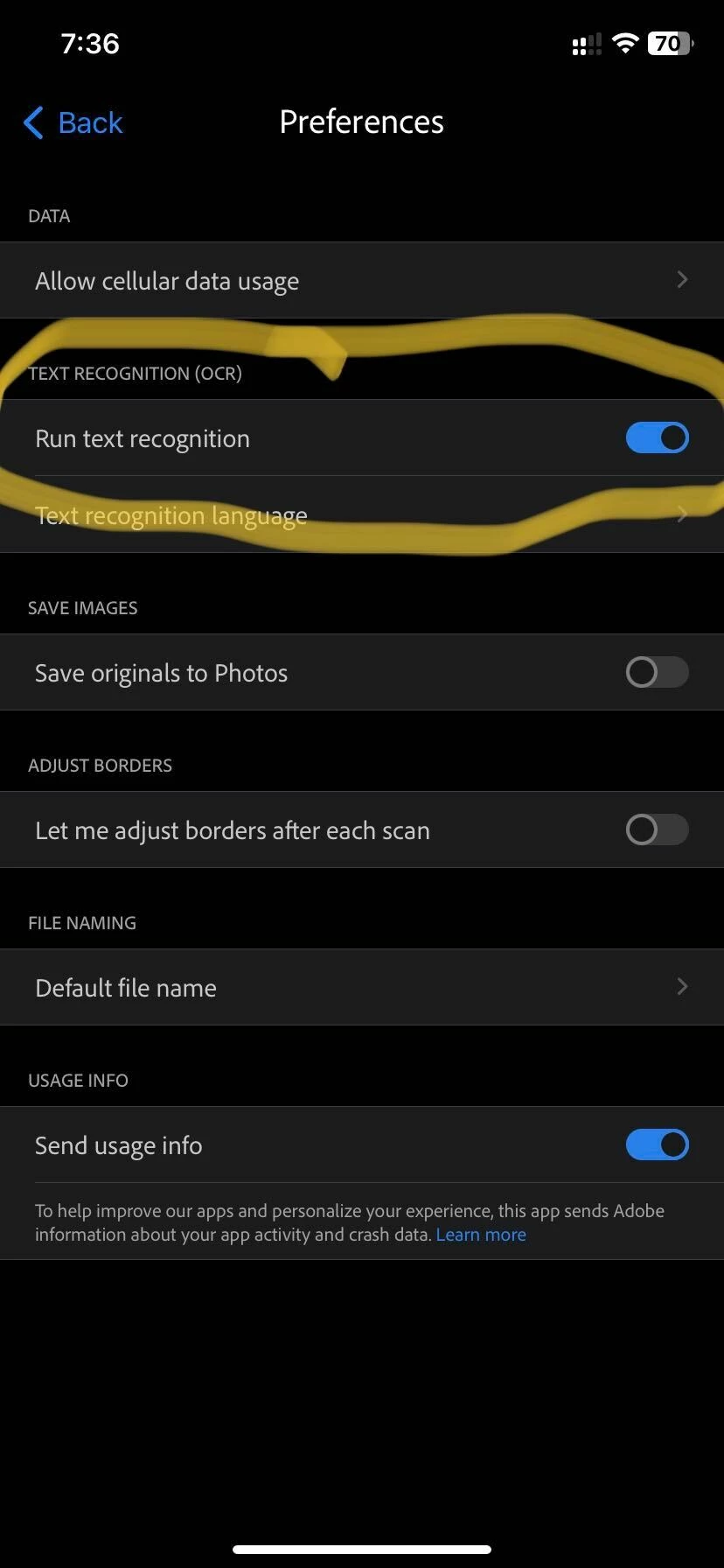
1. Click on the home tab on the top left-> click on your profile icon-> Preferences-> disable the option to run text recognition (screenshot shared for reference)


2. Once done, on the camera where you use to scan, use the Whiteboard mode.


Let me know if this works.


-Souvik.

1 reply

S_S
Community Manager
S_SCommunity ManagerCorrect answer
Community Manager
December 12, 2022

Hi @Liam27521491dyky,


Hope you are doing well. Sorry for your experience with Adobe Scan.


From the description, it looks like you are using a different mode to scan the file.

Would you mind checking with a few troubleshooting steps if they work:

1. Click on the home tab on the top left-> click on your profile icon-> Preferences-> disable the option to run text recognition (screenshot shared for reference)


2. Once done, on the camera where you use to scan, use the Whiteboard mode.


Let me know if this works.


-Souvik.

Participant
December 16, 2022

Hi Souvik, 


Thank you! This worked. 

S_S
Community Manager
Community Manager
December 16, 2022

@Liam27521491dyky,


Thank you for letting us know that the solution worked.


-Souvik.