


December 17, 2025
Answered

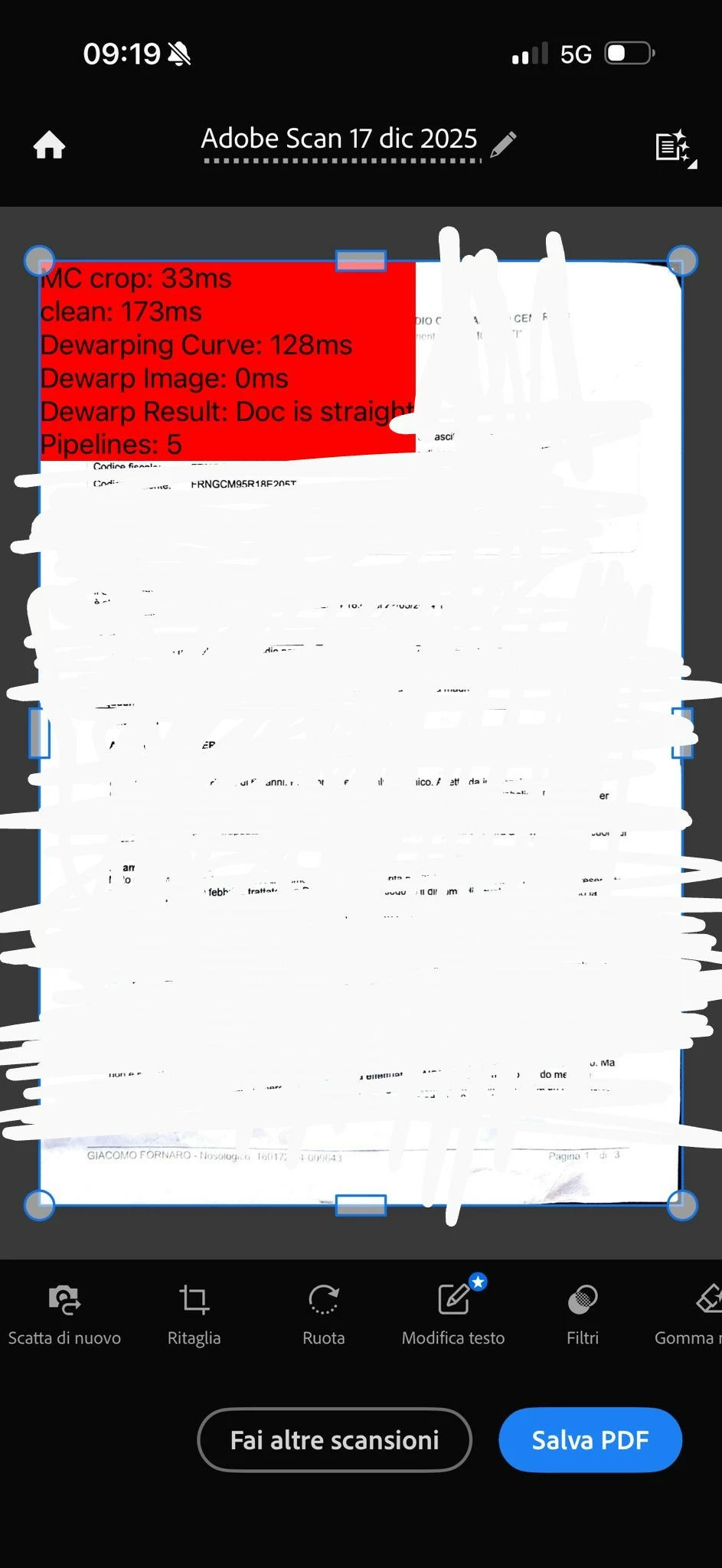
Red box with statistics appears on iOS, how to remove it?

  • December 17, 2025
  • 9 replies
  • 2479 views

When scanning a document, this red box appears with statistics about the scan, but it is not always an option that can be activated in the app. I have an iPhone 16 Pro and the app is up to date.

1000075681.jpg

Correct answer Souvik Sadhu

Hi @Macdonald_Design,


Completely understand your frustration.


I updated the app on my device to the latest version (25.12.18), and the issue stands resolved for me.


Would you mind verifying this and letting me know if it works?


Regards,
Souvik.

9 replies

Participating Frequently
December 19, 2025

Having same Red Box of statistics shows when scanning. Up dated app with no success. At least the red box doesn't show up in the final scan when a PDF is created! But it's annoying. 

Souvik Sadhu
Community Manager
Community Manager
December 19, 2025

Hi @RIck N,


Thanks for sharing your observations.


Would you mind sharing the information as asked above for better understanding and assistance?


Regards,
Souvik.

December 19, 2025

I have the same issue (red box with metadata) with iOS 26.2 on an iPhone 16 Pro. I deleted the app, restarted my iPhone, redownloaded the Adobe Scan app. The red box is still there.  While this does not affect the scan itself (for me), it is still a pain that it blocks part of the preview.

What's more frustrating is I tried to get support via chat and I kept geting routed around in circles when trying to get to an agent.  Then, I tried calling and an automated message says that there is no phone support for this product.  I am a paying Creative Cloud customer. I should get phone support on ALL apps.  So, I tried for anoter 15 minutes to get around the AI "agent" an finally got to someone.  I was routed to the wrong department.  They got "slam routed" twice to other departments until I got someone who could finally help.  Finally, they told me it is a know issue and to wait for an update.  All of this took over 45 minutes for something that could have simply be answered with a phone call or bein able to chat with an agent immediately.  I pay a LOT of money to Adobe. The least they could do is have adequate support.

Souvik Sadhu
Community Manager
Souvik SadhuCommunity ManagerCorrect answer
Community Manager
December 19, 2025

Hi @Macdonald_Design,


Completely understand your frustration.


I updated the app on my device to the latest version (25.12.18), and the issue stands resolved for me.


Would you mind verifying this and letting me know if it works?


Regards,
Souvik.

December 22, 2025

I'm not sure if the app updated or not.  I have automatic updates enabled.  But, the red box issue is now resolved for me as of yesterday (Dec 21, 2025).

The issue I have with the lack of real support for a paid product is not resolved.

December 18, 2025

Having the same issue on iPad Pro 12.9, 3rd Generation. Updated over the weekend ( 12/14 /2025) to 18.7.3 (22H217). The red banner appears when scanned. After the image is scanned, when it is pinch zoomed in to enlarge the image, the red banner  disappears. When the scanned imaged is pinched zoomed out the image seems to reappear as though red banner is linked to a thumbnail view of image. All other functions in the zoomed out view including "rotate", crop, etc seems to retain the red banner image. I am trying to provide some constructive troubleshooting beyond complain so that you might have some software behavior observation that might contribute to resolving the issue as an Adobe Scan software fix or an iPad OS update. For reference, I also use Adobe Scan on an Samsung GalaxyS25 concurrent with my iPad Pro and I am not experiencing the same software performance issue in the Android OS environment. Hope you folks at Adobe are able to fix this soon. The red banner blocking the scanned image is really a production annoyance and handicapp to my document management task. Thank you.

Souvik Sadhu
Community Manager
Community Manager
December 19, 2025

Hi @mykeonthemoveRN,


Thanks for writing in!


We completely understand your situation, and a patch will soon be released to fix the issue.


Regards,
Souvik.

December 18, 2025

same problem with the red box here. also very disappointing that OCR in free version last period reduced from 25 pages to 7 and now only 5 pages

December 18, 2025

I am having the same issue! I used the app yesterday with no red box. I'm using the latest version, uninstalled and reinstalled, force quit, restarted my phone and still the red box persists. It is there even if I scan from photos instead of using the camera. 

December 18, 2025

Any idea when this will be fixed?  I have the same issue with the red box.  This is ridiculous. 

TxSunflower
December 18, 2025

I agree. I've had to find a different app for this weekend. This is a major break...and quite the shock when you get it.

Souvik Sadhu
Community Manager
Community Manager
December 18, 2025

Hello Everyone,


Thanks for reporting this, and sorry for the experience with using Adobe Scan.


We were able to reproduce the issue, and the team has been made aware of it.


Please allow us some time to get this investigated and circle back with an update.


Your patience and kind understanding are highly appreciated.


Regards,
Souvik.

December 18, 2025

I have the same problem on an iPhone 15 Pro Max with  one TB and iOS 26.2.

December 18, 2025

To complete my additional note to this red block problem here some reference information of my environment:

ADOBE SCAN Version 25.12.16 (20251211.115820)

iOS 26.2

iPhone 15 Pro MAX one TB

December 18, 2025

I deleted my Adobe Scan, reinstalled it and get the error again: Red Block with statistics info. 

December 18, 2025

I get the same issue on two iPhone 17 Pro max's:

Subject: Red Developer Debug Overlay stuck on in v25.12.16

Issue: A red text overlay showing ML metadata (MC crop, dewarping, segmentation) is permanently visible in the camera view and cannot be toggled off with standard gestures. App Version: 25.12.16 (20251211.115820) Device: iPhone (iOS) Details: This appears to be an internal developer debug mode that was accidentally left active in the production build. Standard two-finger/three-finger gestures do not disable it.

December 17, 2025

I am also having the same issue when trying to scan a new document. I also cannot see any of my scans - screen is stuck on "Loading all scans".

Amal.
Legend
December 17, 2025

Hi there 


Hope you are doing well and sorry for the trouble. I tried to reproduce the issue at my end using the latest version of the Adobe Scan app available on the App Store and iOS 18.5 and the app is working as expected. 


Would you mind sharing the version of the Adobe Scan app and the OS you are using? Tap on the profile icon > About Adobe Scan to check the version. 


Also try updating the app to the latest version available on the App Store and reboot the device once and check. 


If it still doesn't work, please share a small video recording of the steps you are taking and the issue as it occurs for more clarity and understanding.


~Amal

arnaudr72189700
Participant
December 17, 2025

Hello,

I have the same problem too on both iPhone and iPad.
The version is 25.12.16 (20251211.115820)

Best regards