Correct answer S_S

@HAGEI776 


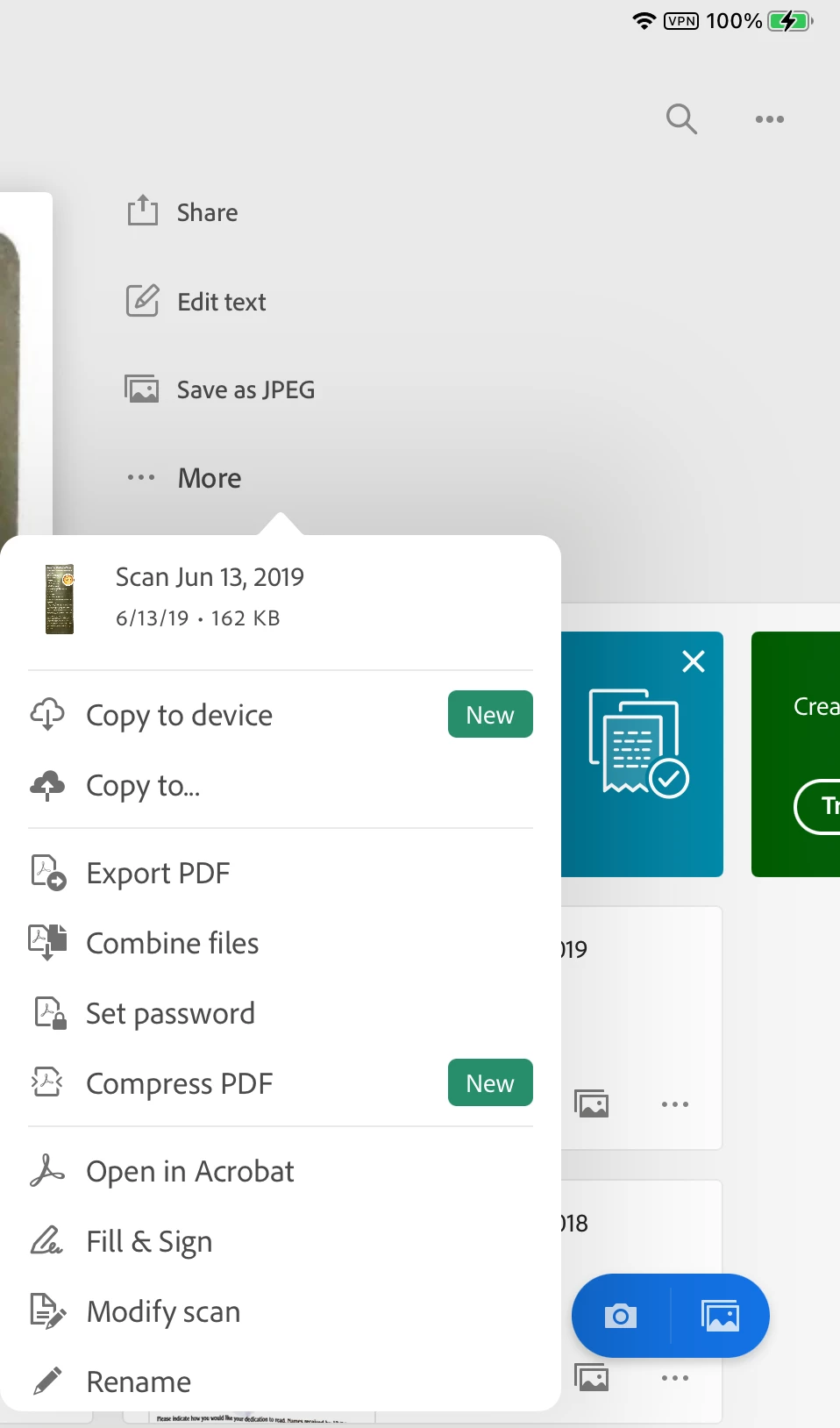
I did a bit of poking around and see that "Copy to Device" is new and will save to your device. You can also save as a jpeg, copy to DropBox, Set a PW, and more. Will any of these help?


Jane

Forum volunteer


Hi @HAGEI776,


Hope you are doing well. Sorry for your experience with Adobe Scan.


Concerning all the suggestions shared above, Adobe Scan is a cloud-based service, and you cannot use the application without it uploading the file to the cloud for OCR and storage.

This is in line with the fact that the application cannot access your files application to write files automatically unless you use the "Copy to device" option.


As a workaround, I suggest using the option "Copy to device," as suggested by Jane, and then deleting the file from Adobe Scan.


Note: You cannot modify or open the file through Adobe Scan again if you delete it from the application.


Hope this helps.


-Souvik

36 replies

Participant
October 21, 2025

Thanks for harvesting my ID scans that I make through your app, Adobe! I don't understand why I am even using your apps at this point

Participant
February 29, 2024

Any updates on this?
I had to look this up as I think the automatic upload and no way to stop it is outrageous. Please escalate this and make it into a ticket to change cause this is borderline scary. 

S_S
Community Manager
Community Manager
March 13, 2024

Hi @Magnus LS,


As mentioned earlier, Adobe Scan is a cloud-based service, and the application cannot function without uploading the files to the cloud for processing.


If you wish to remove the files from the cloud, you can use the option "Save a copy" and then remove the cloud saved file to keep a local copy of the file on your device.


-Souvik

Participant
July 26, 2023

Hello,


I have complained multiple times in Google Play reviews that this app automatically uploads my scans to the cloud and doesn't give the option to disable it. Can you imagine your ID, passport, government papers, or other important documents leaving your device without asking you for permission? Yes yes, we read your 12000 pages terms and conditions and somewhere it must have said that it was going to send them to the NSA or something. Also, whoever replies to the reviews just lies over and over again saying that you can cancel the auto upload when in fact there is no such option in the settings (in case you reply here, what the setting does is ALSO save them locally, but files keep being saved to the cloud. I checked in the cloud and they were still being uploaded). Anyways, you guys deserve to be sued or something, stop using people's ignorance to steal our private documents.

Community Expert
July 27, 2023

If nothing works for you to disable the auto upload, you can try disabling internet access to the app and you should be good.

-Manan

-Manan
Participant
July 27, 2023

Can't you see how ridiculous your solution is? Turning airplane mode on to scan documents, force stopping the app when connecting to the Internet... it's CRAZY! Adobe is the worst TBH. 

Participant
July 3, 2023

Hello, actually I had a soft copy of a pdf file I would like to upload that pdf in adobe scan without scanning it. Can I get any option for saving it. If I had a hard copy I would scan it but how can a soft copy of that pdf be uploaded in adobe scan

S_S
Community Manager
Community Manager
July 5, 2023

Hi @Hellol78,


Hope you are doing well. Thank you for reaching out!


Assuming from the tags used, you are using an Android device. You can log in to:https://acrobat.adobec.com/ and upload or move your files to a different location or to the Adobe Scan folder for them to appear.


Hope this helps


-Souvik

Participant
June 20, 2023

Why do you want to control your customers data.  I want to save files on my PC. I don't want to email someone a link to a file I want to send the file itself 


Participant
May 7, 2023

I have scanned copy on Friday but the file is still not uploaded yet 😞 I need it right now what can I do can u please tell me

S_S
Community Manager
Community Manager
May 7, 2023

Hi @sabbisetty29763636xuvb,


Hope you are doing well. Sorry for your experience with Adobe Scan.


Can you confirm if you have enough storage space on your account? You can check that by logging in to: https://assets.adobe.com/files/ and checking the bottom left corner for the storage.


Also, while that happens, you can click on share and then save the file to your internal storage or any other online storage and access the file.


Hope the workaround helps.


Look forward to hearing from you.


-Souvik

Participant
March 30, 2023

When i am creating a pdf file , after creating it was showing uploading and after that any time I can edit the saved uploaded file like add or remove some pages, but now from some days file scanning and after scanning file not uploading and now I can't add or remove some extra pages. 

S_S
Community Manager
Community Manager
March 31, 2023

Hi @maheshwari29155565mfdf,


Hope you are doing well. Sorry for your experience with Adobe Scan.


In general, Adobe Scan uploads your files to Adobe Cloud Storage.


You might want to see if your account has enough storage left to save additional files. You can check the storage either at https://acrobat.adobe.com/ or https://assets.adobe.com/files/


Hope this helps.


-Souvik

Participant
January 30, 2023

I'vs just lost a hundred pages of scanned file because the app crashed.

It took me more than 2 hours to scan the pages, adjusting and making sure the file looks good.

I've looked through the posts and found many similar cases, but the solution was all the same.


I SHOULDN'T HAVE TAKEN ALL THE PAGES AT ONCE!

But why do I know this now? I didn't get any warning notifications while taking and editing the pages on Adobe Scan. If it's evident that scanning more than 50 pages should cause error, isn't it better to warn in advance or set a maximum number in the first place?


I'm using ipad pro 4(ios updated) and I wasn't using other apps at the same time.

Wish I had known the possible error at the moment

S_S
Community Manager
Community Manager
February 3, 2023

Hi @Jeong22510354ky35,


Hope you are doing well. Sorry for your experience with Adobe Scan.


We are aware of the issue and are working on getting this fixed. While we work on a solution, I suggest you create scans with a smaller number of pages, so it does not affect the processor of the system to prevent the crash.


We request your kind understanding and patience while we work on this.


-Souvik

Participating Frequently
May 19, 2022

I have been using Adobe Scan for business on my phone for many years and love it. Recently the upload is painfully slow everytime. I'm using an iPhone 12 with all updates and using WiFi connection not cellular. I scan and email simple documents of around 10-12 pages at a time. An upload of 12 pages takes 15 minutes! This is not good for productivity and business. Anyone else have this happening?

S_S
Community Manager
Community Manager
May 20, 2022

Hello Rick,


I hope you are doing well. I am sorry about the experience with Adobe Scan.


This issue is highlighted to the engineering team, and a bug is logged. Our team is working on getting it fixed in the upcoming update.


In the meantime, we do have a woworkaroundWhenever you face the issue with slow uploading, please remove Adobe Scan app from the app switcher and then re-launch it. This should fix the issue temporarily and you should be able to upload files again.


Let me know if this helps.


Thanks,

Souvik.

Participating Frequently
May 20, 2022

Thank you for the possible solution. I don't understand what "please remove Adobe Scan app from the app switcher and then re-launch it" means. I'm not familiar with the app switcher.
Thank you for your help.

Rick Naylor
[Personal info removed by mod]

Participant
May 18, 2022

For some reason my pdf scans stopped uploading in late April-May 2022. I haven't made any setting changes and all my apps are updated. Using latest IOS 15.5

I can see them in the app under 'recent scans' but they are not showing up in 'view all scans' or in the cloud.

I've had no issues prior.

Harsh Vardhan Pareek
Community Manager
Community Manager
May 19, 2022

Hi @Steve24510832qtru 


Hope you are doing well.

As per the issue description. Would you mind sharing a few more details to understand the issue better?

  1.  Can you save a scan after creating?
  2. Application version?
  3. Kindly open the cloud storage separetly in a browser from https://acrobat.adobe.com .

Make sure that the app is updated to the latest version.


We are looking forward to hearing back from you.


Thanks,

Harsh
