
yoga54n
Participant
March 14, 2018
Answered

White balance on samsung s9

  • March 14, 2018
  • 1 reply
  • 1073 views

Something weird is going on. Scan shows as yellow brown paper. I can't set the white balance. However if I, after the scan use the magic wand and pick whiteboard the documents balance seems to be ok.

I'm on a Samsung s9plus and it's camera is super.
This topic has been closed for replies.
Correct answer Adorobat

Hi Yoga54n,

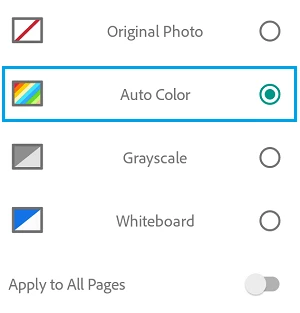
Based on the issue description mentioned above, there is a possibility the scanned documents are visible in their original form (original photo). Could you check what the default option used for scanned documents when tapping on magic wand in the bottom toolbar.

Below is the screenshot:

Thanks,

Shivam

1 reply

Adorobat
Community Manager
AdorobatCommunity ManagerCorrect answer
Community Manager
March 28, 2018

Hi Yoga54n,

Based on the issue description mentioned above, there is a possibility the scanned documents are visible in their original form (original photo). Could you check what the default option used for scanned documents when tapping on magic wand in the bottom toolbar.

Below is the screenshot:

Thanks,

Shivam

yoga54n
yoga54nAuthor
Participant
April 10, 2018

Have there been updates after I posted my question?

For some reason it works now and the colour seems to be set to automatic. Thank you for your troubles anyway.

Regards

YogaA