
Participant
August 28, 2024
Answered

Why Adoobe Scan , Does not Crop Nicely like Cam Scaner ? edges not smooth

  • August 28, 2024
  • 1 reply
  • 326 views

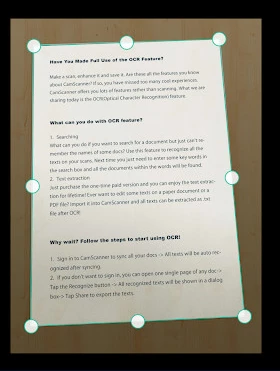
Scan in a Snap with Smart Cropping and Image Enhancement

The smart cropping feature automatically detects the edges of your documents, ensuring that your scans are free from backgrounds and look professional. The automatic edge detection saves time and enhances accuracy, eliminating the need for manual adjustments.


Adobe Scan does not fit the Scan to the Frame and we can not select dynamic edges as well

Documents with different angles can not be scan nicely with ADOBE Scan 


Please include above features to the ADOBE SCAN


This topic has been closed for replies.
Correct answer sprinklr-integration-user

Hi @Dilshan Madushanka


Hope you are doing well and thanks for reaching out.


You can use the Adobe Scan app to instantly scan various types of documents, capture new images, or use existing images and convert them to digital copies. The Scan app converts images to PDF and saves them to Adobe cloud storage. Empowered with Optical Character Recognition (OCR), the app supports automatic text recognition that automatically converts image text to real text.


In auto-capture mode, the app uses live edge boundary detection that displays blue dots to identify document corners.

For more information, please check the help page (https://adobe.ly/3T43djx )


Regards


~Amal


Marking a reply or response “Correct” will help future users with the same issue quickly identify the correct answer.

1 reply

Inspiring
August 29, 2024

Hi @Dilshan Madushanka


Hope you are doing well and thanks for reaching out.


You can use the Adobe Scan app to instantly scan various types of documents, capture new images, or use existing images and convert them to digital copies. The Scan app converts images to PDF and saves them to Adobe cloud storage. Empowered with Optical Character Recognition (OCR), the app supports automatic text recognition that automatically converts image text to real text.


In auto-capture mode, the app uses live edge boundary detection that displays blue dots to identify document corners.

For more information, please check the help page (https://adobe.ly/3T43djx )


Regards


~Amal


Marking a reply or response “Correct” will help future users with the same issue quickly identify the correct answer.