Preran
Community Manager
Community Manager
February 22, 2019
Question

Error: can't verify my subscription status (Windows) in XD

  • February 22, 2019
  • 42 replies
  • 185405 views

Try the following solutions in the order in which they are listed: 


If that doesn't help, then try the below steps.


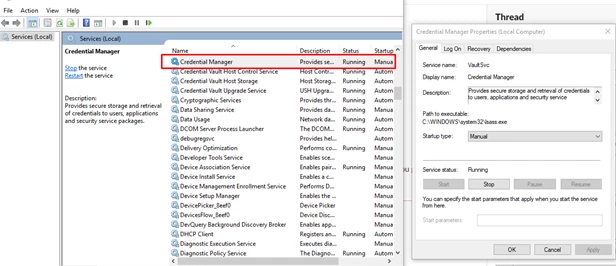
  • Start the Credential Manager Service: 


  • Disconnect VPN and retry 
  • Switch to a different network and retry 


Or,

You may try the below steps-


  1. Click Start Button and Type "Windows Update"
  2. Now either click "Check for Updates' or click on one of the options "Important" or "Optional". This will open a window, "
  3. Select Updates to Install".
  4. In Optional Updates, Find update KBXXXXXX (Depending on the latest update) and check it. You can uncheck all other updates from Important and Optional list as that will make the process faster.
  5. Click Ok, Wait for installation to complete.
  6. Now Download EasyFix.msi from this link (Search Easy Fix as article is quite long)
  7. Easy Fix will add the required registries, Now you must restart the system and check the workflow.


If these solutions do not help, please share your OS and XD version of your machine with Harshika Verma so that she can investigate more about your issue.


Thanks, 

Preran 

42 replies

New Participant
September 26, 2023

Hi there.

I am encountering the same problem as well.

Currently, I am using Adobe XD version 57.1.12 on Windows 10 Enterprise N 10.0.19045 Build 19045 operating system.

In an attempt to resolve this issue, I followed the solution provided in the first comment. However, I encountered difficulty in stopping the task from the Credential Manager Service during this step. Additionally, I experimented with installing a previous version of Adobe XD, but unfortunately, the problem still persists.

Given the situation, I am seeking guidance on the exact steps I should undertake to resolve this problem. Any assistance would be greatly appreciated.

Best Regards,

Vasilis

New Participant
November 6, 2022

For my case, I try contact support team and had two remote fix but did't help.


But I manage to fix somehow by

1. Uninstall all application related to Adobe

2. Remove all credential just like other do

3. Download Creative Cloud Cleaner tool. This tool is official and the staff the do remote fix for me also use this. I chose to clean all Adobe application then restart computer.

4. After that I install Creative Cloud and Adobe XD again. It didn't work at first but after I try to install other application, Adobe Bridge and Photoshop Express, I can open it as normal, after that I finally can open Adobe XD without this error.


Personally I think that Adobe XD had some internal problem about authentication and by open other Adobe application, they trigger some config and allow me to use Adobe XD.


Hope this experience help other poor soul our there.

New Participant
September 13, 2022

Hello,


I get the same window/message in Adobe XD that my subscription couldn't be verified. There are many people here asking for help, and everything they get are links to discussions. If it's so many people, it can't be their fault but Adobe's. So please fix it. I tried everything described here. All other products work fine, just Adobe XD is unable to verify the subscription. The best result I ever got after deleting all Adobe's credentials from Credential Manager is on the picture enclosed. There must be something wrong with Adobe XD. I spent hours reading these topics and pages and pages of offered solutions from which nothing works for me. Please really look into it, and fix it, don't just write polite and comforting answers to everyone. Thank you very much!


Best regards,

Jiri

New Participant
September 10, 2022

I was having the same issue for a very long time, Tried everything Restarting to Re-Installing the apps nothing worked.


But what worked was i removed all the web credentials related to adobe, And it worked Perfectly


New Participant
June 13, 2022

After multiple hours of googling and following guides, I was finally able to resolve it. I then just shook my head in disbelief. In my case, I did not own a valid license for adobe XD. My employer bought me a Photoshop license years ago, but forgot to upgrade mine to a full Creative Cloud membership, which is the default now for newer employees. This way I was able to successfully start Photoshop, but got the popup in question with Adobe XD. I could have saved myself hours of searching if it had just printed "You don't have a license.".

New Participant
June 12, 2022

Rishabh_Tiwari
Community Manager
Community Manager
June 14, 2022

Hi @dKilo248319363hy6 ,


Sorry to hear about the trouble. Please try the suggestions shared in this similar discussion and let us know if this helps or if you need any further assistance. 


Regards

Rishabh

New Participant
May 29, 2022

same problem with Lightroom Classic on my enterprise pro plan. I exclude a user-related problem: tried with 2 different installations of W11. Tried using ethernet/Wi-Fi, DSL and sharing my mobile's connection. Log sent thorugh log collector. certificate services running and certificane console shows 4 adobe certificates. The level of detail returned by the message is insufficient: not a single error code to know what failed and when/where. It seems to me this post has been around for 31 months and the issue is still here...

New Participant
February 6, 2022

when i open the XD;

same times leter, XD pop-up dialog box;


the dialog box displayed "We can’t verify your subscription status."

but my computer can open any other adobe software;

just XD can't use;

New Participant
February 6, 2022

plase help me;

think you all;

HARSHIKA_VERMA
Community Manager
Community Manager
February 7, 2022

Hi ED230219452244,


We are sorry to hear you are unable to open XD. We would request you to please try the steps suggested in this post.


Let us know if this helps.


Thanks,

Harshika

New Participant
January 27, 2022

I too have suddenly found Adobe can't verify my subscription status.

I have worked through all their list of solutions. None of them work.To my mind this is Abobe's problem. We should not be spending hours trailing through ' the community'. There should be an up-front way to contact Adobe directly i.e e-mail or 'phone and it should appear - and be active - with the  ' can't verify your subscription' message.

I don't know how anyone else is affected, but Adobe is taking my money every month and has failed miserably to do anything to correct the problem. What sort of an organisation are we dealing with?

tinad79213934
New Participant
January 28, 2022

Hi,


I'm also experiencing the same issue. It's been more than 10 dyays since I have been able to use Acrobat. What is so special about Acrobat? The other Creative Cloud apps are not affected. Please provide a resolution.


Why is it so difficult to get a resolution to this apparently know issue?

New Participant
September 27, 2021

Is it applicable to Windows 7 ?
I disabled the internet synch option for my clock. It didn't work. I opened Adobe Photoshop using administrative access, still same issue. I restarted my PC after I disable clock synchronization, still same error. There's no Credential Manager service in my Windows Services. I'm not connected to VPN.

Rishabh_Tiwari
Community Manager
Community Manager
October 28, 2021

Hi there,


Thanks for reaching out. Could you please confirm if you are using an older version of XD as the latest version of XD is compatible with Windows 10 (64-bit) – Version 1903 (build 10.0.18362) or later. In case if you have an Enterprise subscription, please contact us directly using this link https://helpx.adobe.com/enterprise/using/support-and-expert-services.html


Feel free to reach out if you need any further assistance.


Regards

Rishabh