Preran
Community Manager
Community Manager
February 22, 2019
Question

Error: can't verify my subscription status (Windows) in XD

  • February 22, 2019
  • 42 replies
  • 185405 views

Try the following solutions in the order in which they are listed: 


If that doesn't help, then try the below steps.


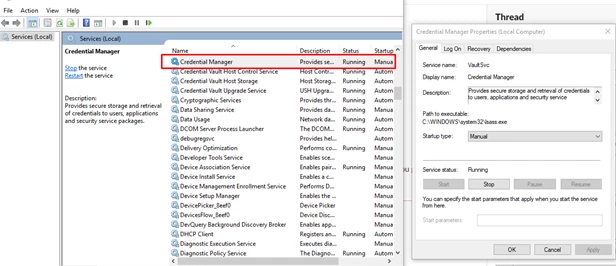
  • Start the Credential Manager Service: 


  • Disconnect VPN and retry 
  • Switch to a different network and retry 


Or,

You may try the below steps-


  1. Click Start Button and Type "Windows Update"
  2. Now either click "Check for Updates' or click on one of the options "Important" or "Optional". This will open a window, "
  3. Select Updates to Install".
  4. In Optional Updates, Find update KBXXXXXX (Depending on the latest update) and check it. You can uncheck all other updates from Important and Optional list as that will make the process faster.
  5. Click Ok, Wait for installation to complete.
  6. Now Download EasyFix.msi from this link (Search Easy Fix as article is quite long)
  7. Easy Fix will add the required registries, Now you must restart the system and check the workflow.


If these solutions do not help, please share your OS and XD version of your machine with Harshika Verma so that she can investigate more about your issue.


Thanks, 

Preran 

42 replies

New Participant
July 13, 2021

I have been getting this error report all day. i have jobs that were supposed to be delivered today and I haven't been able to access my filoes. Please I need you guys to help me out here. I'm out of ideas

Community Manager
July 14, 2021

Hi there,


Thank you for reaching out and sorry to hear you're having trouble using Adobe XD. Would you mind trying the steps mentioned in this article: https://community.adobe.com/t5/adobe-xd/solved-can-t-verify-my-subscription-status-windows/td-p/10618585? Let us know if that helps. 


Thanks,

Madhumati

New Participant
May 21, 2021

I connected internet in my computer but this problem can not be solved. Please help me to solve this problem.

HARSHIKA_VERMA
Community Manager
Community Manager
May 21, 2021

Hi Ayudha,


We are sorry for the trouble. Would you mind trying the steps suggested in this post: https://community.adobe.com/t5/adobe-xd/install-solved-can-t-verify-my-subscription-status-windows/td-p/10618585?


Let us know if that helps.


Thanks,

Harshika

New Participant
March 25, 2021

I use Adobe XD on Windows 10. Almost everytime I start Adobe XD it says "We can't verify your subscription status". If I restart Adobe XD enough times eventually it works.


Sometimes it is not the "subscription status" error but the error code 5718. In this case I restart Adobe XD several times until it works.


I removed and installed Adobe XD several times already but that only makes it work for a while. Eventually the error "We can't verify your subscription status" returns. I also tried to disable the automatic clock synchronization in Windows 10 like other people suggested, but that did not work either.

italosan
Participating Frequently
March 25, 2021
New Participant
August 2, 2021

It DOES not work.


New Participant
March 24, 2021

Hi everyone. I am trying to use XD but i keep getting the "We can't verify your subscription status error", "we can't reach the adobe servers". What could be the issue because I am connected to the internet.

Rishabh_Tiwari
Community Manager
Community Manager
March 24, 2021

Hi there,


Sorry to hear about the trouble. Could you please try the suggestions shared here: https://community.adobe.com/t5/adobe-xd/install-solved-can-t-verify-my-subscription-status-windows/td-p/10618585


Let us know if this helps or if you need any further assistance.


Regards

Rishabh

New Participant
July 4, 2021

I am sick of trying to do the steps above and constantly getting the error message. I cannot even sign in on my computer because the error message appears first. I can sign in on the web without issue and I can sign in to my Win 10 laptop but this is the issue on my WIn 7 PC - very frustrating - paying money for nothing!!!


New Participant
March 11, 2021

Hi Guys,


I have installed the Adobe Creative Cloud Desktop app and installed XD using it. Now as soon as I launch XD it crashes with a delay of 10-15 seconds. During the time of the delay, it keeps displaying the Dialogue Box saying it can't verify my adobe subscription and can't connect to adobe servers. It doesn't even work in offline mode. I have tried stopping the watch to sync with the internet, signing out and sign in again, checked internet settings, reinstalled, clean installation, etc. I have tried every solution provided on adobe forums but it doesn't work.


Please help me in solving the problem. Thanks in Advance.

italosan
Participating Frequently
March 11, 2021
TCT_CheetahFox
New Participant
March 10, 2021

So I've been assigned to work on a website and I found that XD is an ideal choice. However I can't even do anything right after installing it. This error keeps persisting on this and it's crazy frustrating.

Consider that this is my 10th-time reinstallation and my wifi connection is strong enough. I've tried deleting credential manager, stop and restarting credential manager, reinstalled Windows... nothing worked.
I'm really need help.


Rishabh_Tiwari
Community Manager
Community Manager
March 10, 2021

Hi there,


Sorry to hear about the trouble. Please ensure that you have tried removing Adobe's entry from the credential manager as suggested here:https://helpx.adobe.com/xd/kb/cannot-verify-subscription-xd.html 


If you have already tried that, please use the Adobe Cleaner tool: https://helpx.adobe.com/creative-cloud/kb/cc-cleaner-tool-installation-problems.html to uninstall the application and then re-install XD and let us know if that helps or if you need any further assistance.


Regards

Rishabh

TCT_CheetahFox
New Participant
March 10, 2021

Hi Rishabh, I've visited that page for a few days ago and done as said, however nothing changes XD even after I reinstalled it.

New Participant
February 14, 2021

Is there a proper fix coming for this? I'm located in New Zealand, and right now I can only use Adobe XD if my VPN is turned on to a different country (e.g. Australia).

New Participant
January 7, 2021

I can't open Adobe XD suddenly!! But it's OK when I open Photoshop and Illustrator. Why??
It show "We can’t verify your subscription status.
We can’t reach the Adobe servers. This may be because you’re not connected to the internet. Check your connection and try again below. If you’re still having issues, please see our connectivity troubleshooting guide."


I tried upadte XD, install again or install old version, but it's still not working.

I found below solutions, but still useless.

https://helpx.adobe.com/download-install/kb/cannot-verify-subscription-offline-mode.html

https://community.adobe.com/t5/adobe-xd/install-solved-can-t-verify-my-subscription-status-windows/td-p/10618585?page=1


(My system is Windows 10 home)

Rishabh_Tiwari
Community Manager
Community Manager
January 7, 2021

Hi there,


We're so sorry to hear about the trouble. Since you have already tried the basic troubleshooting, we'll need to check this on a remote session, so please contact us directly using this link: https://helpx.adobe.com/contact.html


Regards

Rishabh

LeeMuWei
Inspiring
January 6, 2021

I was trying to open a file which save on Adobe Cloud.
I usually open it from Adobe XD> Your Work. But Today i can't find the file.
(AdobeXD didn't Connect with Adobe CC)

I use Creative Cloud Desktop and try to open the File.
THEN.........

I got this

[WE CAN'T VERIFY YOUR SUBSCRIPTION STATUS.]
["We can’t reach the Adobe servers. This may be because you’re not connected to the internet. Check your connection and try again below. If you’re still having issues, please see our connectivity troubleshooting guide "]

THEN.....

I follow the stupid way Adobe Post on the community
[CLOSE IT, SIGN OUT, SIGN IN AGAIN, OPEN IT]

BUT still don't WORK!!!!!!!!


{Renamed By MOD}

LeeMuWei
Inspiring
January 6, 2021

I can use Mac and open the file from Adobe CC But My windows CAN'T THAT's WHY IM SOOO ANGRY


New Participant
October 27, 2020

H Preran ,


Did the same steps as you suggested above , Still iam facing the issue in Adobe Acrobat DC. Please Help. Also i saw you mentioned that , for one of the user you uninstalled a windows update then its came ok. can you please mention the windows update number for me.