Preran
Community Manager
Community Manager
February 22, 2019
Question

Error: can't verify my subscription status (Windows) in XD

  • February 22, 2019
  • 42 replies
  • 185500 views

Try the following solutions in the order in which they are listed: 


If that doesn't help, then try the below steps.


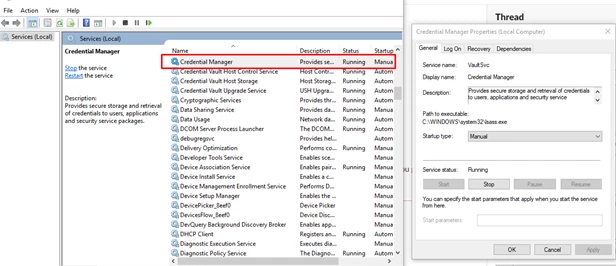
  • Start the Credential Manager Service: 


  • Disconnect VPN and retry 
  • Switch to a different network and retry 


Or,

You may try the below steps-


  1. Click Start Button and Type "Windows Update"
  2. Now either click "Check for Updates' or click on one of the options "Important" or "Optional". This will open a window, "
  3. Select Updates to Install".
  4. In Optional Updates, Find update KBXXXXXX (Depending on the latest update) and check it. You can uncheck all other updates from Important and Optional list as that will make the process faster.
  5. Click Ok, Wait for installation to complete.
  6. Now Download EasyFix.msi from this link (Search Easy Fix as article is quite long)
  7. Easy Fix will add the required registries, Now you must restart the system and check the workflow.


If these solutions do not help, please share your OS and XD version of your machine with Harshika Verma so that she can investigate more about your issue.


Thanks, 

Preran 

42 replies

Participant
October 20, 2020

We can’t reach the Adobe servers. This may be because you’re not connected to the internet. Check your connection and try again below. If you’re still having issues, please see our connectivity troubleshooting guide.


But I am connected to the internet, can open all other adobe programs and have reinstalled XD. Still does not work.

Can someone help me please?

KR

Christina

Atul_Saini
Community Manager
Community Manager
October 20, 2020

Hi there, 


Sorry to hear that you're having a problem with XD. please try the steps mentioned here (https://community.adobe.com/t5/adobe-xd/install-solved-can-t-verify-my-subscription-status-windows/td-p/10618585?page=1) and let us know if that works. 


Thanks,

Atul_Saini

Participant
July 28, 2020

Hi, I'm having the same problem and tried the steps above but the problem persists. I have Acrobat 2020. All the other apps work fine, at least for now. Can you please help. Thank you. 

Participant
July 27, 2020

Hello
I have a problem with Adobe XD which is that when I open the application I see a message written in it We can’t verify your subscription status.
I tried another app and the problem was not present and my name is welcomed

I tried to delete the application then I loaded it and it did not work

Full content of the message:

We can’t reach the Adobe servers. This may be because you’re not connected to the internet. Check your connection and try again below. If you’re still having issues, please see our connectivity troubleshooting guide.

I tried the solutions in the link and it didn't work

HARSHIKA_VERMA
Community Manager
Community Manager
July 27, 2020

Hi Abdullah Alqarni,


We are sorry to hear you are facing trouble using XD. We would request you to please try the solution suggested in this post. If that doesn't help, please get in touch with our support team using this link: https://helpx.adobe.com/in/contact.html so that you can get immediate assistance on the issue.


Hope it helps.


Thanks,

Harshika

Participant
July 27, 2020

The operation did not work for me
I didn't know how to communicate directly with support, and I found an icon saying "Contact us", but it brought me back to the community question

Participating Frequently
July 1, 2020

Hi, I am not able to  launch Adobe XD for the past 1 month after updating my Creative Cloud and Adobe XD. During launching of the app, I get this error message 'We can’t verify your subscription status.'

I have followed every step in the connectivity troubleshooting guide including stopping my system's clock from syncing with the internet time.

I have even changed my machine/Laptop

I have uninstalled and reinstall the app severally

I am using free version of Adobe XD

Attaching the error screenshots. Please help.

Windows Specification

Edition: Windows 10 Pro

Version: 1909

OS Build: 18363.476


Adobe XD Specification

Version: 30.1.12.4


HARSHIKA_VERMA
Community Manager
Community Manager
July 1, 2020

Hi Tobenna,


Thank you for reaching out and trying the steps. Would you mind trying the steps suggested in this post and let us know if that helps?


Thanks,

Harshika

Participating Frequently
July 2, 2020

Hi Harshika,

Thanks for the suggestions but none worked for me. I am still stucked here. And there is no way I could contact a human customer care because I am using free Adobe XD. I wish someone from Adobe can remotely helpp me.

Participant
June 29, 2020

USING A VPN WORKED FOR ME

HARSHIKA_VERMA
Community Manager
Community Manager
July 1, 2020

Nice to hear that and thanks for sharing the solution that worked for you. Please feel free to reach out to us in the future for any query related to XD.


We would be happy to help.


Thanks,

Harshika

Participant
June 27, 2020

Adobe xd keeps crashing I tried reinstalling it, restarting the credential manager, removing certificates from certificate manager, rebooting my pc and signing out, and in from my account but nothing worked!!!!


Also it shows this message before crashing:


We can’t verify your subscription status.

We can’t reach the Adobe servers. This may be because you’re not connected to the internet. Check your connection and try again below. If you’re still having issues, please see our connectivity troubleshooting guide.
 
Ares Hovhannesyan
Community Expert
Community Expert
June 28, 2020

Use the Creative Cloud Cleaner Tool to solve installation issues
https://helpx.adobe.com/creative-cloud/kb/cc-cleaner-tool-installation-problems.html

Participant
June 29, 2020

I have tried it still I have problems.


omariclam
Participant
June 19, 2020

i am facing this issue from last week tried everything but not solving.

I just update the adobe XD to the new version using a creative cloud app after that I am facing this issue.

 regards

Omar Islam

Adobe Employee
June 19, 2020

Hi onariclam,

Please try the solutions in this post https://community.adobe.com/t5/Adobe-XD/SOLVED-Can-t-verify-my-subscription-status-Windows/td-p/10618585 and let us know if you still need assistance. 

omariclam
Participant
June 26, 2020

I tried but it didn't work

Participating Frequently
June 16, 2020
 

Welcome
 After installing the new version of the adobe xd program, when opening the program it appears as a pile and the program is closed, and also a message appears to me that I am not connected to the Internet on the code that I am connected to the Internet 


{Renamed By MOD}

Rishabh_Tiwari
Community Manager
Community Manager
June 16, 2020

Hi Ahmed,


Sorry to hear about the trouble. Please try the steps shared here: https://community.adobe.com/t5/adobe-xd/install-solved-can-t-verify-my-subscription-status-windows/m-p/10618585#M16385


Let us know if this helps or if you need any further assistance.


Regards

Rishabh

Participating Frequently
June 16, 2020
 
Thank you so much But there is the same problem
Participant
June 12, 2020

Hi all, for context: I used to use Adobe XD back when it was free in its beta release, until the period where it wasn't free anymore and a subscription was required. I had switched to Figma later on but kept the Adobe XD subscription in case I needed to revisit client projects built on XD.


I just found out recently that Adobe XD is apparently already free but I still got monthly charges, up to the time I cancelled my subscription. I had my subscription cancelled because it didn't seem like the projects were ever going to be active again anyway, and besides, XD is already free right? But when I opened XD just now, it was still asking me to verify my subscription.


So, two questions:

1. Can I still use Adobe XD after the 6-day warning

2. Am I eligible for a refund after they charged me for what should have already been a free product?


Thanks to everyone who can provide answers!

italosan
Community Expert
Community Expert
June 12, 2020

Hi, in this case I recommend that you contact Adobe customer support directly. 

Participant
May 28, 2020

We have follow the instructions but on Citrix there are no Web crednetials on the VDA's.  Anyone else at the ned of the line?