


New Participant
July 15, 2019
Answered

Unable to delete linked components from the component panel in XD.

  • July 15, 2019
  • 22 replies
  • 13830 views

Hello,

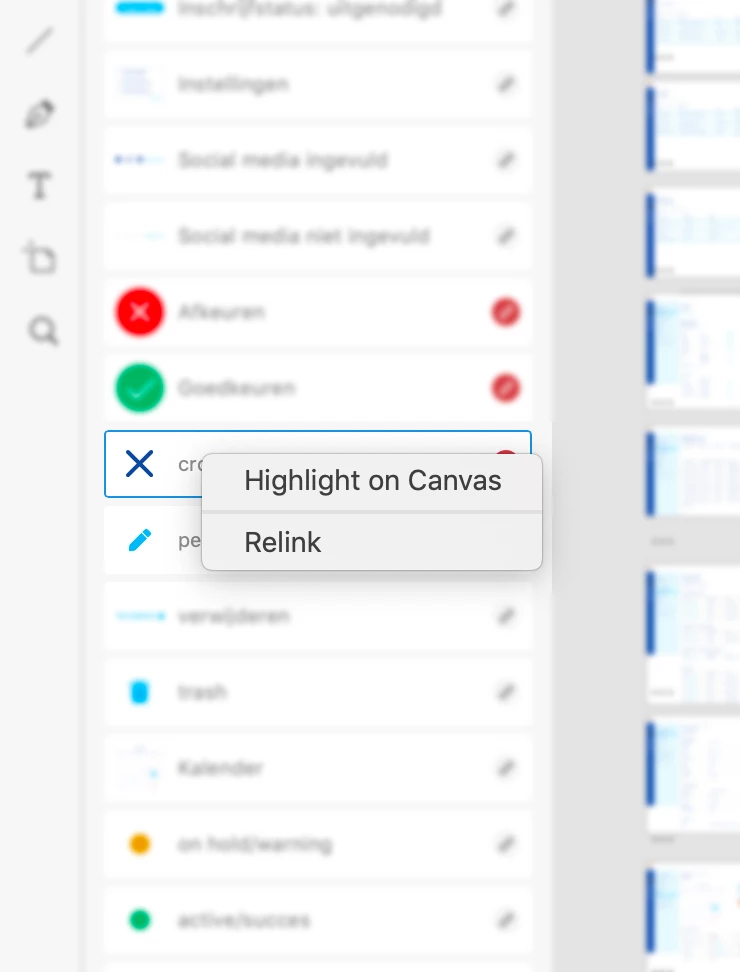
I can not delete some of my components any more. Right click on a component, the only options I have are 'highlight on canvas' and 'relink' or 'edit master in source document'. The component is not in my document any more, so I don't know why I can't delete them. Anyone has the answer?
 

<The title was renamed by moderator>

This topic has been closed for replies.
Correct answer HARSHIKA_VERMA

Hi All,


We are sorry for the trouble deleting the linked component. Unfortunately, we currently don't allow you to make local or delete a linked nested components because that impacts dependent parent components.


The team is working on it to make improvements in the future.


We are sorry for the inconvenience.


Thanks,

Harshika

22 replies

Randy Edmunds 2
Adobe Employee
Adobe Employee
September 29, 2021

Inability to Delete Linked Components is usually because they are nested in some other Component. If you have other Components that you also want to Delete, then Delete those first and return to this Component to see if it can then be Deleted. If you have multiple levels of Component nesting, then you may have to make multiple passes through your Components.


Hope this helps,

Randy


New Participant
July 8, 2021

I'm in the same situation and I can't send them like this to the client, so I have to start another project. It's so disappointing that you don't even care about your customers' needs and this is such bad CX in my oppinion, because this issue has more than 2 years as I can see. 

New Participant
September 29, 2021

Hi there I am having the same issue, I can't delete a component on my document assets. Do you know if this issue has been fixed in the latest xd update?

masons35645689
Participating Frequently
January 3, 2021

Just a reminder that this is still an issue and needs to be fixed. I have several files that have these "orphaned" linked assets that can't be deleted or edited in a master document, because the master document is unavailable or no longer in existence. These are client files, and turning them over like this is a bit embarrasing.

New Participant
January 20, 2021

Are you guys going to fix this? Extremely annoying.

New Participant
September 29, 2021

Anybody know how to fix this issue or if there is a solution for it?

November 6, 2020

There is very strange behaviour. I couldn't remove the list of components as mentioned here by others. There were only two options 'Edit Main in source' and 'Highlight on canvas'. 

However, when I clicked through all of them checking context menu (started from bottom to top, I don't know if any difference) the last one gave me the possibility to remove, and then I back to others which I couldn't and - voila - context menu enriched by 'Make local' and 'Delete' buttons. Is it magic? 

Abbenyi
Participating Frequently
November 7, 2020

It's possible that component was copied over from another document and wasn't actually a linked component

Dylan SANT
New Participant
October 12, 2020

Same here.. Still not fixed....


New Participant
October 12, 2020

I tried to delete the linked component but it doesn´t work. The component still working in my artboard

New Participant
November 15, 2021

Hi All,


We are sorry for the trouble deleting the linked component. Unfortunately, we currently don't allow you to make local or delete a linked nested components because that impacts dependent parent components.


The team is working on it to make improvements in the future.


We are sorry for the inconvenience.


Thanks,

Harshika


@HARSHIKA_VERMA wrote:

Unfortunately, we currently don't allow you to make local or delete a linked nested components because that impacts dependent parent components.


That statement is false! I was not able to delete linked components from my document assets even though they were not used anywhere in my document. Luckily, I stumbled on a workaround.

Workaround

Turns out, if you have enabled Document Assets > Sort By > Name (unlabeled icon button at the top-right of Document Assets), then XD no longer lets you delete linked components. However, as soon as you select Sort By > Custom Order, XD lets you delete them again. 🥳


This is clearly a bug and needs to be fixed. 🪳


FrancoBits
Legend
September 21, 2020

I have this problem as well but I quit trying to understand how it works

Serhii Hubernachuk
Inspiring
September 18, 2020

This topic has started on Jul 15, 2019, and this bug is still not fixed (Autumn 2020).  I have the same issue. So I just stack them at the bottom of my panel to see them less. Thank's Adobe.

New Participant
July 30, 2020

I had the same issue but managed a work-around! Here's how it went -

Previously when I selected only one component at once, it showed me just these two options, and no delete option.


Then I held the shift/command button and selected more than one components at once, the delete option appeared! 

Hope this helps! 🙂

Inspiring
July 31, 2020

Goes to show how incredibly inconsistent XD is cause that doesn't work here. I'm on W10. Adobe should really take a long hard look in the mirror and start iterating XD based on the user respons. There's a ton of errors to fix and instead of releasing buggy software they should adress all the problems before anything else. The "this approach may work for you" thing is hopeless.

New Participant
May 24, 2020

This problem still exists after the May 2020 Update of Adobe XD !!!


We are talking about a tool to create UI which should be easy to use.

And for a problem that exists now nearly over a year there is still no describtion in the offical xhelp.adobe.com or a hint in the UI of XD.

I don´t have any understanding for that.

It takes too much time to find out about these unnecessary undocumentet issues (search in XD, search the Web....)

Makes me feel like beta-testing for Adobe without being asked or paid.

And I wonder how much longer it will take for a team (not one or two people) to "work towards improving the experience for complex component workflows".

The only reason I prefer XD over figma so far,  is the workflow with Ai and Ae, otherwise I would be gone by now.

Inspiring
July 3, 2020

It's july 2020 and I also have this same problem. The component and asset system is not working as intended at all. And it ruins any copy document as well. It's a nightmare.

New Participant
May 14, 2020

I had this problem too but what I did was click on the "+" button beside the "Components", then you'll be able to delete the other symbols!