Participant
September 2, 2026
Answered

재생 스페이스바 누르니까 손툴로 바뀌는 현상

  • September 2, 2026
  • 6 replies
  • 39 views

에펙 재생 스페이스바 누르니까 손툴로 바뀌는 현상이 있습니다.

오디오 하드웨어 설정과 키 변경, 프로그램 재설치도 해보았는데 그대로 입니다.

손툴로 바뀌다가 선택도구로 바뀌고 미리보기에선 재생 표시로 뜹니다, 그리고 타임라인에선 재생바가 그대로 입니다.

해결방법 알려주시면 감사하겠습니다.

    Correct answer 밍나

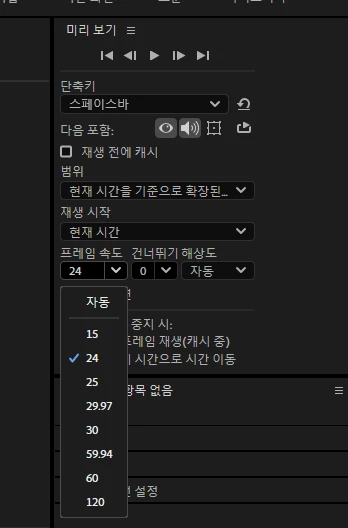
    키 설정에서가 아닌 미리보기 패널에 있는 프레임 속도 때문이였습니다.

    감사합니다!

    6 replies

    밍나AuthorCorrect answer
    Participant
    September 4, 2026

    키 설정에서가 아닌 미리보기 패널에 있는 프레임 속도 때문이였습니다.

    감사합니다!

    Nishu Kushwaha
    Community Manager
    Community Manager
    September 4, 2026

    Great, glad you figured it out! Thanks for coming back to share the solution.

    One quick follow-up so I can look into this further: what frame rate was set in the Preview panel that caused the issue, and what did you change it to that resolved it? Just want to understand whether this was a specific edge case or something we should investigate as a bug.


    Thanks,

    Nishu

    밍나Author
    Participant
    September 4, 2026

    버그인지 모르겠지만 미리보기 패널에서 프레임속도가 자동으로 되어 있었습니다! 이전까지 프로젝트 설정에서 프레임 속도를 바꿔었지만 그것은 틀린 방법이였습니다. 


    감사합니다.

    Nishu Kushwaha
    Community Manager
    Community Manager
    September 2, 2026

    Hi, before we dig further, please try running After Effects in Safe Mode with third-party plug-ins disabled to see if the issue changes: https://adobe.ly/4ypsAPO

    Also worth knowing: in AE, tapping spacebar plays preview, but holding spacebar temporarily switches to the Hand tool for panning. If your tap is being interpreted as a hold, the Hand tool activates. Try tapping spacebar very briefly.

    If Safe Mode doesn't help, please share:

    1. Your exact AE version (Help > About / 도움말 > After Effects 정보).

    2. Your OS (Windows / Mac + version).

    3. Does the playhead advance if you drag it manually with your mouse?

    Let me know how it goes.


    Thanks,

    Nishu

    밍나Author
    Participant
    September 2, 2026

     안녕하세요, 우선 답변해주셔서 감사합니다.

    1. version26.3.0
    2. Windows
    3. yes

      작성해주신 방법을 해보았지만 손툴로 되었다가 선택도구로 돌아옵니다.
    Nishu Kushwaha
    Community Manager
    Community Manager
    September 2, 2026

    Thanks for giving it a try. Do you have a Bluetooth audio device connected to your computer? Do you mind sharing a screenshot of the Audio tab in the preferences? When did it start happening? Have you recently installed a new app/plug-in?

    Let me know.


    Thanks,

    Nishu