


Participating Frequently
October 21, 2018
Question

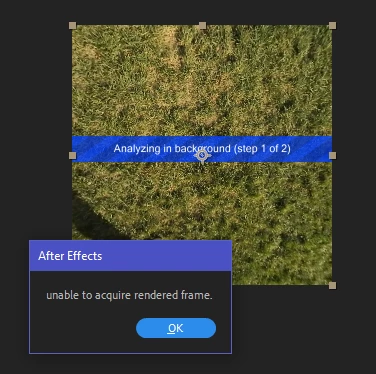
3D Camera Tracker: unable to acquire rendered frame

  • October 21, 2018
  • 25 replies
  • 36532 views

I can't stabilize any 360 footage using the 3D Camera Tracker from VR Comp Editor. 95% of the time, I run the analysis to create the camera for stabilization, it fails with the incredibly non-descriptive and undocumented error message "unable to acquire rendered frame." The error appears for videos of any length and any resolution. It also appears at various progress stages of the process and even within the same file (it can be at 5%, or at 55%, or at 98% completion).

At this point, I've exhausted any possible solution I could find:

  • Reduced the Comp width down to 260 pixels and aspect ratio to 1:1: it speeds up processing but doesn't guarantee success even with a 6-second video
  • Converted the video to sequences of JPEGs and PNGs: the success rate is slightly higher (the process is likely to complete than not) but this slows down the process exponentially (a 20-second video takes 5+ minutes to get converted into images then takes longer to analyze and re-encoded)
  • Played with every combination of settings when creating the 3D Edit
  • Disabled the antivirus (Windows Defender)
  • Turned off all cloud syncing and took the computer offline
  • Moved the source files to an M.2 SSD from RAID0 (2x7200rpm WD Black drives)
  • Moved disk cache to the M.2 SSD
  • Increased paging file size to 16GB
  • Tried changing from CUDA to OpenCL and back

The source camera is Nikon KeyMission 360. The videos are stitched in-camera and exported as equirectangular 2:1. Tested video resolution was 3840×1920 and 3840×2160.

Computer specs: Dell XPS 8930, i7-8700, 32GB RAM @ 2667MHz, GeForce GTX 1070 8GB, AE 16.0.0 build 235 with 429 plugins.

Every single tutorial talks about how easy this feature is and has no tips for troubleshooting. I'm hoping an actual Adobe (or Mettle) developer chimes in on this.
This topic has been closed for replies.

25 replies

Participant
October 26, 2023

Hello! 


I have got this same issue last days. Finally I found a solution for this. I went into the settings tab of AE, than Media and Disk Cache and I deleted cache files - by pressing "Empty Disk Cache". This solution works for me and 3D camera tracking and warp stabilizer works again. 


Hope it will work for you aswell 🙂 


See ya!

3Dcowboy
Participant
April 27, 2020

I came across this issue today and I wanted to share my findings. The first time I got this error was when my computer was conducting another render in the background. Later on when I finished my other render and my computer had all of its resources available for the 3D tracking I managed to finish the tracking with no issue. So I'm guessing it's also a hardware issue for most of people who have this issue.

Participant
February 13, 2020

If anyone is still having this same issue, I think I have solved it (or at least have a workaround the bug).  Here are the steps:


Create your initial comp with your 360 footage and apply the 3D Edit in the VR Comp Editor as normal.  This will create your Edit and Output Comps.  Go back in the ORIGINAL/initial comp you created in step 1 and create a solid and scale it down like so:


Then, go back to your 3D edit comp and apply the AE 3D Camera Tracker. It should work. Then, just hide/delete the layer in your original comp once the tracker is complete.


I've tested it with the Adobe 360 footage and without the cyan solid, I get the unable to aqcuire rendered frame error. When I added the cyan solid to the scene, the 3D tracker is able to do it's job flawlessly! Let me know if that wasn't clear enough directions. 

eigenartfilmproduktion
Known Participant
July 29, 2020

This is the solution. Had the same problem and this worked out. By the way @Adobe Team: can you please fix issues concerning the camera tracker? Had serious issues while tracking a 6 minute 360 Stitch in AE - fact was, that it wasn´t trackable via camera tracker. This is a shame, due to the fact, that I worked on a client project with tight deadline and couldn´t deliver. Frankly spoken I should´ve sent you the invoice to that job I couldn´t deliver because of this bug!!! And for all the time sitting and trialling and erroring like a monkey in front of a tree trunk. At least this isn´t the only actual bug. Please check as well export options for media encoder: I got some serious aborts while rendering h.264 which I needed to deliver in on this project as well. Ended up building workaround after workaround which is very tedious when you´re short in time because the deadline rolls over you like a tsunami! No go I would say. So, please please, as so many professionals like us out there work on serious projects with your software: 

spend more time and accuracy updating your products! WE would rather have a working,
really valuable update every two years than something, that cannot be used for 10 months because it is full of errors and you lack updating it!

 AND: I would pay twice the monthly subscription or more if I knew someone would take care of these
special problems within 7 days until they were all eliminated. That sounds like a new business case, doesn't it ?!


The next time a project fails due to poorly programmed Adobe software, I'll charge Adobe the cost of it - and it's not about $ 59.99 for the monthly subscription. I encourage all professional users out there to keep it that way, otherwise nothing happens in company policy!


Participant
November 20, 2019

+1 for this problem. 

goldensail001
Participant
July 2, 2019

Here’s what worked for me.

I was getting that error around 6% into the tracking and it was getting aggravating. All I did was cut a couple frames in the beginning and it worked like a charm. Im guessing the problem might be that there is a single frame somewhere that the tracker is unable to track

megacinn
Inspiring
July 29, 2019

..another month without anything new !?

..still....being worked on ??

what are the news , rameez !?

Can you tell us anything helpfull ?

what does adobe expect from us...... pay for 12month in advance...then unable to work...and no help and solution within the whole year....the customer will hace to pay for the next period of time to get this "future release" ( I don't think so).

BorisM1987
Participant
July 1, 2019

I too can confirm that this issue persists in AE CC 2019, but if I use 2018, I don't have any issues.

Participant
June 12, 2019

For PC Versions AE 2019 on windows 10 wont track any of my prores .mov files. I converted some of the clips to DNX and it would track some but inconsistently. Im tracking around 150 different moving clips so this became difficult.

This was my process that worked for me.

Open AE 2019
Create comps with each clip in its own specific folder
Create 3D edits in VR Comp editor

Move the created output folder to associated folder created above
Do for all clips
Save a copy as 2018 CC15x version when done.
Open that file AE 2018
Apply Vr Comp editor AE Camera tracker  (i had around 10 clips per project so i camera tracked roughly 5 at a time)

Note: Some will track fine and some will get stuck at the orange line "solving" don't worry. Keep on tracking all shots.
Save. Then close the document. It will ask to save again and click yes. At this point if any camera tracks were stuck at solving AE 2018 will crash. Just force "close the program".
Open the 2018 AE file in AE 2019 and it will ask you convert. Click yes and rename. I renamed it after my first 2019 project file above and replaced it. (do this only if you are comfortable you have a backup)
Click the tracks that weren't solving and they will either solve or will say failed. Most of mine solved. I think only 3-4 failed out of 150 with this process. If failed try the same cycle with an export of the comp. I had time remapping on my original tracked clips so an export worked for me.
At this point. Create all the cameras and click stabilize and done.
Really weird and long work around but it worked for me.

megacinn
Inspiring
June 22, 2019

...anyone tested the new 16.1.2 Update yet?

This bug is not listed in the fixed-list.....thaught that it is "reproduced by engineers" and top-priority !?

Rameez_Khan
Legend
June 25, 2019

I know this doesn't help but sorry to say that 16.1.2 doesn't include a fix for this. This is still being worked on and will be fixed in a future release.

-Rameez

Participant
June 11, 2019

It is Hugh here from CreatorUp. Some of you guys might know me (or not). So based on my original AE tracking tutorial on 360 footage,  I can confirm 100% AE 2019 latest version has 360 tracking issue and won't finish with the error messages everyone experiencing. Using AE 2018 will solve this issue. But for me, it is ONLY in tracking. It track but it WON'T solve the tracking camera - hang on yellow solving camera FOREVER. On my PC - i9 9980XE with Titan RTX.

Exact same footage will solve in AE 2018 in Mac - so in conclusion, if you have a 360 video just can not track - downgrade to AE 2018 and use a Mac to try it again.

Adobe SHOULD fix that asap! It really hurt our works for clients with a tight deadline. 

Known Participant
May 29, 2019

Exact same problem here.

No problem so far with AE 2018. So it seems it is a CC 2019 bug.

OpticalSound
Known Participant
May 24, 2019

This has completely screwed me. Having used this feature countless times before on 360 footage from multiple different cameras, I'm now sitting under a deadline with the 3d camera tracker returning an error time after time, and with every possibility I'll be losing the client I'm currently on assignment for.

I've always loved and had complete faith in Adobe products, particularly AE, but this is a huge, huge problem for me, and for the first time I'm sincerely questioning whether I should be paying a subscription for software which causes such a headache.

Coupled with the fact that we have been arbitrarily barred from using the previous versions which actually worked, as if we hadn't paid through the nose for those too over the years.

Shameful.

Rameez_Khan
Legend
May 24, 2019

I'm so sorry to hear that, OpticalSound. I can't provide you with a solution but I'd suggest that you use an earlier version of After Effects for now until this bug is fixed.

Best,

Rameez

OpticalSound
Known Participant
May 24, 2019

I'd love to, @Rameez.

Can you provide me a download link to any CC version pre April-2018, and your guarantee that I won't be sued for using it?

Thanks