Inspiring
March 15, 2019
Answered

3D layer not converting properly

  • March 15, 2019
  • 2 replies
  • 973 views

Hello there,

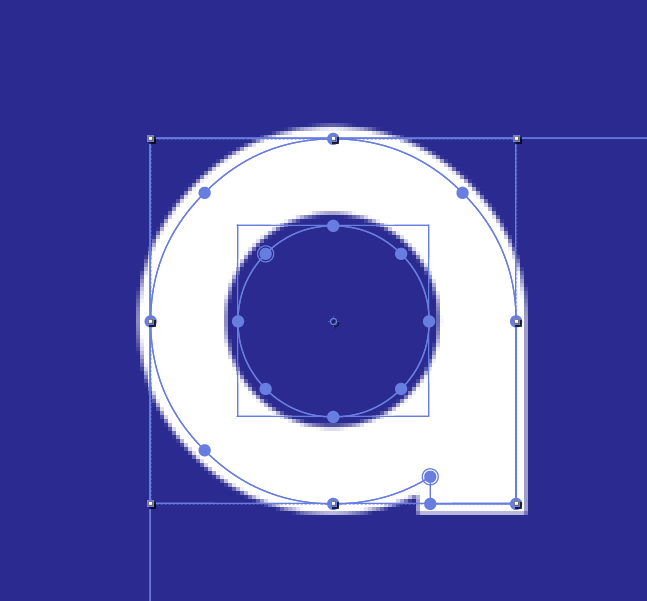
After now having learned to use AE for all kinds of 2D animations I finally wanted to start with 3D but every time I convert a 2D layer into 3D it looks as I if I  had a stroke with an offset effect applied for some reason. I really can't figure out why and google has no anwsers.

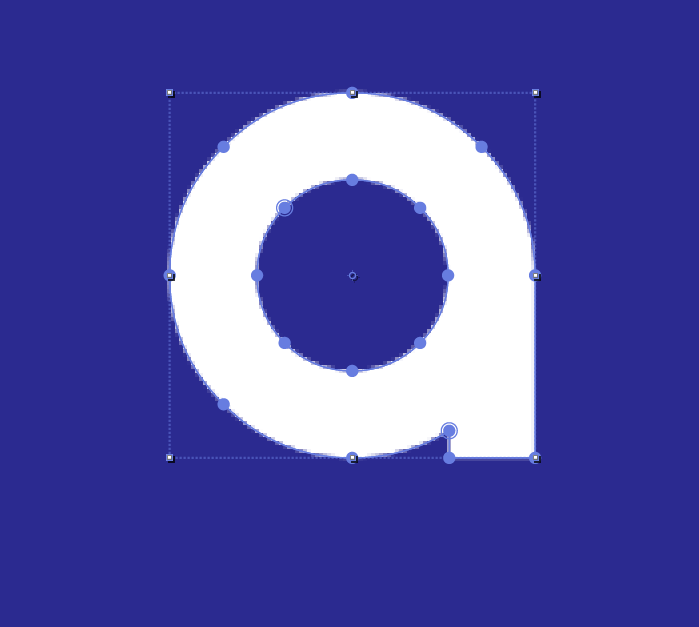
This is what the 2D layer looks like:
e9ad9a6e1b7ce6e94e02a166d8f205dc.png

and this is what happens with it after clicking "3D Layer":
3c2b6eab82e9b7d187f28e96556e5d26.png

it's not a perspective thing:

603a9b6dc314a6326f8cddf2ea7dc225.png

I have the same issue in seperate compositions and even seperate projects...

does anyone know how too fix this?

Thanks in advance.

This topic has been closed for replies.
Correct answer BiBoetzke

After asking for help on the r/aftereffects Discord server we found a solution...

It's important that I used Illustrator to create the shape

Quoting user "ramon":

solution: scale everything up in illustrator before importing! the text layer was scaled up a lot in after effects, and that caused issues. scaling everything up in illustrator and then importing the shapes works much better My guess is that the c4d 3D looks at inital path data (which always gives it a slight offset due to AA or something else). now if you scale that up with transform properties that slight offset becomes very noticable

2 replies

BiBoetzkeAuthorCorrect answer
Inspiring
March 18, 2019

After asking for help on the r/aftereffects Discord server we found a solution...

It's important that I used Illustrator to create the shape

Quoting user "ramon":

solution: scale everything up in illustrator before importing! the text layer was scaled up a lot in after effects, and that caused issues. scaling everything up in illustrator and then importing the shapes works much better My guess is that the c4d 3D looks at inital path data (which always gives it a slight offset due to AA or something else). now if you scale that up with transform properties that slight offset becomes very noticable

Szalam
Community Expert
Community Expert
March 15, 2019

What 3d renderer are you using for your comp? Is it the deprecated ray-traced renderer, the c4d renderer, or the standard one?

BiBoetzkeAuthor
Inspiring
March 15, 2019

I'm using the c4d renderer.

Szalam
Community Expert
Community Expert
March 15, 2019

Check your bevel settings. I would be willing to bet that's the bevel you're seeing.