
Participating Frequently
February 7, 2018
Answered

3D shapes and DoF

  • February 7, 2018
  • 1 reply
  • 622 views

Hey.

I'm kinda stuck right now. I would like to work with 3D shapes and DoF at the same time. 3D shapes (/geometry options) works with "Cinema 4D" and "Ray-Traced 3D" and DoF works with "Classic 3D" and "Ray-Traced 3D".

Based on that "Ray-Traced 3D" should be able to do it, but the DoF it produces is just weird. You can see a comparison below with Ray first and Classic second.
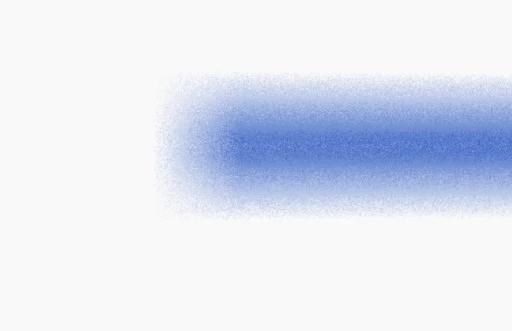
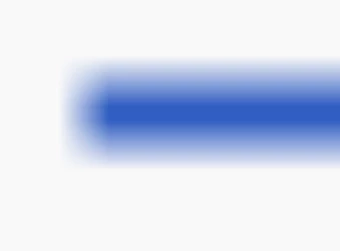
So my question is: how do i get 3D shapes and normal DoF at the same time?

This topic has been closed for replies.
Correct answer Mylenium

You can't. It simply works differently. Increase the sample rates in the renderer settings to smooth out the artifacts at the cost of increased render times.

Mylenium

1 reply

Mylenium
MyleniumCorrect answer
Legend
February 7, 2018

You can't. It simply works differently. Increase the sample rates in the renderer settings to smooth out the artifacts at the cost of increased render times.

Mylenium

Roland Kahlenberg
Legend
February 7, 2018

As Mylenium has stated, the noise you are seeing, within semi-transparent areas, with the Ray-traced Renderer is an expected outcome when the ray-tracing anti-aliasing and Quality settings are low. Increase these settings accordingly. Then, ensure you set them to settings appropriate for working/previews and update the settings when it comes time to render.

Very Advanced After Effects Training | Adaptive & Responsive Toolkits | Intelligent Design Assets (IDAs) | MoGraph Design System DEV