


Participant
October 15, 2023
Question

3D Track Multiple Separate Segments of a Project

  • October 15, 2023
  • 1 reply
  • 131 views

Hello everyone,


I am new to AE (and the CC environment in general as I edit in DaVinci) and have been messing around with the 3D Tracker Camera. One thing that I have noticed is that for my projects, which have a lot of transitions and jump cuts, I have to split each segement off into its own layer for the tracking to function, otherwise it just says "Analysis Solve Failed" because it's trying to track the whole project. This is fine, what isn't fine is that I only seem to be able to do this with one of the segments I've created. No matter what I do, it won't track for more than one segment/layer at a time. If I remove the tracking in the first clip, it will track properly on the second, but then I can't track the first again unless I remove the tracking effect from the second.


Unlike what happens when I try to track the whole thing, in these cases the tracking appears to think it's worked as it doesn't throw up an error, but it won't actually create any tracking points (no matter the track point size I use). Also once I do this I can no longer see any tracking points on whatever clip actually did track, even though tracked-in elements still function properly. Also, the clip selection indicators (the little crosshair in the middle and the white bars at the edges) has stopped functioning at all and I can't figure out why. I'm totally lost here, and no amount of Google searching has come up with anyone having any issues even similar to this. Maybe I'm just stupid, maybe I'm just used to DaVinci where everything just works and is logical next to this comparatively cluttered and unintuitive program. Whatever the answer, I've been unable to find it with about 3 hours of looking on my own (probably something so simple that it doesn't even warrant a troubleshooting video, but it's a CC product so the toggle will be burried deep within 17 sub menus), so I figured I'd ask the experts before I go insane and roundhouse my monitor. I've attached a screenshot of my application to try and help with this.


I'd appreciate any help with this, otherwise I'll give up on CC entirely and cancel my subscription, because between PP and this I'm nearing my limit.
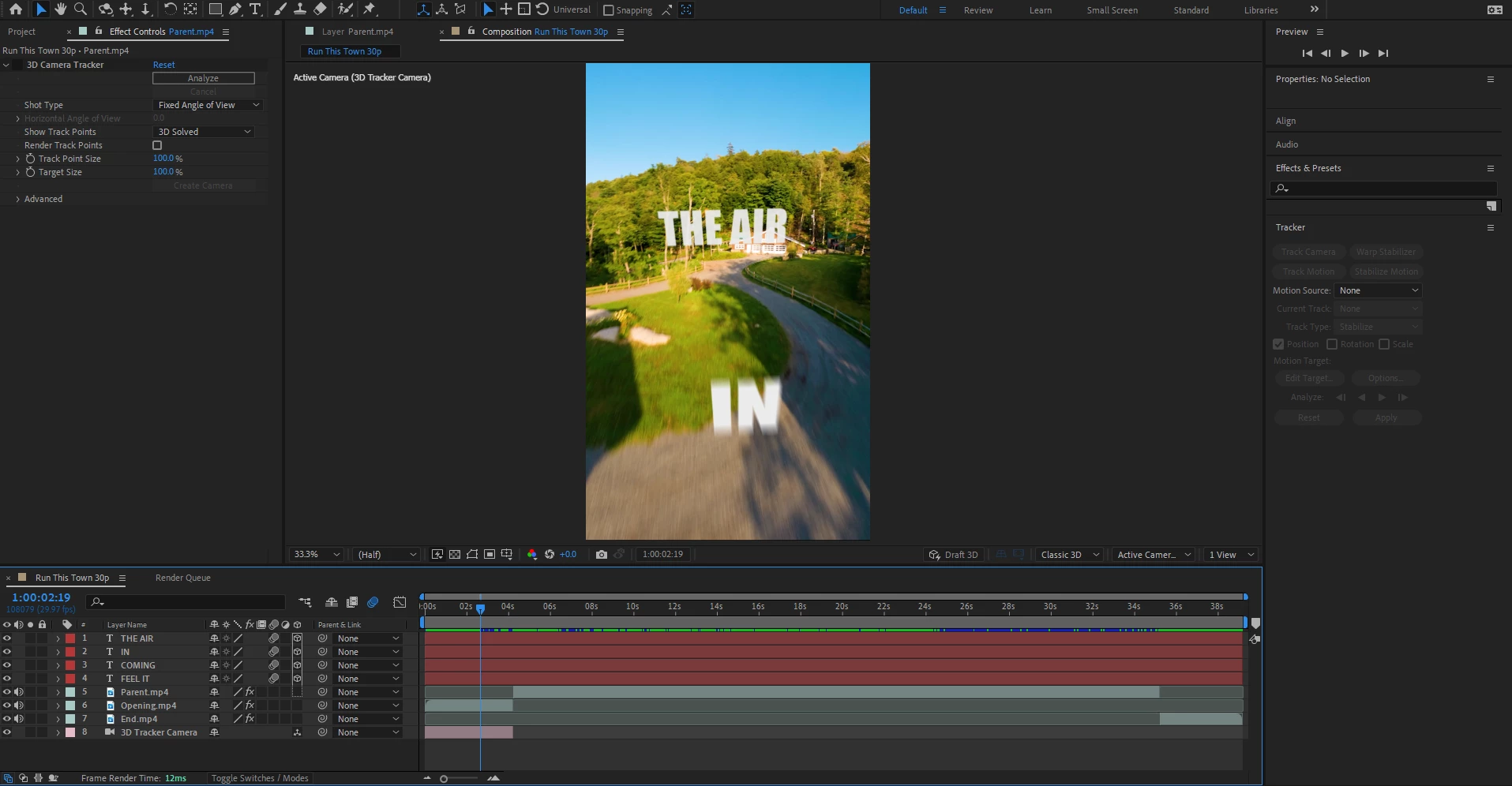


This topic has been closed for replies.

1 reply

Community Expert
October 15, 2023

After Effects is not a video editing app; it is designed to create visual effects and composites in shots you cannot create in an NLE like Premiere Pro or Davinci. When you use After Effects as an Animation app, each shot in your animated movie should be a separate comp. That's the way animation has always been done. Even Disney assigns animators to create a shot, renders the shots, and then edits the shots into a movie. 


The camera tracker tracks camera moves in a single shot. Camera Pans do not give you depth information because parallax does not change in a camera pan. You need fixed geometry for any camera tracker in any app to accurately figure out the camera's movement. 


The proper use of After Effects in projects that have a lot of transitions and jump cuts would be to put each shot in a separate comp, do your effects, and then make the transition between shots by nesting (pre-comps) the two shots in a main comp and performing the transition there. The only time you would have more than one shot in an AE comp is when you need some of the elements in one shot to interact with a component in the second shot during the transition. Did that make sense?


The last step in the project would be to return to your NLE and do the final editing, sound mix, and color grading. That is how all major studios do all of their movies. The effects people do the effects render them. Then, the film is edited, the sound polished, and the final color grading is done using an NLE, or an NLE and Audio Editing app (Adobe Audition) or Mixing Studio (like Skywalker Sound), and the final color grading in a studio (like Reason Studios). 


Davinci has a built-in effects workflow, so you can jump out of the timeline momentarily and create an effect, then jump back into the NLE. After Effects and Premiere Pro have a little more clunky symbiotic workflow, but the idea is the same. Just as in Davinci, if the effects shots get complicated (many of mine have a hundred or more layers in a 4-second shot), you render the effects before returning to the NLE. I do the same thing when I'm working in Davinci. If the effects are complex, I render them so that the NLE does not get bogged down or be susceptible to crashes.


I hope this helps you figure out how AE works with your editing workflow.