

Scasey
Inspiring
July 20, 2019
Answered

9 Slice scaling in After Effects

  • July 20, 2019
  • 1 reply
  • 2453 views

I see some pretty old references to this in Google searches, but nothing recent. Anyone know of a way to do 9 slice scaling in AE? I found a plugin for this but it's only for Mac. Ultimately I'm trying to create a text box with two rounded corners that dynamically scales with text, and then convert this to a mogrt file to use in Premiere. I can't find a way to do this in AE without distorting the corners and don't see how to create the rounded corners in Essential Graphics. Can this be done?

TIA
This topic has been closed for replies.
Correct answer Rick Gerard

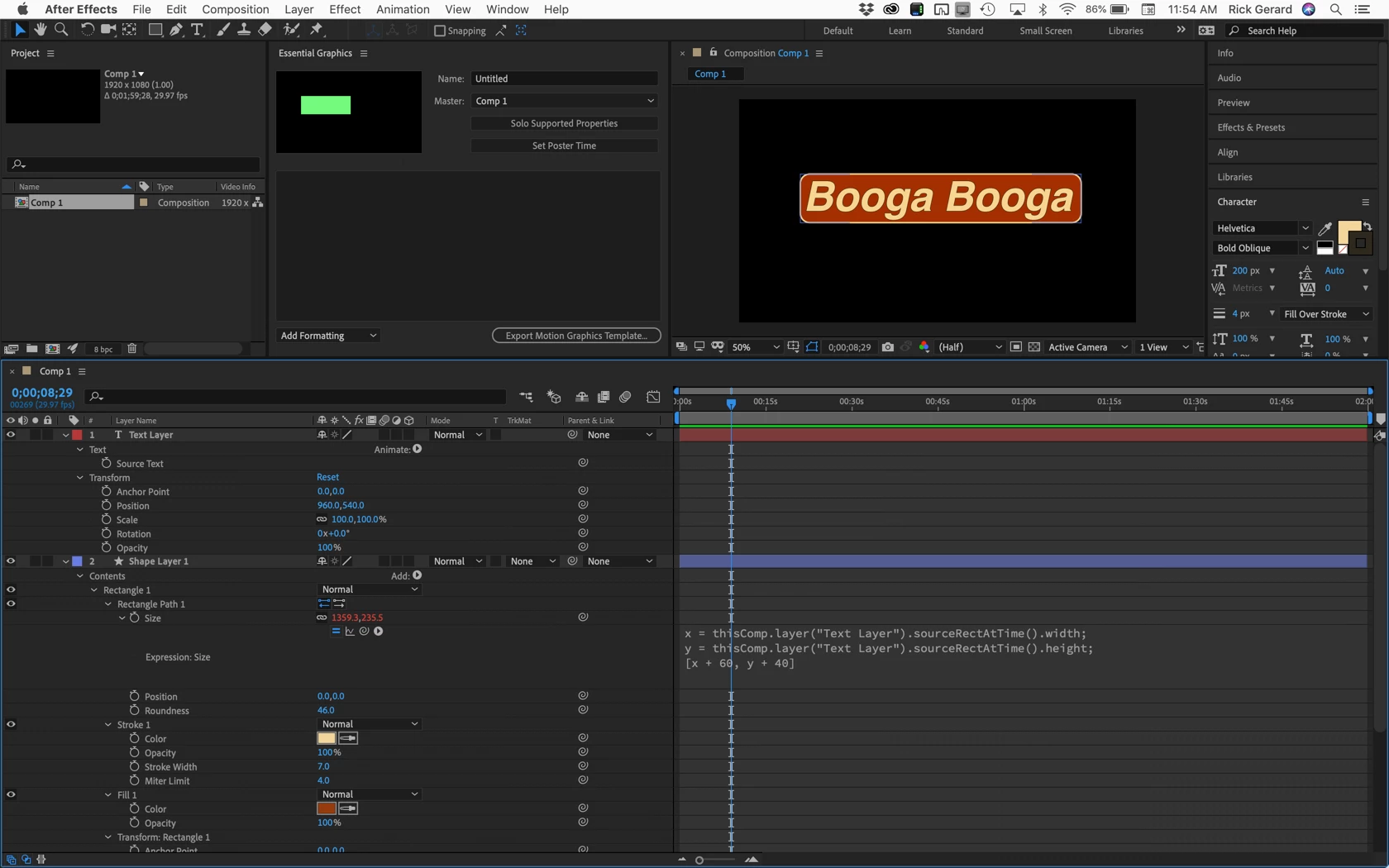
Use a shape layer with rounded corners instead of Scale. It just requires a little modification moving the soruceRecAt Time property to the Rectangle 1 Size parameter. I would never use Scale for that kind of thing even if I didn't have round corners. The basics of the expression you will use look like this:

x = thisComp.layer("Text Layer").sourceRectAtTime().width;

y = thisComp.layer("Text Layer").sourceRectAtTime().height;

[x, y]

With a few modifications, the basic two first variables [x, y] can be used to position, size, and even expand a shape layer to use as a background in the Essential Graphics process. Here's the first step, I'm showing the soloed properties that can be animated using Essential Graphics.

Evan Abrams is a guy that produces tutorials and he really knows what he is doing. He has an excellent tutorial on sourceRecAtTime(). That will all work in essential graphics. Follow the link to his site or just watch it on YouTube. He covers everything you need to know about using that method. The user guide should answer any questions you have on MOGRT's.

1 reply

Rick GerardCommunity ExpertCorrect answer
Community Expert
July 20, 2019

Use a shape layer with rounded corners instead of Scale. It just requires a little modification moving the soruceRecAt Time property to the Rectangle 1 Size parameter. I would never use Scale for that kind of thing even if I didn't have round corners. The basics of the expression you will use look like this:

x = thisComp.layer("Text Layer").sourceRectAtTime().width;

y = thisComp.layer("Text Layer").sourceRectAtTime().height;

[x, y]

With a few modifications, the basic two first variables [x, y] can be used to position, size, and even expand a shape layer to use as a background in the Essential Graphics process. Here's the first step, I'm showing the soloed properties that can be animated using Essential Graphics.

Evan Abrams is a guy that produces tutorials and he really knows what he is doing. He has an excellent tutorial on sourceRecAtTime(). That will all work in essential graphics. Follow the link to his site or just watch it on YouTube. He covers everything you need to know about using that method. The user guide should answer any questions you have on MOGRT's.

Scasey
ScaseyAuthor
Inspiring
July 23, 2019

Thanks Rick!