
Known Participant
October 23, 2024
Answered

A different color of a button in UI

  • October 23, 2024
  • 2 replies
  • 680 views

Hello!

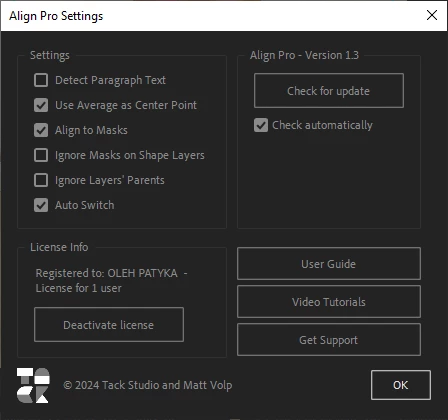
A couple times I saw little brighter colored button on different scripts UI, how to do this type of button?
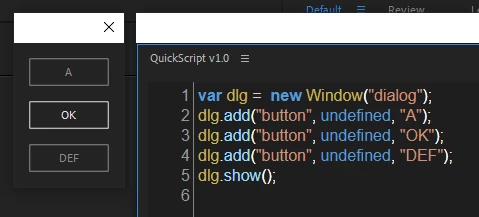
On the screen below is the button "OK"
I'm sure it is not just drawn graphic element, it looks and work 100% like regular button, just white.
This topic has been closed for replies.
Correct answer Airweb_AE

In AE 2024, you just need to name your button OK


2 replies

Airweb_AECorrect answer
Legend
October 23, 2024

In AE 2024, you just need to name your button OK


Known Participant
October 24, 2024

Hmm, you a right, and also it turning white only in "dialog" window type. Thank you!

Don't you know about this one ? Blue and Red

Legend
October 24, 2024

It uses ScriptUI’s graphics controls.

nishu_kush
Community Manager
Community Manager
October 23, 2024

That is not ideal. Do you see this in any other panel or just the plug-in panel? What's the version of OS and After Effects?

Let us know, we're here to help.


Thanks,

Nishu

Known Participant
October 24, 2024

It's a Script, not plug-in
Window 10, AE 2024
Airweb_AE answered on this topic question, but I have another one...
Basicaly I want to color the button in script windows UI without using graphic elements, if its possible