
MahaB82A
May 16, 2022
Answered

About Ai files

  • May 16, 2022
  • 1 reply
  • 745 views

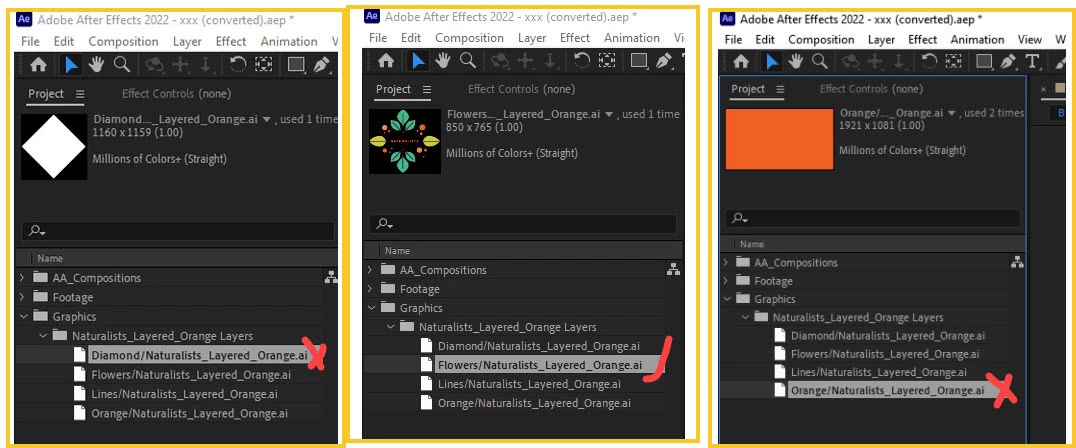
In online tutorial of Ae there is a folder provide where there is all imported files are there. In this case out of one file three Ai files are not there but I am able to open Ae app without any problem. How can understand this?


2 Build graphic transitions with Shape layers


This topic has been closed for replies.
Correct answer Kyle Hamrick

You will need Illustrator installed to open Ilustrator files. 
HOWEVER, I don't believe that should have an impact on your ability to complete this tutorial. 

Are you able to complete the step near the beginning of the tutorial, when you are supposed to choose "Create Shapes From Vector Layer," or does that step not work for you? 

1 reply

Kyle Hamrick
Community Expert
Community Expert
May 16, 2022

I just checked the download, and the needed Ai file is included there. I can also see this is previewing properly in AE, so it doesn't appear to be unlinked. 

Do you have Illustrator installed? The lack of icons makes me wonder if you don't. 


That said, I don't think that you NEED it installed. Are you finding yourself unable to use these files when going through the tutorial?

MahaB82A
MahaB82AAuthor
May 16, 2022

I do not have Illustrator installed. Only one blank icon was with a *.ai extension but I tried to open with VLC now it shows VLC icon.


Kyle Hamrick
Community Expert
Kyle HamrickCommunity ExpertCorrect answer
Community Expert
May 16, 2022

You will need Illustrator installed to open Ilustrator files. 
HOWEVER, I don't believe that should have an impact on your ability to complete this tutorial. 

Are you able to complete the step near the beginning of the tutorial, when you are supposed to choose "Create Shapes From Vector Layer," or does that step not work for you?