
Access to text animator through scripting
I would like to add basic opacity text animator to text layer through scripting and change its attributes.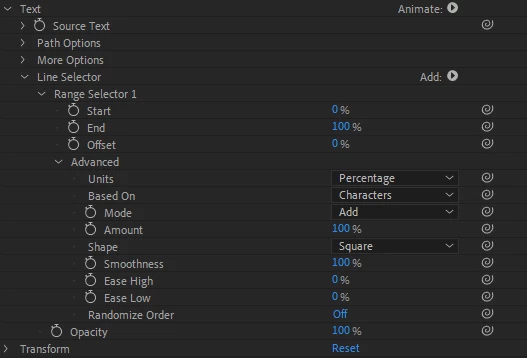
I am looking for access mainly for:
Start
End
Offset
Units
Based on
Mode
Opacity
What I got so far. I am able to create animator with text selector:
var animator = newLayer.Text.Animators.addProperty("ADBE Text Animator");
animator.name = "Line Selector";
var opacityAnimator = animator.property("ADBE Text Animator Properties").addProperty("ADBE Text Opacity");
var selector = animator.property("ADBE Text Selectors").addProperty("ADBE Text Selector");
I can access and change most of the settings like this:
selector.property("Offset").setValue(1);
selector.property("Advanced").property("Mode").setValue(2);
However as soon as I change the units to Index from percentage like this:
selector.property("Advanced").property("Units").setValue(2);
I lose all control over selector. I can no longer change anything.
If I again use something like:
selector.property("Start").setValue(100);
or
selector.property("ADBE Text Index Start").setValue(100);
it does nothing.
Also i was not able to find a way to change the Opacity of the animator whatsoever. Even before the "units" change. Not sure what is the correct syntax there.
Thanks for your help,
Martin


 AdChoices