
Participant
September 30, 2021
Question

Active camera different from selected camera when rendering

  • September 30, 2021
  • 4 replies
  • 834 views

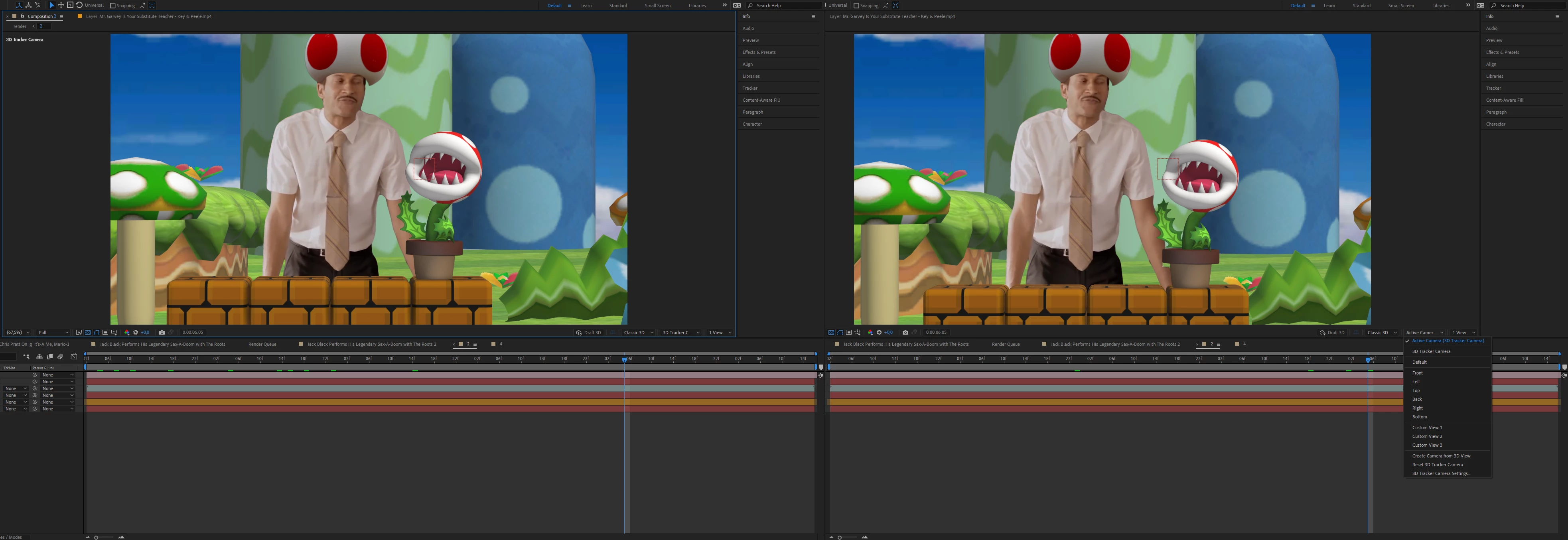
I have a 3d solved camera in my scene. When i select the 3d camera it shows correctly, but if i select the active camera, which is the same camera it won't. I can't render out my scene cause it only renders the not working active camera.
AE v18.4.1
This topic is closed to new replies. Start a new post to keep the conversation going.

4 replies

Mylenium
Legend
October 1, 2021

Perhaps an issue with E3D not correctly fetching and uptdating the camera data then...


Mylenium

Mylenium
Legend
September 30, 2021

Impossible to know. You have made your screenshots useless by cropping off the timeline columns on the left. My guess would have to be that you have multiple cameras and are not aware of the fact that AE will always use the topmost camera layer for rendering. Reordering the layers may already fix the issue, if indeed that is the case. For anything else you have to offer better info.


Mylenium

Participant
September 30, 2021

Wrong guess. Only one camera in the comp, is visible and on top! The camera was solved in the comp itself and not copied.
When i cut and past everything in the comp above it, it works for half the length and then stops. Once again, if i select the 3d camera it works and when i select the active camera it either plays for half the lenghts or just freeze frames on the frame where i switched the cameras.